Concise user interface and step by step wizard make even computer novice can handle this software without any trouble.
Accidentally deleted or lost the text messages, contacts, call logs, documents and media files from your Android device? Don't worry anymore. With Coolmuster Lab.Fone for Android, the most representative data recovery software for Android, your lost files can be easily recovered from Android phone's internal memory card and external SD card. What's more, it allows you to backup both deleted and existing data from Android device to computer in case of data loss. Undeniably, it is your best choice to keep your Android data safe.
Great tool, I was able to get all of my lost information from my Android. Works good on my samsung Note. It's exactly what I need. You saved my data and solved my problem... Great!- Reviewed by Meeno
Generally speaking, the program works well and I also use it to regain my lost contacts. However, when I tried to scan the lost photos on my Samsung Galaxy S6, the program remind me there is no results. All my photos are saved in the device itself. So I think if your program can support to restore photos from the phone's internal memory, it could be more welcomed!- Reviewed by Richard

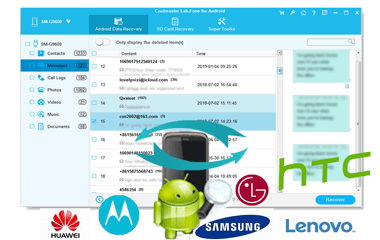
Want to recover deleted files from Android device? Even though data saved in Android internal memory and SIM card is inaccessible on computer directly, Coolmuster Lab.Fone for Android enables you to access and recover all the lost data from Android internal memory card, SIM card, and external SD card. 2 Android data recovery modes are available:
Android Data Recovery: (1) Recover the deleted messages, call logs, contacts, videos, music, photos and documents from Android internal memory & SIM card(Root Required);(2) Recover the deleted media files from Android SD card (if any) to computer without root; (3) Backup the existing files from Android to computer without root. (See how to recover deleted contacts on Android.)
SD Card Recovery: (1) Retrieve lost or deleted photos, videos, music and documents from external SD card and save to a computer in original quality and formats. (See how to recover data from Android SD card.) (2)
Scan out and backup the existing photos, videos, music and documents from external SD card to computer.
To choose whichever files to recover, it enables you to preview the details of each file before recovery with customized list sorting as required. To avoid data loss again, it also allows you to export data from Android to computer for backup.
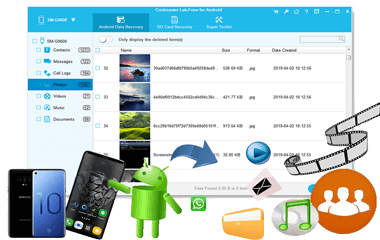
With its quick scan, deep scan and partial scan feature, the files on Android device can be easily scanned out and listed in categories, including the lost data (in red) and the existing ones (in black). So you can easily preview and select any data you want to recover or backup.
Android SMS, call logs and contacts can be restored and saved as HTML or XML format for easy reading and printing. And all info of contacts, messages and call logs can be well preserved, like name, phone number, duration, email address, job title, address, etc.
Android documents, videos, music and photos can be recovered and saved as JPG (JPEG), PNG, BMP, HEIC, MP4, 3GP, M4V, EPUB, DOC, DOCX, XLSX, PDF or other formats. Thus you can easily view, edit, play them for further use.
It is quite easy to use this data recovery tool. With special technical skills, only 3 simple steps are required to accomplish the whole data recovery process for Android phone or tablet:
Connect - Run the software and connect your Android device to the computer with a USB cable.
Scan - Authorize the connected device to scan out Android data for data recovery. (2 scanning modes available for media files: Quick Scan & Deep Scan.)
Recover - Preview and select the data you want and start the Android file recovery process.
To meet Android users' demand as far as possible, Coolmuster Lab.Fone for Android is widely compatible with almost all Android phones and tablets. Besides, it guarantees the highest safe and risk-free data recovery process on Android device, and keeps all recovered Android data original, non-damaged and unmodified.
Supported Devices: Almost all Android brands and models are supported by this data recovery software, including Samsung, Huawei, Google, HTC, LG, Sony, Motorola, ZTE, Xiaomi, etc. (View specific supported phone models >>)
Supported Android OS: It works well on almost all of the Android OS versions available, from Android 2.1 to 10.0 (or up).
Concise user interface and step by step wizard make even computer novice can handle this software without any trouble.
Work well on all Windows platforms, including Windows 10/8/7/Vista/XP.
Do NOT need any other third-party program while you're running this program.
Transfer Text Messages, Backup Android Contacts, Samsung Contacts Backup, Recover Data from Dead Phone, Restore Deleted Contacts, Android Photo Recovery, Transfer Contacts from Android to iPhone, Samsung to Huawei, Transfer Messages from iPhone to PC, Transfer Music from iPhone to Computer, Recover Deleted iPhone Messages, Restore iPhone Contacts