TL;DR:
Deleted photos from an SD card are not always permanently lost. You can recover them by using professional SD card recovery software, checking the Recycle Bin or Trash, restoring from cloud backups, revealing hidden files, or seeking professional recovery services. This guide covers five practical methods to help you retrieve deleted photos safely and improve your chances of successful recovery.
"Hello, I accidentally deleted 800 photos from my SD card instead of saving them, and I am in desperate search for help in recovering them. I have a Canon EOS Rebel T6i and was using Canon's camera connect' app to download when I deleted them from the camera and after inserting the SD card to my computer I realized they were also deleted there. So yeah, I'm spiraling because the pictures were so special and if anyone could help, I would be so grateful. Thank you."
- From Reddit
Accidentally deleting photos from an SD card is a common and frustrating problem, especially when those images are important memories or work files. The good news is that deleted photos are not immediately erased. Instead, they remain on the card until new data overwrites them, which means recovery is often possible if you act quickly.
In this comprehensive guide, you'll learn several effective methods of how to recover deleted photos from an SD card, ranging from professional recovery software to some built-in solutions.
If your photos are not backed up, using a professional tool is the most effective way to recover them. Coolmuster Data Recovery is a powerful yet easy-to-use program that helps you retrieve deleted, formatted, or inaccessible photos from SD cards, USB drives, cameras, and other storage devices.
Why choose Data Recovery?
Now follow the steps below to recover deleted photos from your SD card.
01First, remove the SD card from your phone or camera and insert it into your computer using a card reader. Then download, install, and open Data Recovery to access the main interface.
02From the left panel, choose the "Deleted Recovery" mode. Then, select your SD card from the list of available drives and click the "Start Scan" button to begin scanning.
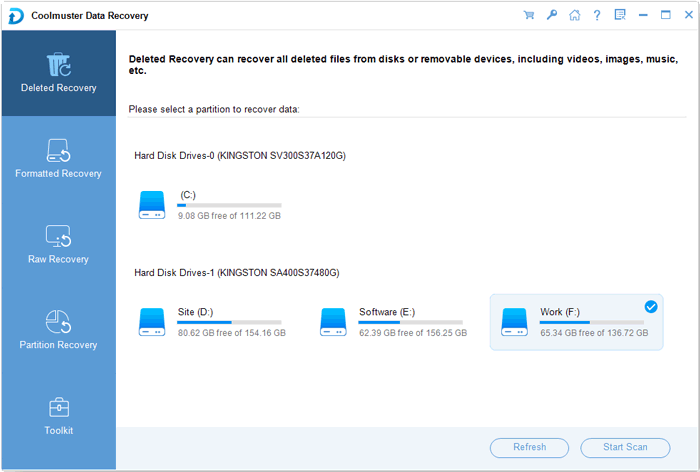
03After the scan is complete, all recoverable files will be displayed. You can browse them by file type or location and preview your photos to confirm they are the ones you want to restore.
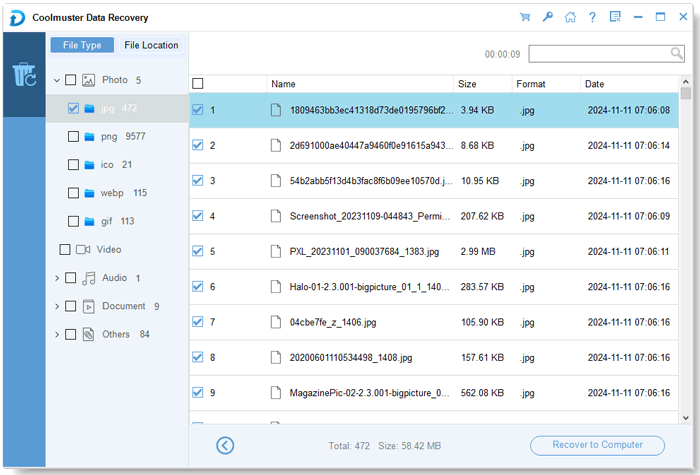
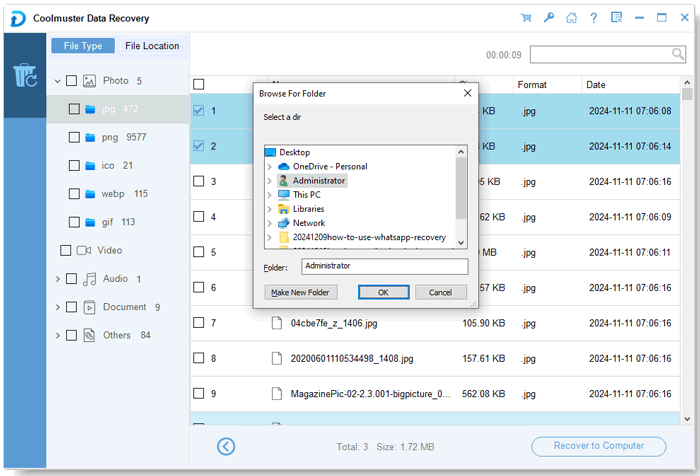
04Select the photos you wish to recover, then click the "Recover to Computer" button. Choose a safe location on your computer to save the recovered files, and the recovery process will begin automatically.
If you prefer a more visual guide, you can also follow the step-by-step video tutorial below to see how the entire recovery process works in real time.
If you prefer another professional solution, you can also use Coolmuster Lab.Fone for Android, which is designed to recover deleted photos and other data from Android devices and SD cards. It allows you to restore lost photos from SD cards on Android with ease.
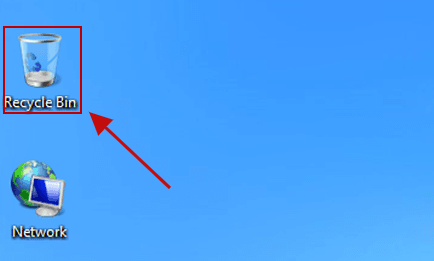
If you deleted photos from your SD card while it was connected to a computer, the system may not remove them immediately. Instead, they are often moved to the Recycle Bin (Windows) or Trash (Mac), which gives you a chance to restore them easily. This is one of the fastest recovery methods because it doesn't require any additional tools, but it only works if the bin hasn't been emptied.
How to recover deleted photos from SD card by checking the recycle bin?
Step 1. Insert the SD card into your computer using a card reader and ensure it is recognized.
Step 2. On Windows, double-click the Recycle Bin icon on the desktop. On Mac, open the Trash from the Dock.
Step 3. Browse the files or use the search function to locate your photos by file name, format, or date.
Step 4. Right-click the selected files and choose "Restore" (Windows) or "Put Back" (Mac).
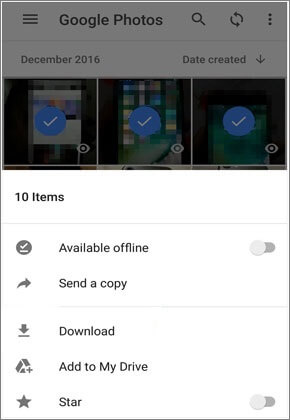
Many users enable automatic cloud backup without realizing it, especially when using services like Google Photos or camera apps. If your photos were backed up before deletion, you can quickly restore them without using any recovery software. This method is very convenient and safe because it avoids the risk of overwriting data on your SD card.
Step 1. Go to the cloud platform you used, such as Google Photos, Dropbox, or your camera app.
Step 2. Sign in with the same account used to back up your photos.
Step 3. Navigate to the photo library or backup folder and browse your images.
Step 4. Select the photos and download them to your computer or SD card.
In some situations, photos may appear to be missing but are actually hidden due to system errors, virus infections, or accidental changes to file attributes. By enabling hidden files on your computer, you can reveal these files and recover them without using any third-party tools. This method is simple and worth trying before moving on to more advanced solutions.
How to get back photos deleted from SD card by unhide hidden files?
Step 1. Insert the SD card using a card reader and open it on your computer.
Step 2. On Windows, open File Explorer, go to the "View" tab, and check "Hidden items". On Mac, press "Command + Shift +. ".

Step 3. Browse folders like DCIM and locate faded or hidden files.
Step 4. Copy the photos to your computer or remove the hidden attribute to make them visible again.
If your SD card is physically damaged, not recognized by your computer, or all software methods fail, professional data recovery services may be your last option.
These services use advanced tools and cleanroom environments to recover data directly from the storage chip. You need to send your SD card to a recovery center, where specialists will analyze and attempt to retrieve your files.
While this method can achieve high recovery success rates, it is usually expensive and may take several days. Therefore, it is best reserved for situations where the data is extremely valuable.
1. How long after deleting photos from an SD card is recovery still possible?
Recovery is possible as long as the deleted data has not been overwritten. This could be minutes, days, or even weeks depending on how often the SD card is used. If you stop using the card immediately after deletion, the chances of recovery remain high.
2. Why are my recovered photos corrupted?
Recovered photos may appear corrupted if parts of the data have been overwritten or damaged. This often happens when the SD card continues to be used after deletion. Using deep scan mode or trying another recovery tool may help improve results.
3. Can I recover photos from a formatted SD card?
Yes, you can often recover photos from a formatted SD card, especially if it was a quick format. The original data usually remains on the card until it is overwritten, so using professional recovery software can still retrieve the files.
Losing photos from an SD card doesn't always mean they're gone forever. As long as the data hasn't been overwritten, you still have a good chance of getting your photos back using the right method.
Here's a quick overview of the most effective solutions:
If you're unsure where to start, using a professional recovery tool like Coolmuster Data Recovery is usually the safest and most effective first step. To avoid data loss in the future, it's always recommended to back up your photos regularly and stop using the SD card immediately after deletion.
Related Articles:
How to Recover Deleted Videos from SD Card with 4 Methods
Top 10 Best SD Card Recovery Software | 100% Working
Micro SD Card Recovery: How to Recover Deleted Files from Micro SD Card (Full Guide)







 Free Download for PC
  Free Download for Mac


