TL;DR:
To make SSD data permanently unrecoverable, standard quick formatting or traditional zero-filling (like DBAN) is insufficient due to SSD wear-leveling algorithms, TRIM delays, and over-provisioned memory blocks. According to NIST SP 800-88 Rev. 1 guidelines, you must invoke hardware-level firmware commands (ATA Secure Erase or NVMe Sanitize), use certified data erasure software, or physically destroy the NAND flash chips.
With the widespread use of Solid State Drives (SSDs), data security has become an important concern. If you need to sell, donate, or dispose of an old SSD, ensuring that the data cannot be recovered is crucial. Below is a complete guide to making SSD data untraceable across SATA, NVMe, and external SSDs.
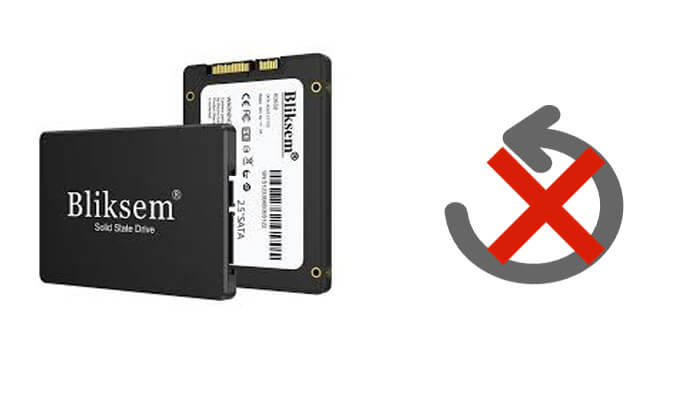
Most SSD manufacturers provide dedicated SSD management tools, which typically include "Secure Erase" or "Sanitize" functions that can safely erase SSD data, making it unrecoverable. Unlike HDDs, SSDs store data across NAND flash blocks managed by a wear-leveling controller.
These tools leverage the characteristics of SSDs to completely wipe data using built-in ATA Secure Erase (SATA) or NVMe Format/Sanitize (NVMe) commands, without affecting the lifespan or performance of the SSD.
Here are some software options from manufacturers that you can try:
Alternative: BIOS/UEFI Secure Erase
If your boot drive cannot be erased inside Windows, restart your PC and enter the motherboard BIOS/UEFI (usually by pressing F2 or Delete). Navigate to the Tools or Security tab to find features named "ASUS Secure Erase," "MSI EraseErase+," or "ROG Secure Erase" to issue hardware wipes directly.
If your SSD brand does not provide a secure erase tool, if you are dealing with external/USB SSDs, or if you need a more efficient and simpler method to completely erase data, using professional data erasure software is an ideal choice.
Among them, Coolmuster Data Erasure is the best option, as it can permanently delete data from SSD, ensuring complete destruction of the data, and making it unrecoverable. Compared to manufacturer tools, it offers more powerful data cleaning modes, adheres to military-grade standards (DoD 5220.22-M & NIST 800-88), and supports SSDs from almost all brands (NVMe, SATA, M.2, PCIe, and portable SSDs).
Highlights of Data Erasure:
01 Download and open Data Erasure on your PC. From the main interface, select the "Drive Wiper" mode.
02Choose the desired erasing level, either "Quick Erase" or "Deep Erase".
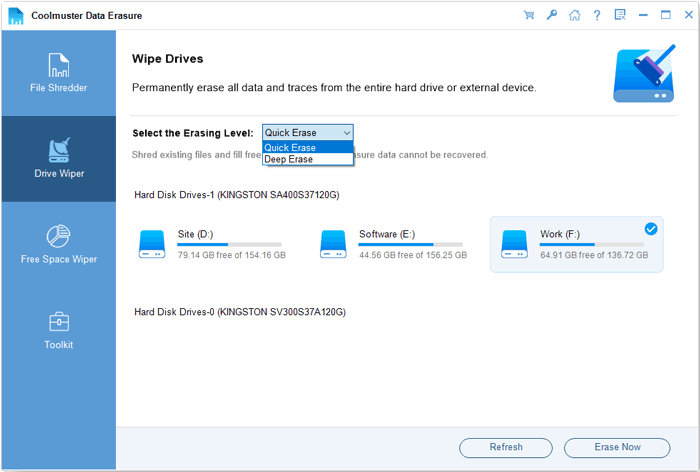
03Then, select the SSD you want to wipe and click the "Erase Now" button to begin the wiping process.
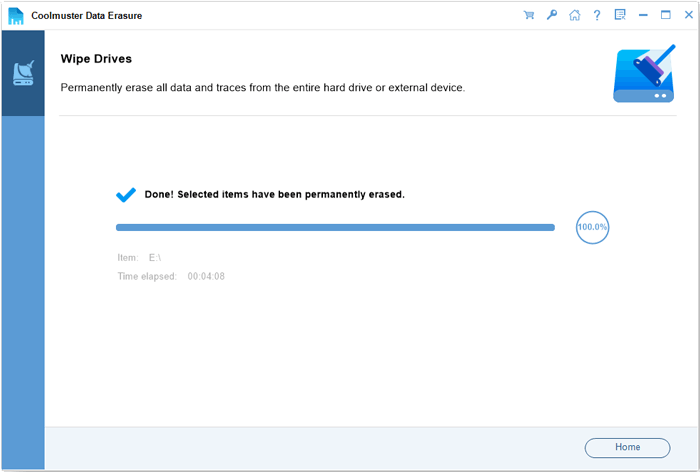
Video Tutorial:
If the SSD is already damaged, unreadable, or no longer in use, physical destruction can be used to ensure the data is completely unrecoverable. This method is suitable for situations where the SSD is no longer needed or contains top-secret government/corporate assets.
How to Physically Destroy an SSD?
Drill to Destroy (Target the NAND Flash Chips): Use an electric drill to create multiple holes directly through the black rectangular NAND memory chips (not just the main controller board) to cause fatal physical damage.
Hammer to Shatter: Repeatedly strike the chips with a hammer to ensure the silicon dies inside are shattered.
High-Temperature Incineration: Burn the SSD at extreme high temperatures in certified facilities, but be mindful of toxic environmental fumes and safety concerns.
Shredding with Professional Equipment: Use an industrial cross-cut media shredder capable of reducing SSD circuits into 2mm or smaller particles.
Notes: Degaussing Does NOT Work on SSDs
Unlike traditional hard disk drives (HDDs) that rely on magnetic platters, SSDs store data electronically using flash memory cells (floating-gate transistors). Exposing an SSD to a powerful magnetic degausser will NOT erase any data.
Q1: Does a standard Windows quick format make SSD data unrecoverable?
No. A quick format only deletes the partition table and file system indexes. The raw binary data remains intact on the NAND flash blocks and can easily be retrieved using basic data recovery software like Coolmuster Data Recovery or Disk Drill.
Q2: Why is multi-pass zero-filling (like 35-pass Gutmann) bad for SSDs?
Traditional multi-pass wipes were engineered for magnetic HDDs. Executing multiple overwrite passes on an SSD causes unnecessary P/E (Program/Erase) cycle degradation on NAND flash cells without wiping hidden bad blocks or over-provisioned areas. A single-pass certified wipe or hardware Secure Erase is sufficient according to NIST SP 800-88 guidelines.
Q3: How long does it take to permanently wipe an SSD?
Hardware-level ATA Secure Erase or NVMe Sanitize commands take only a few seconds to 2 minutes because they flush high voltage through all memory cells or reset the master encryption keys instantly. Software-level overwriting with tools like Coolmuster Data Erasure takes between 5 to 20 minutes depending on drive capacity and USB/SATA interface speeds.
To ensure SSD data is unrecoverable, we can choose the appropriate method based on different needs:
Overall, Coolmuster Data Erasure is the best choice. It is compatible with all SSD brands (SATA, NVMe, PCIe) and provides advanced data erasure algorithms compliant with NIST 800-88 standards to ensure data is completely gone, making it suitable for users who wish to erase data safely without risking drive damage. If you need to make SSD data unrecoverable without damaging the SSD, Coolmuster Data Erasure is recommended.
Related Articles:
How to Delete Everything on iPhone? Solved in 4 Effective Ways
How to Delete Files on iPhone/iPad in 6 Ways [Step-by-Step Guide]
Which Is the Best iPhone Data Eraser Software? [A Comprehensive Review]
How to Permanently Delete Contacts from iPhone? Solved in 4 Ways






 Free Download for PC


