If you often transfer photos from your iPhone to a Windows PC, you have probably encountered HEIC files. Since Apple uses the HEIC format to save storage space while maintaining image quality, many users need a reliable HEIC converter to make these photos compatible with Windows, Android, and other devices.
In this Apowersoft HEIC Converter review, we will provide a detailed analysis of the software to help you decide whether it is worth using.
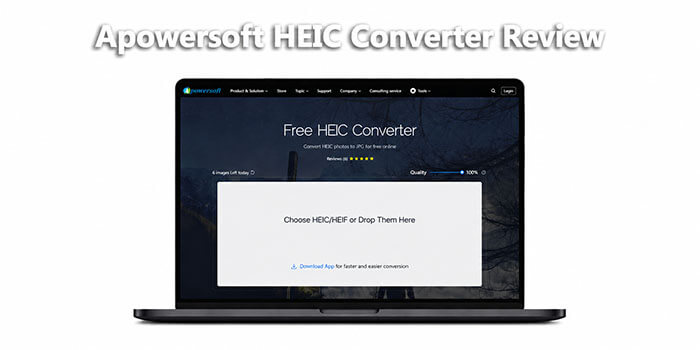
Apowersoft HEIC Converter is a free online tool for Windows and Mac users that allows you to convert HEIC and HEIF photos to JPG format. It works directly in your browser, requiring no downloads or additional installations.
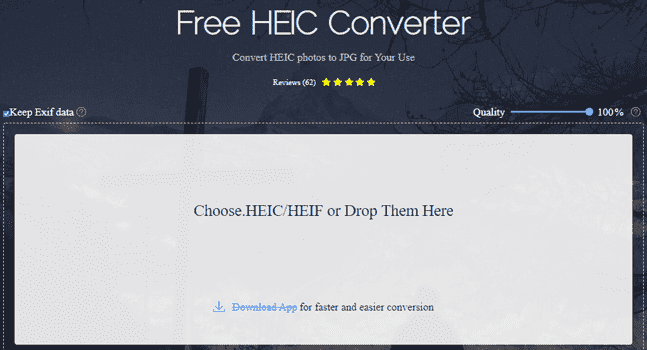
What can Apowersoft HEIC Converter do for you?
* Support batch conversion, allowing up to 30 HEIC images to be converted at once, saving time when handling large photo collections.
* Work in the cloud, running directly in a web browser without the need to download or install software.
* Accessible across devices, compatible with any device that has an internet connection.
* Preserve Exif data, keeping timestamps, geolocation, camera model, and other metadata intact.
* Deliver high-quality output, with converted JPEG files maintaining the original clarity and resolution of HEIC images.
Pros:
* Enjoy a super easy experience—just drag and drop files in your browser, no technical skills needed, perfect for beginners.
* Keep your image quality and Exif data intact to preserve all the original details of your photos.
* Protect your privacy—files are automatically deleted after conversion, so your sensitive photos stay safe.
* Convert online without logging in, subscribing, or installing third-party plugins.
* Get high-quality photo output every time.
* Use the tool in multiple languages.
* Take advantage of a completely free service.
Cons:
* Note the free version limits batch conversion to 30 images, which may not be enough for large collections.
* Make sure you have an internet connection, as the online version doesn't work offline unless you purchase the premium desktop version.
* Remember it only converts HEIC to JPEG and doesn't support other popular formats like PNG.
* Expect limited custom options.
* Be aware that Exif data may occasionally be lost, even if you choose to preserve it.
* Download converted photos from the cloud one by one.
While Apowersoft HEIC Converter is a solid tool, it has limitations (like limited output formats and batch limits in the free version) that may not meet the needs of all users. If you're looking for a more versatile, feature-rich alternative, Coolmuster HEIC Converter is the top choice. It converts HEIC photos from iPhone not only to JPG but also to PNG, maintaining full image quality. Plus, it supports unlimited batch processing, allowing you to convert as many HEIC images as you need at once.
Key features of Coolmuster HEIC Converter:
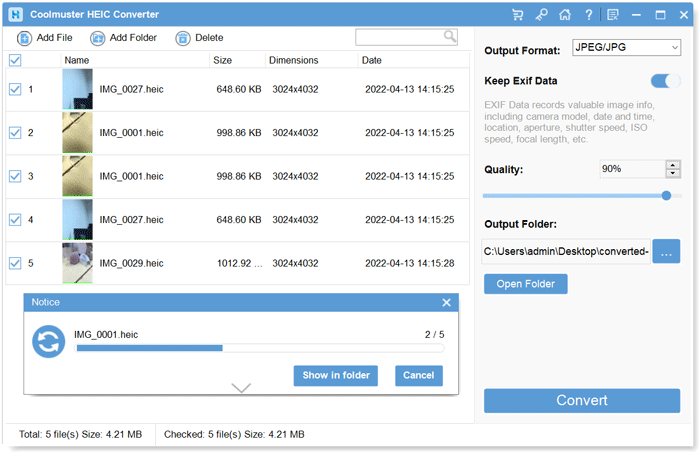
Here is how to convert HEIC to PNG/JPG using Coolmuster HEIC Converter:
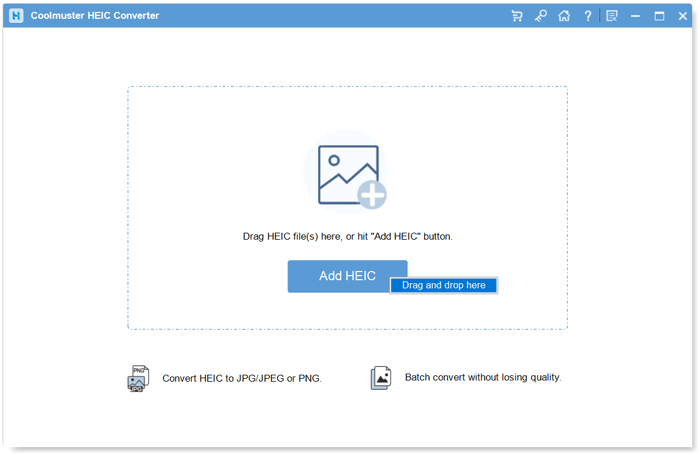
01Open the software and add HEIC photos by clicking "Add HEIC" or drag your images into the dotted-line frame and click the "Drop and drop here" icon.
02Select the images, choose "JPEG/JPG" or "PNG" as the output format, enable "Keep Exif Data", and adjust quality if needed.
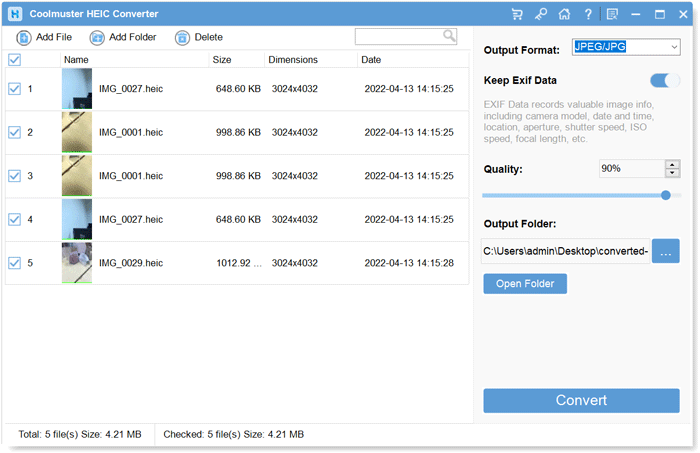
03Choose a save location and click "Convert" to start converting your HEIC images.
Video Tutorial:
Q1. Is Apowersoft HEIC Converter safe?
Yes, Apowersoft HEIC Converter is 100% safe. Most mainstream antivirus software does not flag it as malware. Additionally, the tool automatically deletes uploaded files from its cloud servers after conversion to protect user privacy. However, be sure to download it from the official website.
Q2. Is Apowersoft HEIC Converter free?
Apowersoft HEIC Converter offers both free and premium versions. The free online version allows you to convert up to 30 HEIC images per batch without any cost or registration. However, it has limitations like batch size restrictions and only supports JPEG output. The premium version (desktop or part of the Apowersoft Unlimited package) removes these limitations and offers additional features like unlimited conversions and offline use, with pricing starting at $19.95 per year.
Q3. Does Apowersoft HEIC Converter preserve image quality?
Yes, Apowersoft HEIC Converter is designed to preserve the original image quality during conversion. It uses advanced compression technology to ensure that converted JPEG files maintain the same clarity, resolution, and color accuracy as the original HEIC files. Additionally, it allows you to retain Exif data, so your photos' metadata (like date, location, and camera details) remains intact. However, some users have reported minor quality loss with very high-resolution photos, though this is rare.
Q4. Does Apowersoft HEIC Converter work on Mac?
Yes, Apowersoft HEIC Converter works on Mac. The online version is accessible via any web browser (Safari, Chrome, Firefox) on Mac, with no installation required.
Q5. Can Apowersoft HEIC Converter convert HEIC to PNG?
No, the free online version of Apowersoft HEIC Converter only supports converting HEIC to JPEG. The premium version also focuses on JPEG output, so it does not offer PNG as an output format. If you need to convert HEIC to PNG, we recommend using Coolmuster HEIC Converter, which supports both JPEG and PNG output and offers more flexibility.
After a thorough Apowersoft HEIC Converter review, we can conclude that it is a reliable, user-friendly tool for converting HEIC to JPEG, especially for casual users who need occasional conversion. Its free version offers enough functionality for most people, with features like batch conversion, Exif data preservation, and cloud-based access making it convenient and accessible. However, its limitations—like the 30-image batch limit in the free version, lack of PNG support, and need for an internet connection (online version)—may make it less suitable for professional users or those with large photo collections.
For users seeking a more versatile alternative, Coolmuster HEIC Converter is the best choice. It addresses all of Apowersoft's shortcomings, offering unlimited batch conversion, multiple output formats (JPEG/PNG), offline use, adjustable image quality, and reliable Exif data preservation.
Whether you choose Apowersoft for its simplicity or Coolmuster for its versatility, both tools solve the HEIC compatibility problem effectively—choose the one that best fits your needs and budget.
Related Articles:
5 Easy Ways to Convert HEIC to JPG Online for Free: Step-by-Step
How to Convert HEIC to JPG on Mac: 5 Easy & Fast Methods





 Free Download for PC
  Free Download for Mac


