"I accidentally deleted a text with an important code on my new OPPO A38. It was only deleted for about an hour, but now the message is gone, and the phone's files app bin is empty. I need the code to access a card to pay for my internet. Any suggestions on how to retrieve it would be greatly appreciated."
- From Reddit
Accidentally deleting an important SMS can be stressful, especially when it contains verification codes, payment details, or personal information. Many OPPO users face this issue and assume their messages are gone forever, but that's not always the case.
Whether you're using a newer model like OPPO Reno, Find, A series, or another device, there are several ways to recover deleted text messages from OPPO. In this guide, we'll walk you through practical and effective solutions, from built-in features to advanced recovery tools.
The "Recently Deleted" folder (also known as the SMS recycle bin) is a built-in feature on some OPPO phones that allows you to recover recently deleted text messages without needing a backup. However, this feature is turned off by default and is only available on ColorOS 11 and above. Deleted messages are usually kept for up to 30 days before being permanently removed.
Step 1. Enable the Recently Deleted feature
Open the "Messages" app on your OPPO phone, tap the three-dot icon in the top-right corner, and choose "Settings". Scroll down to find "Recently Deleted", then turn it on.
Step 2. Access the Recently Deleted folder
You can enter this folder in two ways. On the Messages list screen, long-press the back arrow in the top-left corner to open it directly, or go to "Messages" > "three-dot" icon > "Settings" > "Recently Deleted" or "trash".
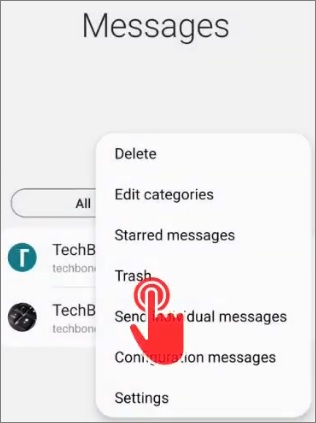
Step 3. Recover deleted messages
In the Recently Deleted folder, browse the messages deleted within the last 30 days. Long-press the message(s) you want to restore, then tap "Recover" at the bottom. The selected messages will return to their original location.
Note: If you delete messages again from this folder, they will be permanently erased and cannot be recovered.
OPPO phones provide a built-in local backup feature that lets you back up data such as text messages, contacts, and call logs to internal storage or an SD card. If you created a backup before the messages were deleted, you can restore them from there.
Step 1. Locate the local backup
Open "Settings" on your OPPO phone. If you are using ColorOS 15 or above, go to "System & update" > "Back up & reset" > "Back up & migrate" > "Local backup".
For ColorOS 5.0 to ColorOS 14, go to "Additional settings" (or "System settings") > "Back up and reset" > "Back up & restore" > "Local backup".
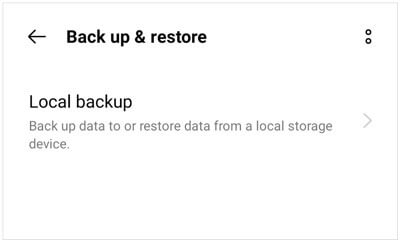
Step 2. Choose a backup file
You will see a list of available backup files with timestamps. Select the backup created before the text messages were deleted and make sure it includes "Messages".
Step 3. Restore the messages
Tap the selected backup file, choose "Messages" from the data types, and tap "Start" to begin the restoration process. Wait for it to complete, and the deleted messages will be restored to your Messages app.
OPPO Cloud is the official cloud service that allows you to back up and sync important data, including text messages. If cloud backup was enabled before deletion, you can restore your messages from a previous backup.
Step 1. Sign in to OPPO Cloud
Open "Settings" on your phone, tap "OPPO Cloud", and log in using your OPPO ID.
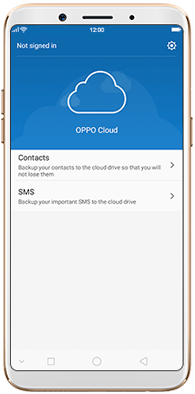
Step 2. Check backup records
Tap "Cloud Backup" to view your backup history, then select a backup created before the messages were deleted. Make sure "Messages" is included in the backup content.
Step 3. Restore deleted messages
Tap "Restore", select "Messages", and follow the on-screen instructions to complete the process. Once finished, your deleted text messages will be restored to the Messages app.
OPPO Cloud usually offers limited free storage (such as 5GB). If your backup storage is full, you may need to manage or upgrade your storage plan.
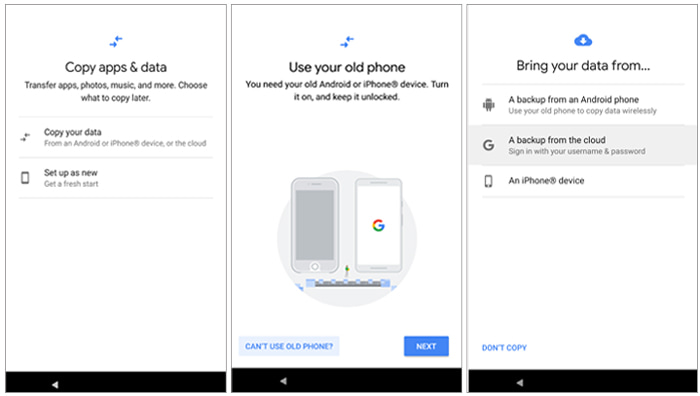
Many OPPO phones support Google backup through Google Drive. If you enabled this feature, your SMS messages may have been backed up automatically. However, in most cases, restoring text messages from a Google backup requires resetting your device.
Step 1. Reset your OPPO phone and start the setup process, including connecting to Wi-Fi and selecting your language.
Step 2. When prompted, sign in with the same Google account used for the backup.
Step 3. Once Google detects your backup, select it and tap "Restore". This will restore messages, contacts, apps, and other data to your device.
Step 1. Open "Settings" > "Accounts & sync" > "Google", then select your Google account.
Step 2. Tap "Sync account" and make sure "Messages" is enabled. You can toggle it off and on again to trigger a sync.
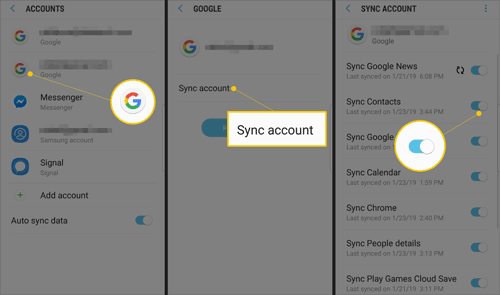
Step 3. Wait a few minutes and check the Messages app to see if any data is restored.
If you don't have any backup available, using a professional recovery tool is often the most effective way to recover deleted text messages from OPPO. Coolmuster Lab.Fone for Android is designed to scan your device storage and retrieve lost SMS data, even after deletion.
Key features of Coolmuster Lab.Fone for Android:
How to recover deleted text messages from OPPO without backup?
01Download and install Coolmuster Lab.Fone for Android on your computer, then launch the program and connect your OPPO phone via a USB cable. Make sure USB debugging is enabled so the software can detect your device properly.
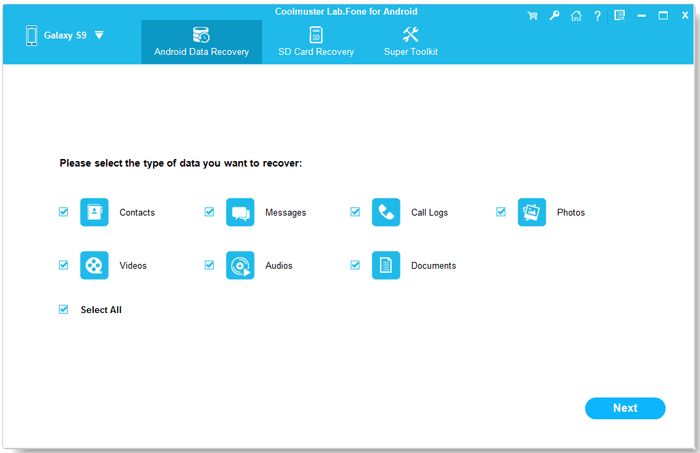
02After your device is recognized, you will see a list of recoverable data types. Select "Messages" and click "Next" to continue.
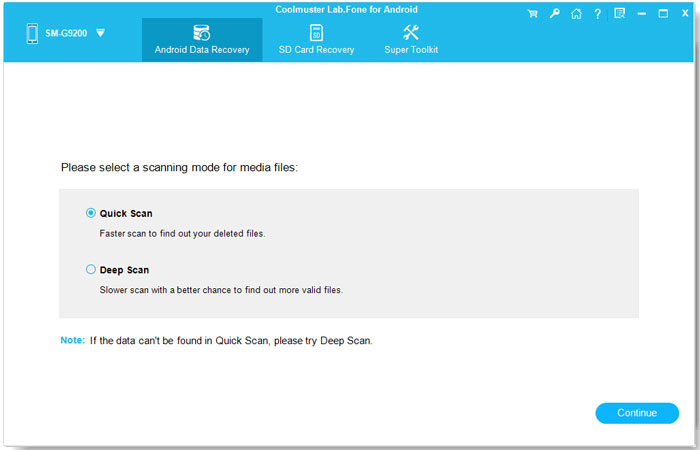
03Choose a scanning mode based on your needs. You can select "Quick Scan" for a faster process or "Deep Scan" for a more comprehensive search, then click "Continue" to begin scanning your device.
04Once the scan is complete, all messages (including deleted and existing ones) will be displayed. You can filter to show only deleted items, preview the details, then select the messages you want and click "Recover" to save them to your computer.
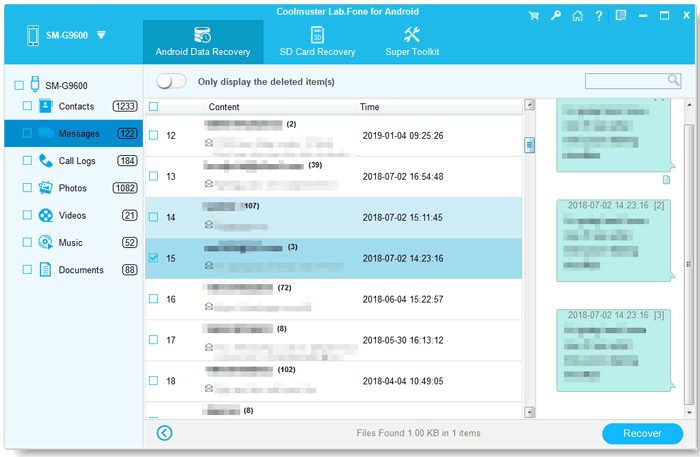
For a clearer walkthrough, you can watch the video tutorial below to see how this tool works in action.
Losing important text messages from your OPPO phone doesn't have to be permanent. You can choose the most suitable method based on whether you have a backup:
If you're unsure where to start, a professional tool like Coolmuster Lab.Fone for Android can be a reliable and efficient option to recover deleted text messages from OPPO. The sooner you take action, the higher your chances of getting your important SMS back.
Related Articles:
How to Retrieve Deleted Texts on Android Without Computer Scientifically
OPPO Data Recovery: Restore Lost Files with or without Backup
How to Perform OPPO Backup and Restore in One Click? (4 Simple Ways)







 Free Download for PC
  Free Download for Mac

 Download for PC
 Download for Mac

