When you feel extremely bored or down, finding something interesting or relaxing can help distract your mind and soothe your emotions. You can download music on your iPhone or iPad to enjoy your favorite songs, get free e-books to immerse yourself in literature, or play games to fully relax. Among these popular entertainment activities, watching movies certainly ranks in the top three, if not number one.
This article will recommend several reliable websites and apps to get free movies on your iPhone or iPad, allowing you to enjoy a variety of blockbusters directly on your devices without any restrictions.
Popcornflix offers free, ad-supported streaming of feature-length movies and webisodes. On both the app and website, you can easily search for movies starring big names like Brad Pitt, Angelina Jolie, Kristen Stewart, Paul Rudd, Charlize Theron, Alec Baldwin, Daniel Craig, and many more. Popcornflix makes it simple to browse and select from hundreds of theatrically released and independent titles across a wide range of genres. One important thing to note is that this service is currently only available in the United States and Canada.

Crackle, originally founded as Grouper in the early 2000s and backed by Sony Pictures Entertainment, is a free, ad-supported streaming service available on multiple platforms. Its award-winning app offers a fresh selection of movies and TV episodes every month. You can enjoy a wide variety of films and shows without signing up or paying any fees. Currently, the Crackle app is accessible in the United States, Canada, Australia, Brazil, and Latin America.
Read Also: How to Transfer Videos from iPhone to iPad in 6 Easy Ways?
Tubi TV is the largest provider of free and legal movies and TV shows across the web, mobile, and connected TV devices. With over 40,000 titles from around the world, it lets you enjoy some of Hollywood's biggest hits, including Oscar-winning films and movies starring Leonardo DiCaprio, Tom Cruise, Sandra Bullock, Will Smith, Matt Damon, and Kevin Spacey. While a few films require rental, the majority of content is completely free to stream.

Yidio lets you watch movies on demand and discover TV shows and films from Netflix, Hulu, Amazon, and hundreds of other providers—all in one place. You can easily sort free movies by rating (R, PG-13, G), genre, or release date. The Yidio app works on multiple devices, but it's worth noting that it mainly serves as a guide, showing you exactly where to find free movies rather than hosting them directly.
Read Also: How to Send High-Quality Videos from Android to iPhone?
The website of Internet Archive is a non-profit digital library offering free universal access to books, movies & music, as well as 456 billion archived web pages. And the Internet Archive's app - The Internet Archive Companion allows users to flip through the pages of a book, view many archival images, or create a playlist of the thousands (if not millions) of music or video files. You can find numerous films in this Internet Archive website and The Internet Archive Companion application.

Within Veoh website, you can find and watch major studio content, independent productions and user-generated material since this is an Internet television company based in San Diego, California. Veoh is a video sharing service where you can enjoy videos in high quality without viewing limits. With Veoh application, you are allowed to watch and share videos for free, as well as enhance your Veoh experience by finding friends and communicating with other users.

You May Want to Know: 5 Ways to Transfer Videos from External Hard Drive to iPhone
Pluto TV is a free, ad-supported streaming service that offers over 250 live TV channels and thousands of on-demand movies and shows. You can enjoy a wide range of content, including news, sports, entertainment, and Hollywood films, without any subscription. The app works on iPhone, iPad, and other devices, providing an easy way to watch both live and on-demand content for free.

Kanopy provides access to thousands of movies, documentaries, and educational videos for free, but you need a library card or university login to use it. It offers high-quality films from major studios and indie creators alike, covering a wide variety of genres. The Kanopy app works smoothly on iPhone and iPad, making it easy to enjoy award-winning and classic films legally at no cost.
Peacock Free is the ad-supported tier of NBCUniversal's streaming service, offering movies, TV shows, and exclusive content at no cost. You can watch popular Hollywood hits, classic TV series, and some original programming without a subscription. The app is compatible with iPhone and iPad, letting you stream free entertainment anytime, anywhere, while only showing occasional ads.

If you want to know how to transfer videos from iPhone to your computer, here is a step-by-step guide.
How to Transfer Videos from iPhone to Computer? 9 Ways You Can't MissiPhone Transfer is a powerful and user-friendly tool designed to help you easily manage and transfer media files between your iPhone, iPad, and computer. With this software, you can quickly transfer downloaded movies, music, photos, and other files to your iOS devices without relying on iTunes. It supports a wide range of video formats, maintains high-quality playback, and ensures your data remains safe during the transfer process. Whether you want to enjoy free movies on the go or organize your media library, iPhone Transfer makes it simple and efficient.
Key Features of iPhone Transfer:
3 Simple Steps to Transfer Free Movies from Computer to iPhone or iPad:
01 Download and install iPhone Transfer on your computer, then launch the program. Connect your iPhone, iPad, or iPod via a USB cable, and the software will automatically detect your device.
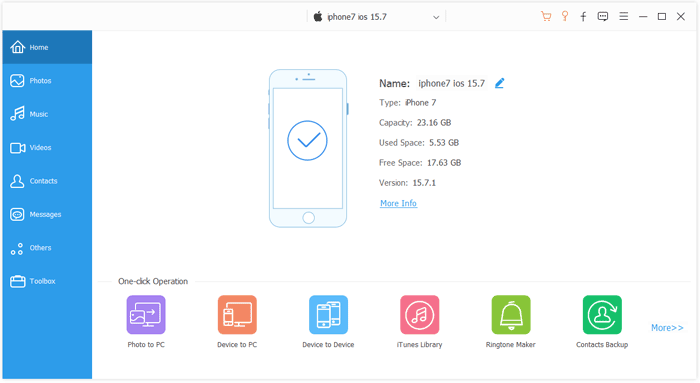
02 On the main interface, click the "Videos" tab located on the left sidebar to access your device's video library.
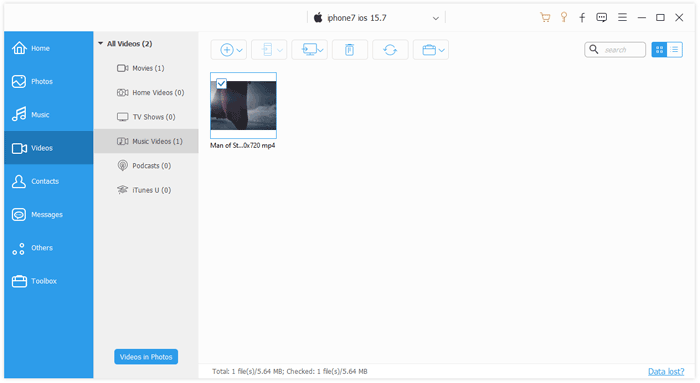
03Click the "Add" button, browse and select the video files you want to transfer, then click "Open" to start saving them to your iPhone, iPad, or iPod.
In short, there are many ways to watch free movies on your iPhone, iPad, or iPod. This article introduces nine platforms that offer a wide variety of films, from Hollywood blockbusters to independent classics, all completely free and legal. For even more convenience, tools like iPhone Transfer allow you to download and transfer movies directly to your iOS device, ensuring smooth playback anytime, anywhere.
Related Articles:
Top 4 Ways to Recover Permanently Deleted Videos on iPhone?
9 Effective Solutions to Fix Unable to Load Video on iPhone
How to Import Videos from SD Card to iPhone in 4 Easy Ways
Videos Disappeared from iPhone? Troubleshoot it with 10 Ways




 Free Download for PC
  Free Download for Mac


