"My application uses Google maps feature which needs Google Play services to be installed and enabled on the device. I wanted to test a case in which if Google play service has been disabled by user manually ask user to enable it so that application can work properly.SO i need to test my code against this case but I don't know how do I disable (not uninstall) Google play service on my phone and check if my code works properly."
If you are developing or testing an Android application that relies on Google Maps, you may need to simulate real-world situations where Google Play services is unavailable or manually disabled. Since Google Play services plays a critical role in supporting many Google-based APIs, your app may not function properly if it is turned off. In this guide, we will explain why you might want to disable Google Play services, what changes on your device when it is turned off, and how you can safely disable it for testing purposes.
Part 1: Reasons Why You Want to Turn off Google Play Service
Part 2: What Will Happen If You Disable Google Play Service?
Part 3: How to Disable Google Play Service on Android?
If you are interested in using a wide range of services provided by Google, you may decide to add Google Play services to your Android device. Though these services can be very useful to some users today, they can begin to cause problems for others. Having said that, one of the first things that you should know about Google Play Service is that there are a number of different reasons why you may also decide to disable these services at one point in time. So, here are a few that you may want to review as you make your decision.
A Package of services that some people do not know that they are getting When they add them to their device
Some people may add Google services to their device because of all of the cool things that Google usually offers to users when they create and deploy their applications. Even though this may be the case for some users, not all of the applications are essential to the use for everyone. As a result, some people may quickly add download software on their Android devices like Google Play services because it is available. Unfortunately, this is not always beneficial to all users since these applications come along with a full package of software applications that includes Google Account Manager, Google Services Framework, and Google Backup Transport. Each of which provide a variety of functionality that some users may not even need because of other applications that they presently house.
While this package of services may be attractive, one of the biggest problems that many users encounter is a huge drain on the device's battery. Therefore, the user will not get the battery life that they are used to getting throughout the day. In some cases, many of these problems can be associated with other issues. At least until these problems are traced back to the package of services that have obtained through Google Play Service.
Features in the Packages Not Needed by the User
While Google play services can be useful for many of today’s users, this is not necessarily true for those who have lots of other apps on their devices. Therefore, in some cases, the features in the package may not be needed at all. For instance, some users already have a cloud services apps or service that they can use to back up all of their data. Therefore, they will not need the Google Backup Transport app to assist them with transferring all of their critical data during a factory set or other problems that they may encounter.
If an individual does decide to disable Google play services on their Android devices, it is important that they know what this will affect. So, for those of you who are interested in knowing what services that you will lose and the overall effect, here is a brief overview.
Lose the Capability of Account Syncing
Disables the functionality that provides each user with the capability to sync their account data. For instance, the Google Account Manager application is meant to assist the user with syncing their email and other related items.
Cloud Messaging Services Eliminated
Cloud messaging services will not be available to the user because Google Services Framework is deleted with this application being disabled.
Data Back up Processing
The ability to back up data in the cloud during a factory reset will no longer be available.
Save Battery Life
The user will no longer lose their battery life so quickly since this package has a significant drain on the battery.
To disable Google play services on your Android device, there are a few steps that you can take to complete this process and they are provided to you below.
After accessing the data on your android device, the user will do the following:
Step 1. Go to Settings and then apps on your device.
Step 2. Tap on the Google Play Services Section on the screen.
Step 3. Choose the Disable feature on the top of the screen.
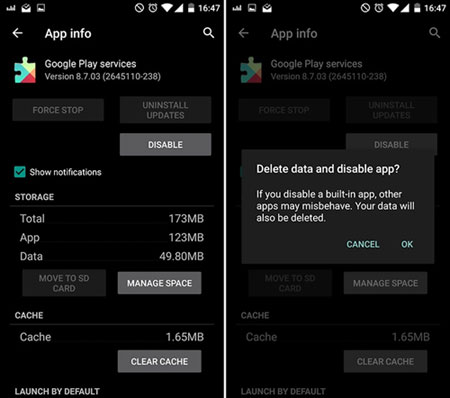
Disabling Google Play services can be useful for testing or troubleshooting purposes, but it also comes with significant limitations that may affect the normal performance of your Android device. Many apps rely on Google Play services to function properly, so turning it off or removing it can lead to unexpected issues. Therefore, it is important to understand the potential impact before making any changes and proceed carefully when enabling or disabling these system services.
Related Articles:
How to Fix Google Play Services Keeps Stopping with 11 Easy Solutions
How to Fix Google Play Services Won't Update [9 Simple Tricks]
How to Fix Apps Not Updating in Google Play Store [100% Effective]
How to Change Country in Google Play Store in 3 Easy Methods






