Data loss on Android devices is an inevitable nightmare for most users - whether it's accidental deletion of precious photos, sudden loss of important contacts due to system crashes, or file disappearance after rooting errors. Myjad Android Data Recovery, a PC-based tool designed for Android data retrieval, claims to solve these issues with its scanning and recovery capabilities. In this Myjad Android Data Recovery review, we will delve into its core functions, pricing, usability, and potential drawbacks, along with a superior alternative to help you make an informed choice.
Myjad Android Data Recovery is a desktop-based data recovery program designed for Android devices. It aims to scan Android phones and tablets to recover lost or deleted data, including contacts, messages, photos, videos, and other file types. The software is typically installed on a Windows computer and requires a USB connection to access the Android device.
Myjad Android Data Recovery packs essential features to handle common data recovery needs, with a focus on efficiency and file integrity:
Myjad Android Data Recovery provides a free trial that lets users perform a full scan and preview the files that can be recovered. To restore and export the selected data, an upgrade to the paid version is required. The software is available under a single-user personal license priced at $49.95, which can be activated on one Android device only.
To provide a balanced view, we summarize the advantages and disadvantages of Myjad Android Data Recovery based on actual usage and user feedback:
Pros:
Cons:
Myjad Android Data Recovery features a user-friendly operational process that even beginners can master quickly. Follow the step-by-step guide below to recover your lost data smoothly:
Step 1. Download and install the software
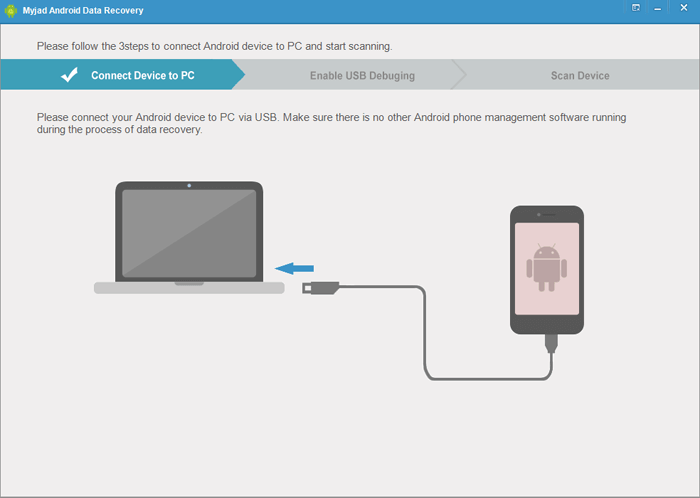
Install MyJad Android Data Recovery on your Windows computer first, then launch the program. Connect your Android device to the computer using a USB data cable, preferably the original one to ensure a stable connection and avoid connection failures during the process.
Step 2. Enable USB debugging mode on the phone
USB debugging is essential for the software to access your phone's storage space. If this mode is not enabled, MyJad will guide you through the setup steps on the screen. The operation path may vary slightly by Android model and system version, but the on-screen prompts are clear and easy to follow.
Step 3. Turn on file transfer mode
Ensure that USB storage device mode is enabled, as this allows the software to detect data on both the internal memory and SD card of your device. The software provides icon instructions to help you complete the enabling operation, so you can follow the prompts to confirm the mode setting.
Step 4. Select the data types to scan
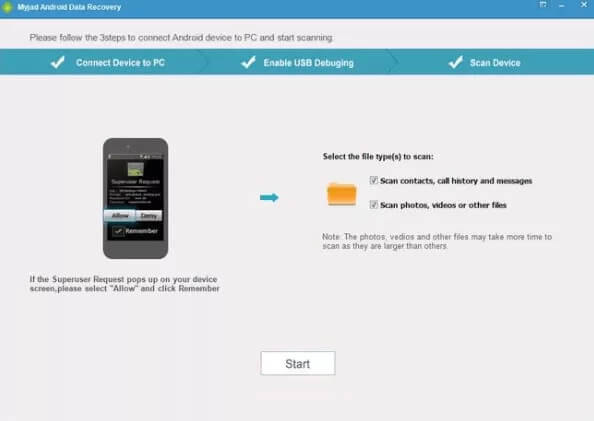
After the device is successfully connected, the software will display a list of supported file types. Select the types of data you want to recover, such as photos, videos, messages, documents, or other files, then click the "Start" button to initiate the scanning process.
Step 5. Preview the files
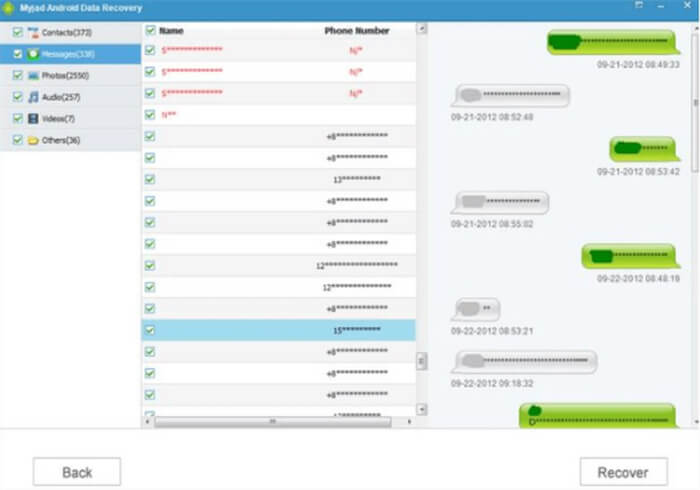
Wait for the scan to complete, the duration depends on the amount of data on your device. Once the scan is finished, a list of recoverable files will be displayed. MyJad's preview function allows you to check the content of each file before deciding to recover it, helping you filter out unwanted data accurately.
Step 6. Recover the selected files
Tick the boxes next to the files you need to recover, then click the "Recover" button. Finally, select a secure folder on your computer as the storage path to save the recovered files. It is recommended to choose a path with sufficient storage space to avoid file corruption due to insufficient space.
If you need Mac compatibility, or pursue better performance and after-sales service, Coolmuster Lab.Fone for Android is the optimal alternative to Myjad Android Data Recovery. As a professional Android data recovery tool, it addresses most of Myjad's shortcomings while offering enhanced features.
Key features of Coolmuster Lab.Fone for Android:
How to use the alternative to Myjad Android Data Recovery to recover Android deleted files?
01Download Coolmuster Lab.Fone for Android from its official website and install it on your computer. Once installed, launch the program to get started.
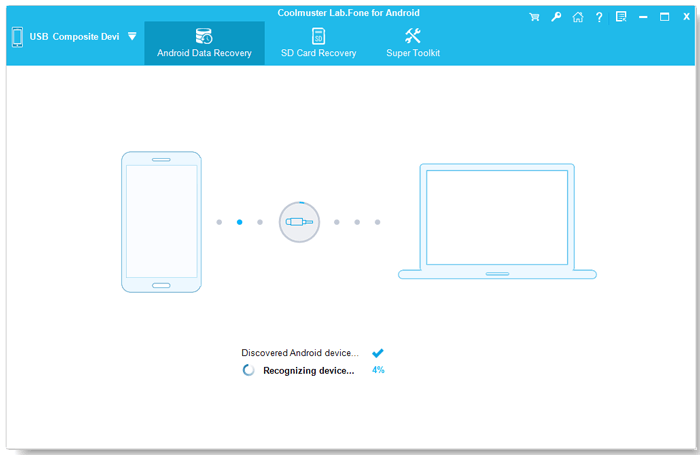
02Use a USB cable to connect your Android phone or tablet to the computer and enable USB debugging on the device as prompted, allowing the software to access your data.
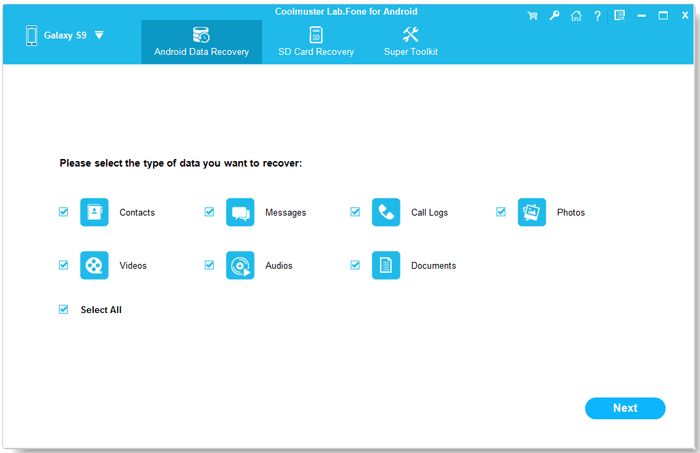
03Select the types of files you want to recover, such as photos, messages, or documents, then click "Next" to proceed.
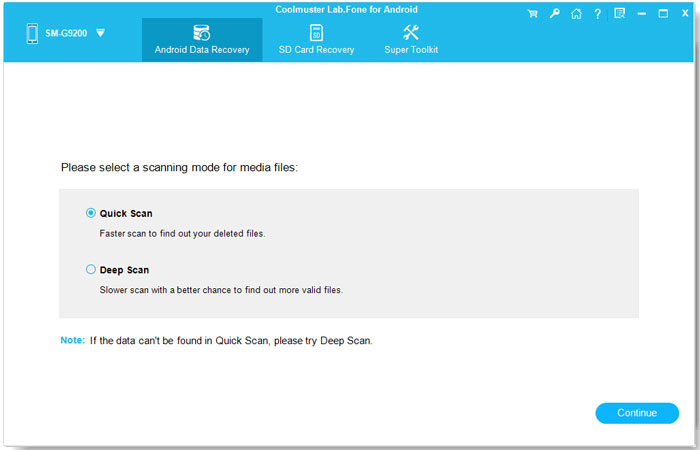
04Choose between "Quick Scan" or "Deep Scan" depending on your recovery needs, then click "Continue" to start scanning the device for lost data.
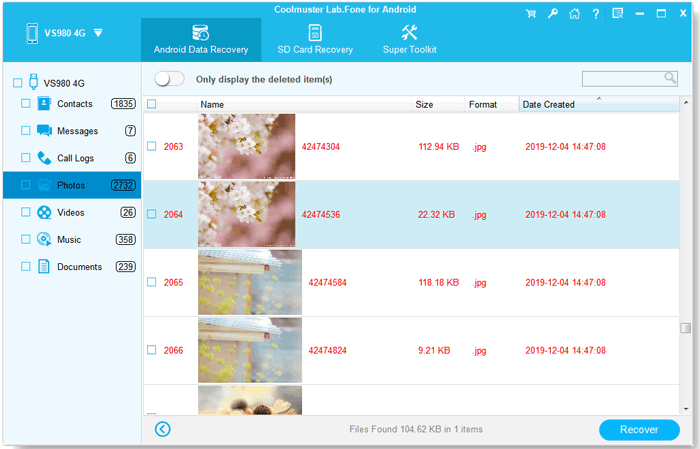
05After the scan is complete, preview the recoverable files, select the ones you need, and click "Recover" to save them to your computer.
For users who prefer a more visual guide, a step-by-step video tutorial is also available to demonstrate the entire recovery process in detail.
Myjad Android Data Recovery can meet basic Android data recovery needs, especially for users who want to scan and preview lost files before making a purchase. However, its limitations in device compatibility, recovery depth, and overall flexibility may affect the experience in more complex data loss scenarios.
For users who are looking for a more stable, feature-complete, and future-proof solution, Coolmuster Lab.Fone for Android offers higher recovery success rates, broader Android support, and additional data backup capabilities. Choosing the right tool ultimately depends on your device, data type, and recovery requirements, but a more comprehensive solution can significantly improve your chances of successful data recovery.
Related Articles:
How to Perform Android Data Recovery Without Root? [3 Easy Ways]
How to Recover Deleted Photos from Android Internal Storage? [5 Ways]
How to Realize SD Card Recovery for Android [Must Read in 2026]
How to Recover Deleted Photos from Android Phone [Top 6 Methods]






 Free Download for PC
  Free Download for Mac


