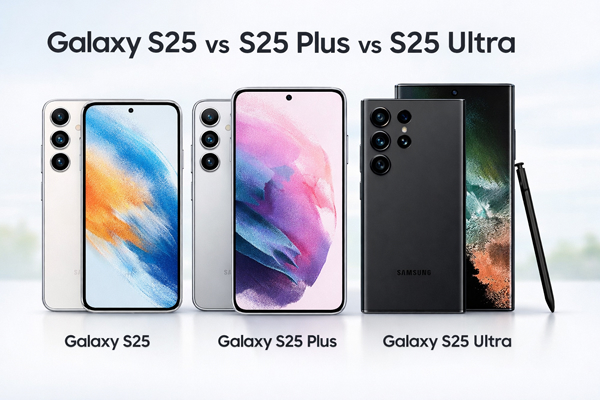
Samsung has expanded its flagship lineup with the Galaxy S25 series, which includes the Galaxy S25, S25 Plus, and S25 Ultra. Choosing between Samsung Galaxy S25 vs S25 Plus vs S25 Ultra can be challenging, as all three models offer flagship-level performance and premium features. While they share a similar design language and software experience, differences in size, display, camera systems, battery capacity, and pricing make each model suitable for a different type of user. In this article, we compare the Galaxy S25 series in detail to help you decide which model is right for you.
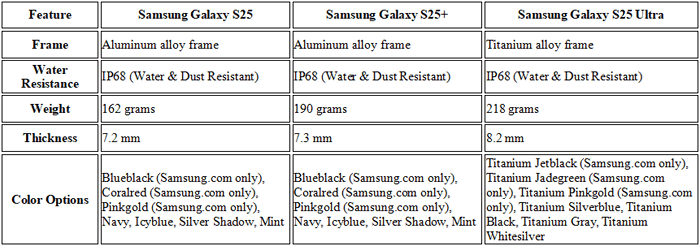
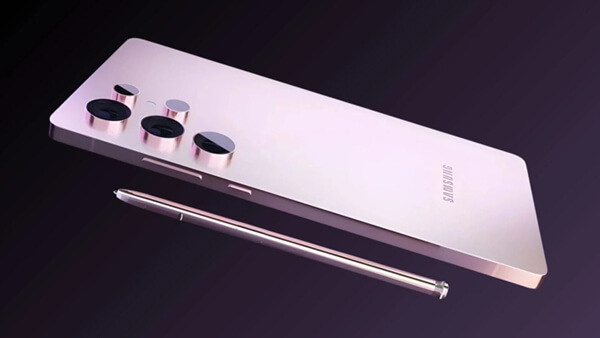
All three Galaxy S25 models feature a refined and premium design with a solid build quality. The specific situation of each mobile phone can be referred to the following table:
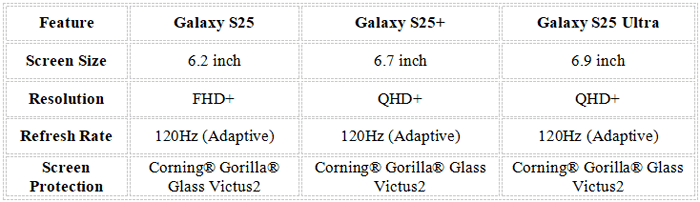
The Samsung Galaxy S25 series features Dynamic AMOLED 2X displays with a 120Hz adaptive refresh rate. Whether you are watching videos or playing games, the screens deliver stunning visuals, smooth performance, and an immersive viewing experience.
All three models of the Galaxy S25 series are equipped with the same Qualcomm Snapdragon 8 Elite for Galaxy processor, ensuring consistent and powerful performance. They all come with 12GB of RAM as standard, but differ in storage options to meet different user needs for storage capacity.

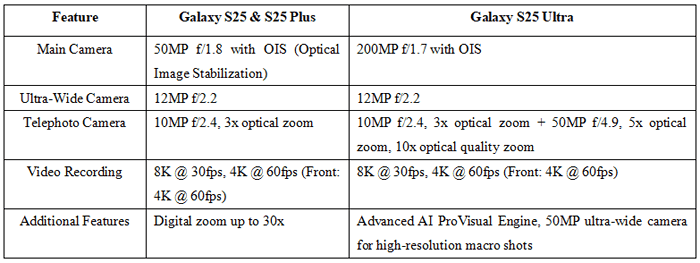
All three models feature Samsung's advanced AI ProVisual Engine for enhanced photography capabilities, and the front-facing camera is a 12MP f/2.2 wide-angle lens. However, the rear camera systems vary across the models:
The three models of the S25 series have different battery capacities, and there are differences in wired charging power. However, they share the same wireless charging and reverse wireless charging power. None of them supports Qi2 wireless charging.
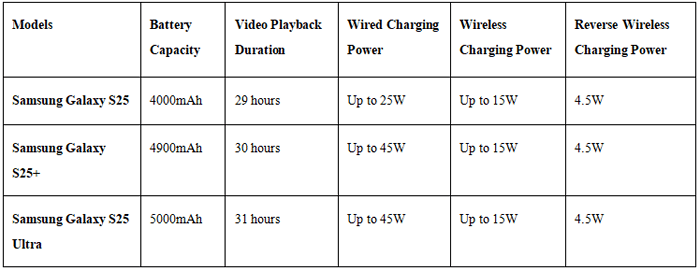
The Samsung Galaxy S25 series runs on One UI 7, based on Android 15, and all three models will receive 7 years of operating system updates and 7 years of security updates, ensuring longevity and security for users.
Samsung has built on the AI features from last year's models and enhanced them for a smarter and more intuitive user experience. Here's a breakdown of the key software features:
* Google Gemini
By default, a long press on the side button launches Google Gemini, a versatile assistant that can handle a variety of tasks. You can also change the side button's behavior to launch Bixby or turn off the assistant completely.
Improvement: The assistant has become smarter and is integrated with more apps and system-wide functions.
* AI Select
AI Select has received a significant upgrade. It now recognizes content on your screen and offers context-based suggestions. For example, if you're watching a video, AI Select can automatically create GIFs or extract text from the video.
You can also access AI Select to create animated clips from videos or instantly share content, making your interactions more fluid and efficient.
* Circle Search
This new feature allows you to search across multiple apps seamlessly. Previously, Circle Search only supported image and text searches. It now also supports audio search, making it easier to find songs, dialogues, or anything playing on your device.
* Natural Language Search
Samsung's Smart Search has been improved with natural language processing, enabling you to type searches as if you're having a conversation.
For example, typing "My eyes hurt" in settings will immediately bring up options like Eye Comfort Shield or Blue Light Filter, making the search more intuitive and user-friendly.
* Generative Image Editing
Samsung has enhanced its generative image editing feature, which allows you to edit photos and videos directly on your device using Large Language Model (LLM) software.
No Download Required: If you don't want to download the LLM package, you can still access similar editing features by connecting your device to the internet. This feature brings the editing experience directly to the user's fingertips, enhancing creativity and customization.
* AI ProVisual Engine for Photography
The AI ProVisual Engine on all models helps optimize photography by automatically adjusting settings like exposure, white balance, and color in real-time, making it easier for users to capture high-quality images and videos without manual adjustments.
* Samsung DeX
The Galaxy S25 series supports Samsung DeX, which allows you to turn your phone into a desktop experience by connecting it to an external monitor. This makes it easier to multitask, work, and browse like you would on a computer.
Multi-Tasking: You can run multiple apps simultaneously on your device, enhancing productivity and user experience.
* Samsung SmartThings
The SmartThings app is built into the Galaxy S25 series, enabling you to control your smart home devices. Whether it's adjusting your thermostat, controlling lights, or monitoring security systems, SmartThings makes managing your home easier from your smartphone.
* Long-Term Software Support
As part of Samsung's commitment to software longevity, the Galaxy S25 series is guaranteed to receive 7 years of Android OS updates and 7 years of security patches, ensuring your device stays current and secure for years.
* S Pen Support
The Galaxy S25 Ultra comes with S Pen support, a feature often associated with the Galaxy Note series. It offers precise control for drawing, writing, and taking notes, making it ideal for professionals, students, and creatives.
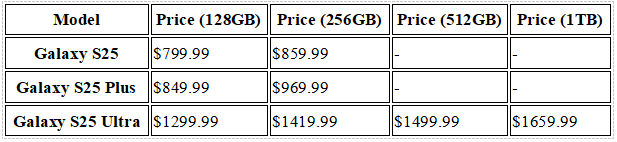
The price of the S25 series increases with the improvement of configuration, and each model has a clear value positioning to match different budget users.
After comparing the different models in the Samsung Galaxy S25 series, you might find yourself needing to transfer data to your new Samsung device. Whether you're upgrading from an older Galaxy model or switching to a brand-new one, Coolmuster Mobile Transfer makes transferring all your important data, like contacts, photos, messages, and apps, quick and easy. With its intuitive one-click process, it takes only a few simple steps to move all your data securely from one Samsung phone to another, with zero data loss.
Key Features of Coolmuster Mobile Transfer:
How to Use Coolmuster Mobile Transfer to Transfer Data Between Samsung Devices:
01Download and install Coolmuster Mobile Transfer on your computer, then launch the program.
02Connect both your Samsung devices to the computer using USB cables or Wi-Fi, and follow the on-screen instructions.
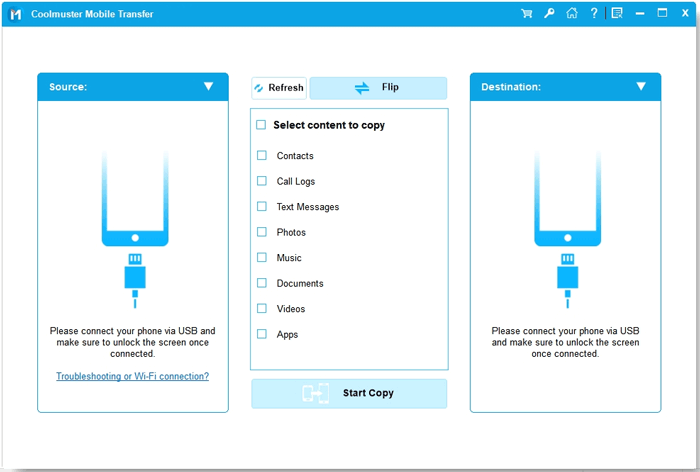
03Once the devices are connected, make sure the old Samsung device is set as the Source. If not, simply click "Flip" to adjust.
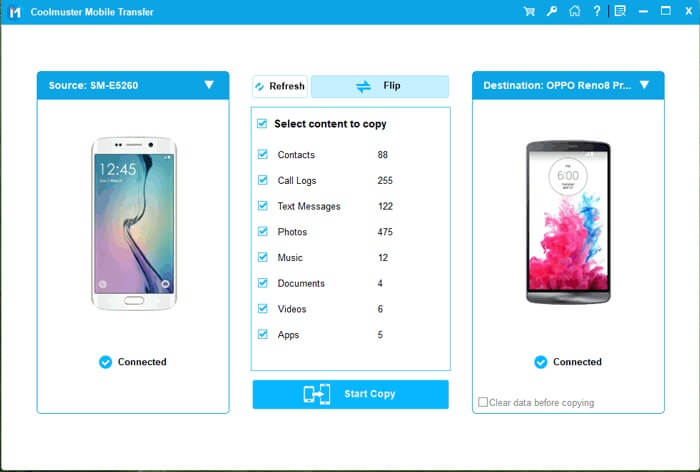
04Choose the data types you want to transfer, then click "Start Copy" to begin the transfer process.
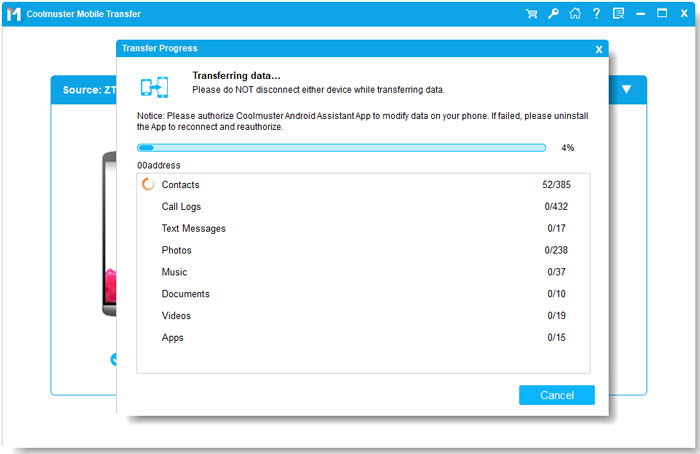
For a step-by-step guide, check out the video tutorial below for an easy-to-follow demonstration.
Choosing the right model from the Samsung Galaxy S25 series depends on your specific needs, whether it's a stunning display, advanced camera features, or long-lasting performance. The S25 Ultra stands out with its high-end specs and camera capabilities, but both the S25 and S25 Plus offer excellent value with impressive features at a more accessible price.
Once you've made your choice, Coolmuster Mobile Transfer makes data migration between Samsung phones effortless. With just a few clicks, you can securely transfer all your important files, contacts, photos, and more without any hassle or data loss, ensuring a smooth transition to your new device.
Related Articles:
Xiaomi 17/17 Pro/17 Pro Max vs Samsung Galaxy S25: Which Brand Is Right for You?
Samsung S25 Edge vs iPhone 17 Air: Which Flagship Is Right for You?
How to Delete Everything on Your Samsung Phone [Answered in 4 Methods]






 Free Download for PC
  Free Download for Mac


