TL;DR:
MTK FRP Tool is a commonly discussed solution for bypassing Google FRP locks on MediaTek-powered Android devices. This guide reviews its key features, supported devices, advantages, limitations, and the steps to use it for FRP bypass. It also introduces a more user-friendly alternative for users who find MTK FRP Tool too technical or incompatible with their devices.
Factory Reset Protection (FRP) is a built-in Android security feature designed to prevent unauthorized access after a factory reset. However, if you forget the Google account credentials linked to your device, FRP can quickly become a roadblock. For MediaTek-powered Android phones, MTK FRP Tool is one of the commonly discussed solutions. In this MTK FRP Tool review, we'll take a closer look at what MTK FRP Tool is, how it works, its strengths and limitations, and whether there's a more reliable alternative.
MTK FRP Tool is a Windows-based utility specifically developed to bypass Google FRP locks on Android devices running MediaTek (MTK) chipsets. It communicates with the device at a low level, usually through Preloader or BootROM mode, to remove or disable the FRP lock without requiring the original Google account.
This tool is mainly used by technicians and advanced users, as it often involves connecting the phone in a specific mode and installing required drivers on a PC.
Among the various functions offered by MTK FRP Tool, its most well-known capability is Factory Reset Protection (FRP) removal. Beyond FRP bypass, the tool also provides several additional features that make it useful for broader Android device management on MediaTek-powered phones:
Removes Factory Reset Protection on Android devices, allowing users to bypass Google account verification after a factory reset.
Enables flashing firmware to repair system errors, fix software issues, or upgrade and downgrade Android versions on supported MTK devices.
Supports removing Android screen locks, including pattern locks, PINs, passwords, fingerprint locks, and facial recognition locks.
Allows access to devices protected by a locked bootloader, making it possible to perform system modifications, repairs, or recovery operations.
MTK FRP Tool is specifically designed for Android devices powered by MediaTek chipsets. It supports a wide range of models from brands like Xiaomi (especially the Redmi series), OPPO, Vivo (Y series), Realme, Infinix, and Tecno. Some Samsung and Motorola models with MTK processors are also supported, although these are less common.
The tool's compatibility is influenced by both the version of the tool and the device's Android version. Devices running older Android versions (from 6.0 onwards) tend to offer better bypass success rates, while newer versions may require additional steps, such as Auth Bypass or Meta Mode, and might not always be fully supported.
Most MTK FRP Tools are compatible with Windows (7/8/10/11) and require the installation of MediaTek USB VCOM or Preloader drivers for stable device connection. Supported chipsets include the Helio and Dimensity series, as well as older MTK models.
Based on its features and compatibility, MTK FRP Tool offers clear advantages for certain users, while also presenting notable limitations. Understanding both its strengths and weaknesses can help determine whether it is the right FRP bypass solution for a specific device and usage scenario.
Pros:
Cons:
In real-world use, bypassing FRP with MTK FRP Tool is generally straightforward for users familiar with Android flashing tools, though the exact steps may vary slightly depending on the tool version and the device model. Using a standard tool like MTK Client Tool as an example, the workflow typically involves the following:
Step 1. Preparation
Download and install the latest MTK FRP Tool and the corresponding MediaTek USB drivers on your Windows PC. Back up any accessible data if possible, and ensure the device has at least 50% battery.
Step 2. Enter Boot Mode
Power off the device and press the combination keys (usually "Volume Down" + "Power", or "Volume Up" + "Volume Down" + "Power") to enter Preloader or BROM Mode. Advanced users may use a test point to force boot mode.
Step 3. Connect Device
Use a reliable USB cable to connect the device to the PC. If drivers are correctly installed, the tool should automatically detect the device. Otherwise, reinstall the drivers and reconnect.
Step 4. Initiate FRP Bypass
Launch the MTK FRP Tool and select the "FRP Remove" or "Bypass FRP" option. Some tools may require selecting the device's chipset or loading a scatter file for precise operations.
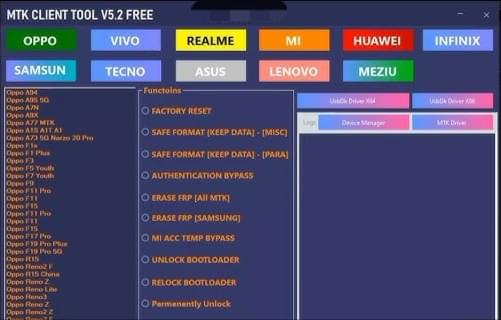
Step 5. Complete the Process
Click "Start" or "Execute". The tool will erase the FRP partition, which usually takes 1 - 3 minutes. Do not disconnect the device during this process.
Once the tool confirms success, disconnect the device and power it on. The device should boot without FRP verification, allowing the setup of a new Google account.
For users who find MTK FRP Tool too technical or limited in compatibility, Android Unlocker offers a more user-friendly and versatile FRP bypass solution. It is designed to simplify the unlocking process while supporting a wider range of Android devices and newer system versions.
Key Features of Android Unlocker
How to bypass FRP using the MTK FRP Tool alternative (Standard Mode)?
01Download and install Android Unlocker on your computer. Launch the program once installation is complete.
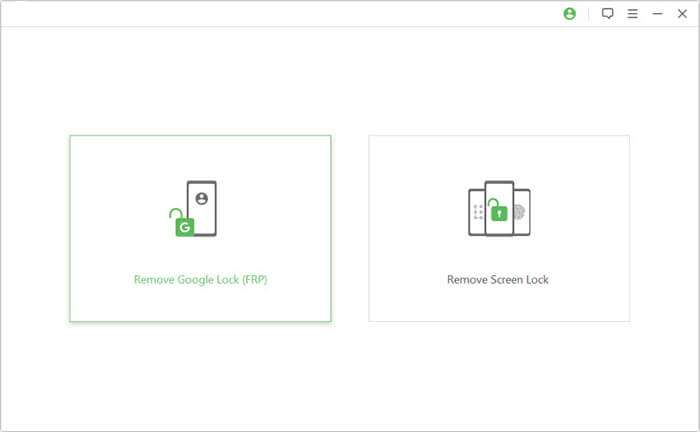
02From the main interface, select "Remove Google Lock (FRP)", then connect the FRP-locked Android device to the computer using a USB cable.
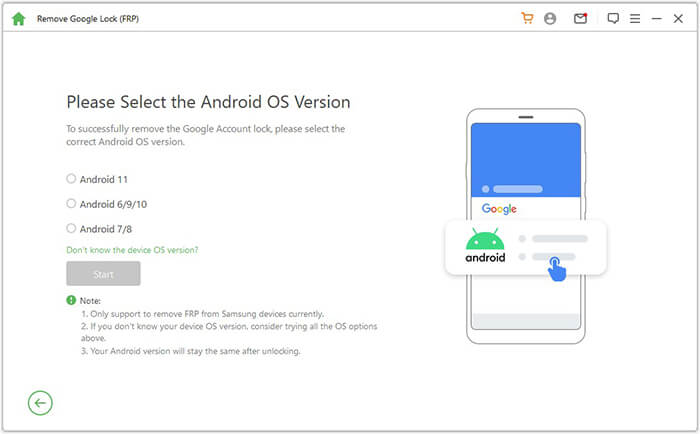
03Follow the on-screen instructions to select the correct Android version for your device. After confirming the system version, click "Start" to continue.
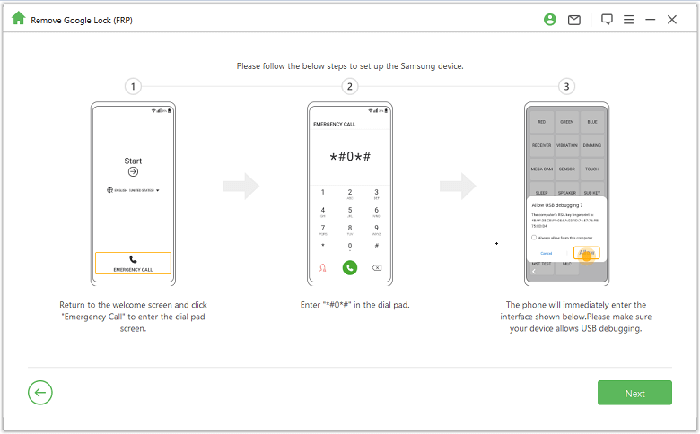
04Proceed with the on-screen guidance to complete the required device setup steps. These instructions may vary slightly depending on the device model and Android version.
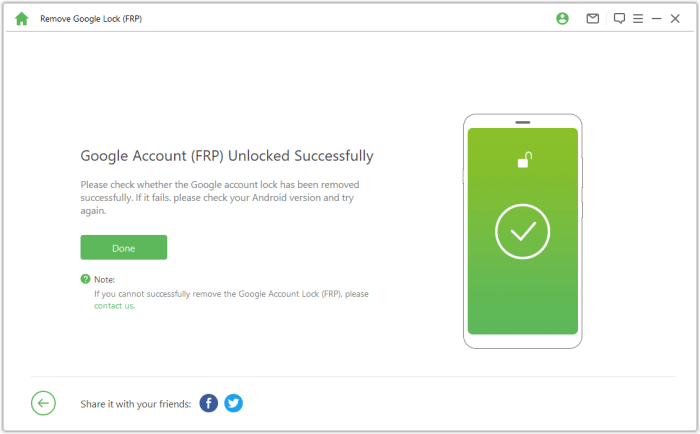
05The software will begin removing the Google FRP lock automatically. During this process, avoid using or disconnecting the device. Once completed, the device may briefly restart or flicker, indicating that the FRP lock has been successfully removed.
That's all of MTK FRP Tool. While MTK FRP Tool is effective for bypassing FRP on MediaTek devices, its limited compatibility with newer Android versions and technical complexity make it less suitable for many users. It works best for older devices and users familiar with flashing tools.
For a more user-friendly and versatile option, Android Unlocker is a strong alternative. It supports a wider range of devices, offers a simple FRP bypass process, and provides better success rates on newer Android versions, making it a practical choice for both beginners and experienced users.
Related Articles:
7 Effective Samsung FRP Tools in 2026 [98% People Don't Know]
How to Bypass FRP with ADB Commands and Other Android Unlock
Unlock FRP with IMEI Free: What You Need to Know & Better Options




 Free Download for PC


