If you are locked out of your iPhone or iPad due to a forgotten passcode, Face ID failure, or a disabled device, you may start searching for a reliable unlocking tool. ApowerUnlock is one of the popular names that appear in many search results. But before purchasing, users often want to know: Is it safe? Is it worth it? Does it really work?
This ApowerUnlock review covers everything you need to know — features, pricing, advantages, disadvantages, how it works, and the best alternative if it falls short of your expectations.
ApowerUnlock is a powerful tool designed to unlock iPhones and iPads without requiring a passcode. It facilitates the removal of various types of locks, including numeric passcodes, Touch ID, and Face ID. According to the software, it can unlock iOS device screens in just a few minutes. It's considered a dependable solution for unlocking most locked iOS devices. It supports unlocking the following types of issues:
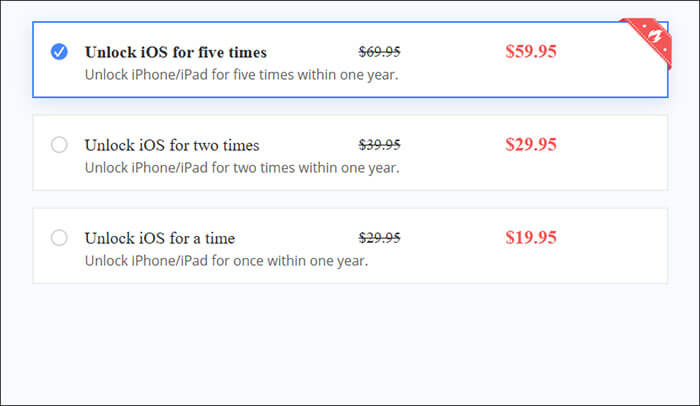
ApowerUnlock offers several paid subscription options to cater to the needs of different users. According to the official pricing, the available plans generally include the following packages:
Pros:
* It has a user-friendly interface that is easy to understand.
* Unlocking the iPhone does not require jailbreaking.
* It is compatible with all iOS devices (iPhone/iPad/iPod).
* It supports bypassing Touch ID, Face ID, and passcodes.
* It can be used in various situations, including screen damage and forgotten passcodes.
* It is safe and reliable, with offline functionality.
Cons:
* It does not offer other unlocking features.
* The success rate for iOS unlocking is relatively low.
* It only supports Windows, so Mac users cannot use it.
* As a very new product, there are not many reviews or user feedback available to help you decide whether to use it.
The way ApowerUnlock works is simple, and the general steps are as follows:
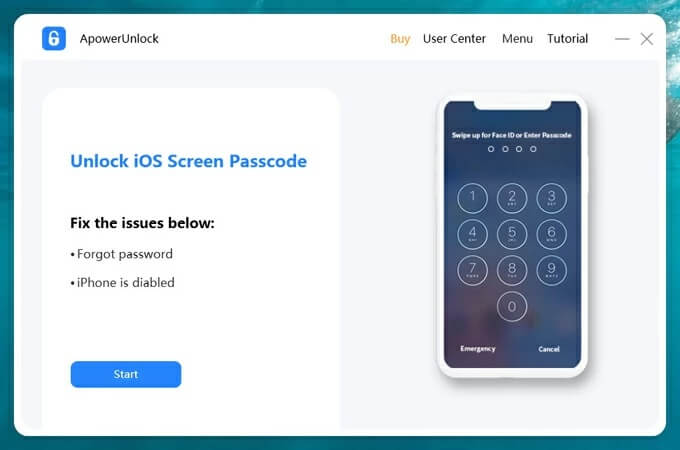
Step 1. Download ApowerUnlock from the official website and install it on your computer. Then, click the "Start" button.
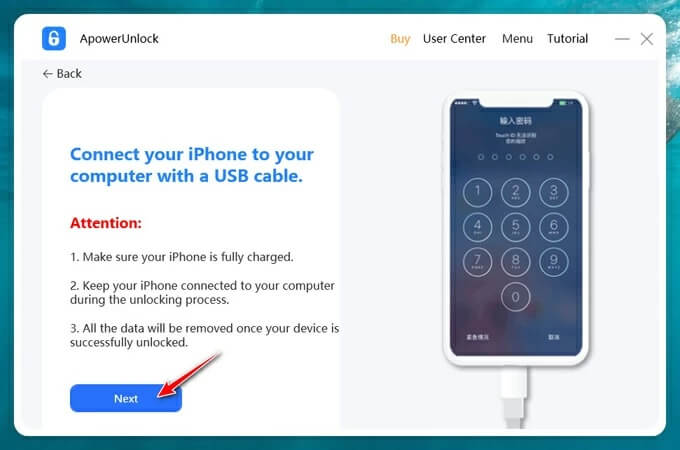
Step 2. Connect your device to the computer using a USB cable. When the "Trust This Computer?" prompt appears on your phone, remember to click "Trust". Once the connection is successful, click "Next".
Step 3. ApowerUnlock will automatically recognize your device model. Then, click the "Start downloading" button to download the firmware package. After the download is complete, click "Start unpacking" to unzip the package.
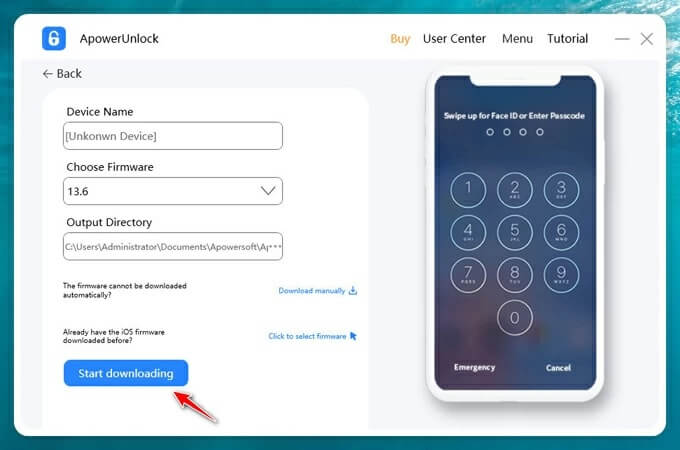
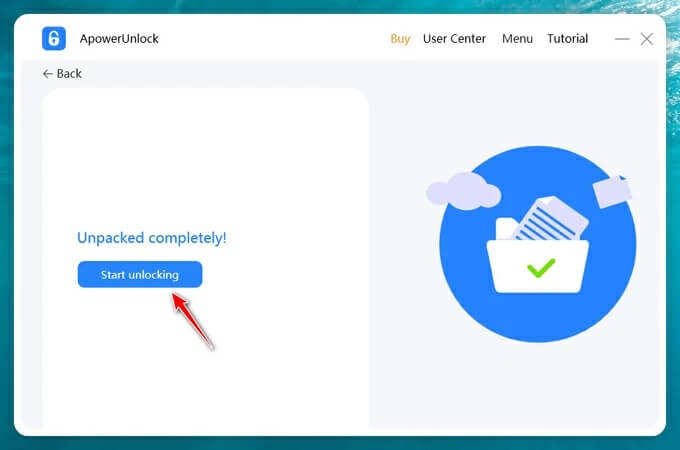
Step 4. Once the extraction is finished, click the "Start unlocking" button to begin the unlocking process. In the prompt box, enter "1111" and click "Continue". After a few minutes, the screen lock will be removed.
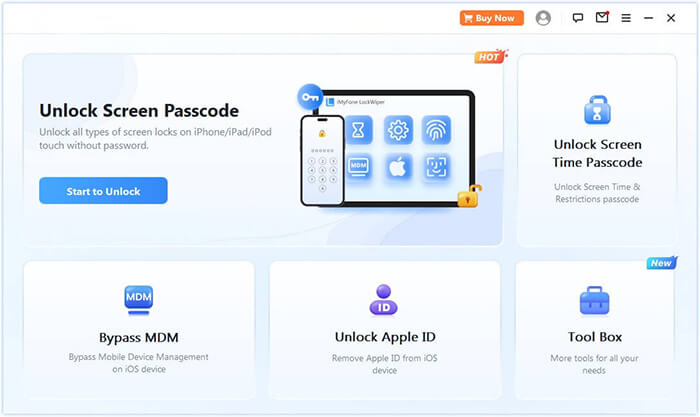
ApowerUnlock is certainly a handy tool for unlocking iOS devices, but it's not the only option out there. Notably, it lacks the ability to remove Apple ID and bypass Screen Time restrictions. But here's the good news: iPhone Unlocker steps in as a strong alternative. It offers three key unlocking modes—Wipe Passcode, Remove Apple ID, and Screen Time. Additionally, it also includes extra features like Remove MDM.
Key features of iPhone Unlocker:
How to unlock an iPhone without a passcode using iPhone Unlocker:
01Open iPhone Unlocker, select "Unlock Screen Passcode" mode, and click "Start to Unlock". Then, connect your iPhone to your computer via USB.
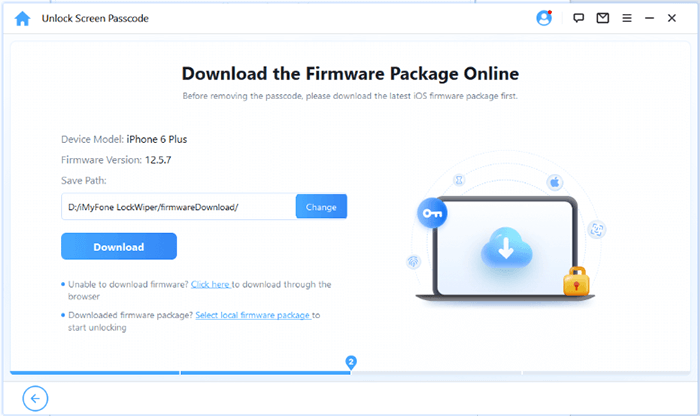
02Follow the on-screen instructions to put your device into Recovery Mode or DFU Mode. Once detected, choose a location to save the firmware package and click "Download".
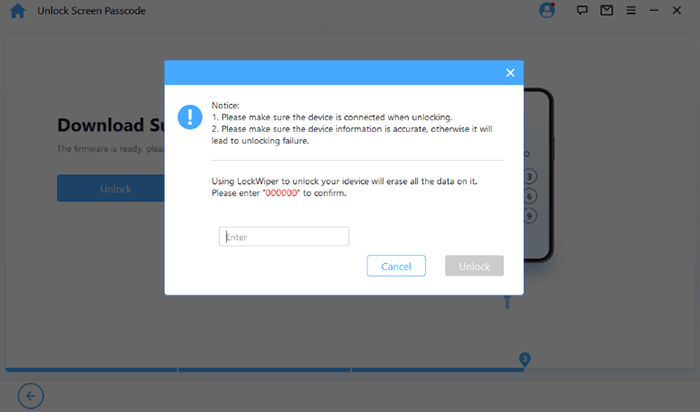
03Once the firmware download completes, click "Unlock". Read the warning message carefully, enter "000000" to confirm, and click "Unlock" again to proceed.
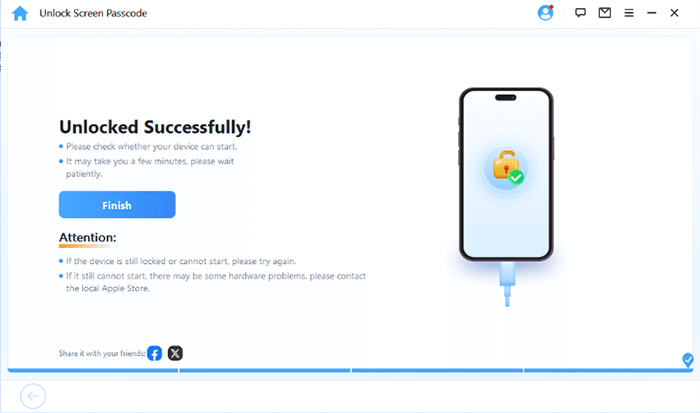
04In just a few minutes, your iPhone's screen passcode will be completely removed. You can now set up a new passcode, Face ID, or Touch ID as needed.
Q1. Is ApowerUnlock safe to use?
Yes. ApowerUnlock is safe if downloaded from the official website. However, the unlocking process will erase all data on your device, which is standard for iOS unlocking tools.
Q2. Is ApowerUnlock free to use?
No. You can download the software for free, but the actual unlocking features require a paid license.
Q3. Does ApowerUnlock work on Android?
Unfortunately, NO! It is not compatible with Android devices. It is specifically designed to unlock iOS devices like iPhones and iPads. If you're looking for an Android unlocker, you'll need to check out other options.
This ApowerUnlock review shows that ApowerUnlock can be helpful for users who simply need to remove a screen passcode, Face ID, Touch ID, or fix a disabled device. Its interface is friendly, and the process is simple. However, the tool has several limitations, including support only for screen locks, varying success rates, and relatively high pricing. If you're looking for a more feature-rich and powerful unlocking solution with a higher success rate, iPhone Unlocker is the ideal choice. It offers broader compatibility and more advanced features.
Related Articles:
8 Top-ranking iPhone Unlock Software to Unlock Your iPhone Without Passcode
How to Unlock iPhone Without Passcode Using Camera [2025 Updated]
How to Unlock iPhone Without Swiping Up? [Comprehensive Guide]




 Free Download for PC
  Free Download for Mac


