Text messaging, also known as SMS, remains one of the most convenient and widely used communication methods worldwide. Unlike instant messaging apps such as WhatsApp or Telegram, SMS does not require an internet connection and works on both smartphones and basic mobile phones, making it accessible to everyone.
With the rise of free SMS websites, users can now send text messages online without using a SIM card or paying carrier fees. These platforms allow you to send domestic and international SMS directly from a web browser, which is especially useful when your phone is unavailable or out of balance. In this guide, we'll introduce the top free SMS websites that let you send messages online at no cost, compare their key features and limitations, and help you choose the best option based on your needs.

TextNow is one of the most popular free SMS websites in North America, offering users a real virtual phone number to send and receive text messages online. It works through a web browser as well as Android, iOS, and desktop apps. Unlike many one-way SMS websites, TextNow allows two-way messaging, making it suitable for long-term communication.

Key Features
Cons
TextFree is a well-known free SMS website that allows users to send text messages online using a dedicated phone number. It is commonly used for casual texting, short-term communication, or as a secondary number for privacy purposes.

Key Features
Cons
EZ Texting is a professional SMS platform designed mainly for businesses rather than individual users. While it is not a fully free SMS website, it offers trial access and is often searched by users looking for large-scale or bulk SMS solutions.

Key Features
Cons
Afreesms is a simple web-based service that allows users to send free SMS messages to various countries. It is mainly designed for one-way international texting and does not require installing any software.

Key Features
Cons
AnonymSMS focuses on privacy by allowing users to send anonymous SMS messages online. It does not require account registration, making it suitable for users who want to hide their identity while sending texts.

Key Features
Cons
Textr is a web-based SMS platform that provides a clean interface for sending text messages online. It is designed for users who want a lightweight and modern texting experience without relying on a physical phone.

Key Features
Cons
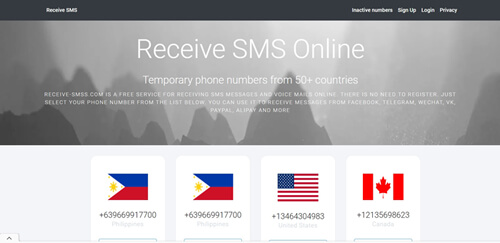
Receive SMS Online allows users to receive text messages using public phone numbers displayed on the website. It is mainly used for receiving verification codes from apps or services without using a personal phone number.
Key Features
Cons
Google Voice is a reliable SMS and calling service provided by Google. It allows users to send and receive SMS messages online using a Google account, with seamless synchronization across devices.
Key Features
Cons
Globfone is a browser-based platform that offers free SMS and online calling services. It is widely used for sending quick, one-time messages without creating an account.

Key Features
Cons
Free SMS websites are useful for quick or temporary messaging, but they often lack advanced management features and long-term reliability. If you want to handle text messages more efficiently, managing Android SMS on a computer provides a more stable and professional solution.
Coolmuster Android Assistant is a comprehensive Android data management tool that lets you control your text messages directly from a desktop or laptop. Instead of relying on browser-based SMS platforms, it gives you full access to your phone's message data while keeping everything private and secure.
Key features of Coolmuster Android Assistant
How to manage text messages on Android with Coolmuster Android Assistant?
01Download, install, and launch Coolmuster Android Assistant on your PC or Mac. The software will automatically guide you through the initial setup.
02You can connect your Android device to the computer using either a USB cable or Wi-Fi. Follow the on-screen prompts to enable USB debugging so the device can be recognized successfully.
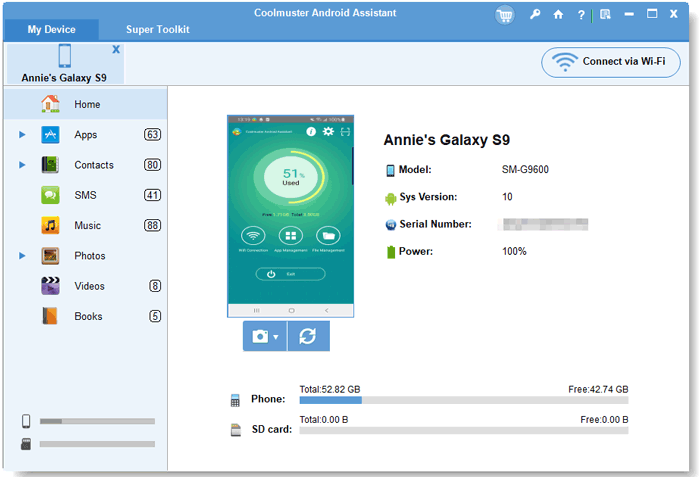
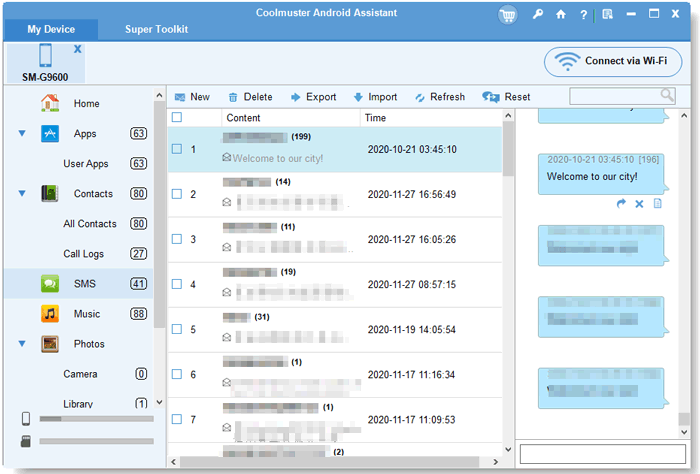
03After your phone is connected, click "SMS" in the left sidebar. All text messages on your Android phone will be displayed. From the top menu, you can choose actions such as "New", "Reply", "Forward", "Export", "Import", or "Delete", making SMS management fast and efficient.
If you prefer a more visual walkthrough, you can watch the video tutorial below to see how Android SMS management works step by step.
Free SMS websites are useful for temporary messaging, anonymous texting, or receiving verification codes. However, most of them come with restrictions such as ads, privacy concerns, or limited functionality.
If your goal is quick online texting, the websites listed above can meet different needs. But for professional SMS management, backups, and long-term use, a dedicated tool like Coolmuster Android Assistant offers a safer and more powerful alternative.
Related Articles:
Powerful SMS Recovery Apps for Android - 9 Options for You
Top 10 Android SMS Managers - Manage Messages for Android Easily
How to Send & Receive Android Text Messages from Computer Easily
How to Sync Text Messages on Android: 4 Effective Ways for You





 Free Download for PC
  Free Download for Mac


