TL;DR:
This guide explains four effective ways to recover call history from OnePlus devices, including using professional recovery software, cloud backup, local backup, and mobile carrier records.
Accidentally deleting call logs on your OnePlus phone can be frustrating, especially when the records contain important phone numbers or business-related information. Call history may also disappear after a factory reset, system update, device crash, or accidental formatting.
Fortunately, recovering deleted call history from a OnePlus device is often possible. If you have a backup, you can restore the records directly. Even without a backup, professional Android data recovery software may help retrieve deleted call logs before they are overwritten.
In this guide, we'll show you four practical methods to recover call history from OnePlus devices, including using a dedicated recovery tool, Google backup, local OnePlus backup, and your mobile carrier's records.

If your OnePlus call history has been lost due to accidental deletion, or other unexpected situations, a professional Android data recovery tool can help you retrieve the missing records efficiently. Coolmuster Lab.Fone for Android allows you to scan your device for deleted call logs and recover them selectively. Besides call history, it can also restore many other types of Android data from both internal storage and SD cards.
Key features of Coolmuster Lab.Fone for Android:
How to recover deleted call history from OnePlus?
01Download, install, and launch Coolmuster Lab.Fone for Android on your computer.
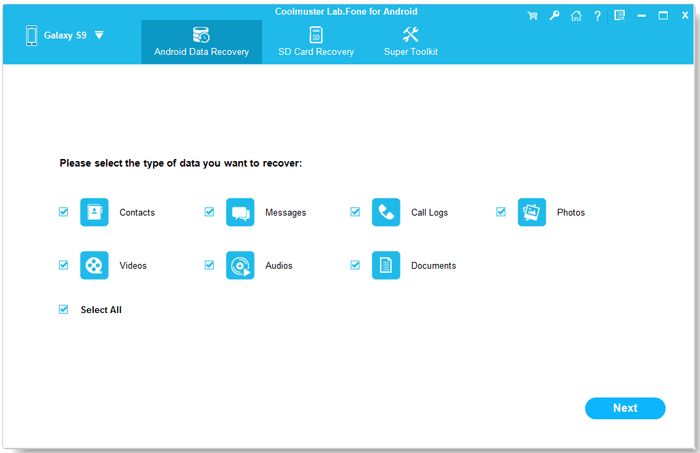
02Connect your OnePlus phone to the computer with a USB cable and enable USB debugging when prompted. Once the device is recognized, select "Call Logs" from the available data categories and click "Next" to start scanning.
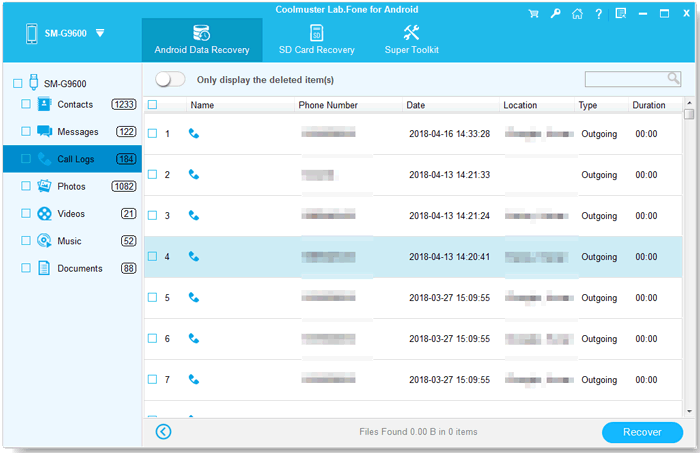
03After the scan is completed, all recoverable data will be displayed on the interface. Choose "Call Logs" from the left panel, preview the deleted and existing call records, select the items you want to restore, and click "Recover" to save them to your computer.
If you prefer a visual guide, you can also watch the following video tutorial to learn how to recover deleted call history from a OnePlus phone step by step.
Google Backup is one of the most convenient ways to recover call history on OnePlus, especially if you previously enabled automatic backup on your device. If your call logs were synced to your Google account before being lost, you can restore them during the device setup process after a reset.
How to restore call history from Google Backup?
Step 1. Open "Settings" > "Google" > "Backup" to check whether a backup is available.
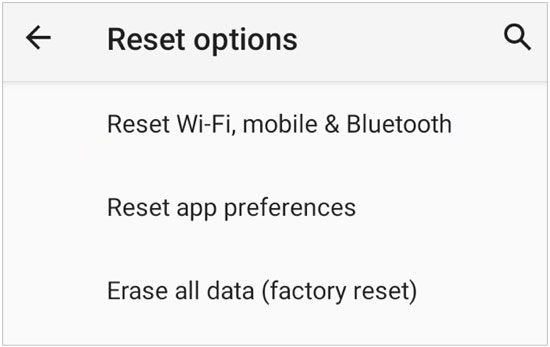
Step 2. If needed, go to "Settings" > "System" > "Reset Options" and perform a factory reset on your OnePlus phone.
Step 3. Restart the device and begin the initial setup process.
Step 4. Sign in with the same Google account used for backup.
Step 5. Select "Restore from Backup" when prompted and choose the latest backup file.
Step 6. Complete the setup and wait for the data synchronization process to finish.
OnePlus devices also support local backups through built-in backup features or the Clone Phone app. If you previously created a backup before your call history was deleted, you can easily restore it from the saved backup file without relying on cloud services.
How to restore OnePlus call history from Local Backup?
Step 1. Open "Settings" on your OnePlus phone.
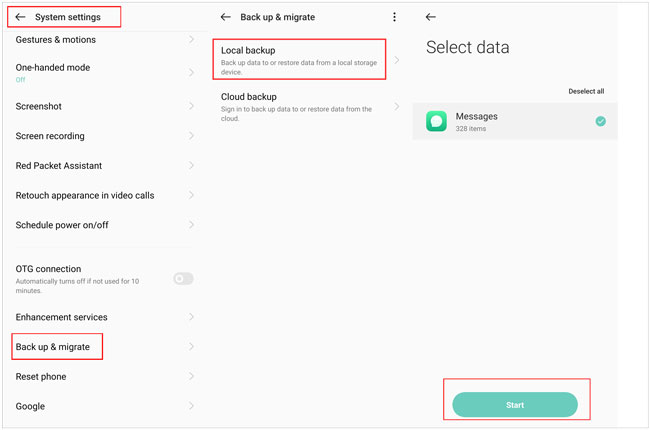
Step 2. Go to "System Settings" > "Back up & migrate".
Step 3. Tap "Local Backup" or "Restore Backup", depending on your device model.
Step 4. Select the backup file that contains your call history.
Step 5. Choose "Call Logs" and other data you want to restore.
Step 6. Confirm and wait for the restoration process to complete.
Mobile carriers store detailed call records for billing and network usage purposes, which makes them a useful alternative when you cannot recover call history directly from your OnePlus device. While these records cannot be restored back into your phone's call log, they can help you retrieve important numbers and call details.
How to request call history from your mobile carrier?
Step 1. Log in to your carrier's official website or mobile app.
Step 2. Go to sections like Call History, Usage Details, or Billing Records.
Step 3. Check and download available call records if provided.
Step 4. If not available online, contact customer support and request detailed call logs.
Step 5. Complete identity verification if required.
What You Can Get from Carrier Records?
Among all the methods introduced, Coolmuster Lab.Fone for Android stands out as the most effective solution for recovering deleted call history on OnePlus devices, especially when no backup is available. It can deeply scan your phone and restore lost call logs with a relatively high success rate, making it a practical choice for most data loss situations.
Other options such as Google Backup, OnePlus local backup, and mobile carrier records can also help in specific cases, but they depend on whether a backup was created or whether the carrier retains the required call data. For a more direct and reliable recovery experience, using Coolmuster Lab.Fone for Android is still the recommended approach when you need to retrieve important call history quickly.
Related Articles:
How to Make OnePlus Data Recovery via 5 Methods [New Tutorial]
OnePlus Backup and Restore: 4 Simple Ways to Keep Your Data Safe
4 Easy Ways to Perform Android Call Log Backup & Restore [Must Read]
Back Up OnePlus to Cloud Services: Google, OnePlus Cloud, Dropbox







 Free Download for PC
  Free Download for Mac


