TL;DR:
The cost to unlock an iPhone depends on the type of lock and the method you choose, ranging from free official solutions to paid software and repair services.
Wondering about the cost to unlock an iPhone? Whether you've forgotten your screen passcode, bought a second-hand iPhone that is still linked to its previous owner's Apple account, or want to use your phone with another carrier, the price can vary significantly depending on the type of lock and the solution you choose. Some iPhones can be unlocked for free through official methods, while others may require paid software or professional assistance.
So, how much does it cost to unlock an iPhone, and which option is right for your situation? In this guide, we'll compare the costs of unlocking carrier locks, screen locks, and Activation Lock, explain the available free options, and help you understand when paying for an unlocking service may be worthwhile.
Yes, you can unlock an iPhone for free in many cases. Carrier unlocking is often free if you meet your carrier's requirements, while screen locks and Activation Lock may be resolved through Apple's official methods at no cost. However, some situations require paid software or professional services, depending on the lock type and device status.
The table below provides an overview of the potential costs.
| iPhone Lock Type | Free Option | Potential Paid Cost |
| Carrier/SIM lock | Contact your carrier if eligible | Varies by provider and service |
| Screen passcode lock | Use Apple's official reset options | Around $29.99 for the software option discussed below |
| Activation Lock | Sign in with the original Apple Account or ask the previous owner to remove the device | Around $39.99 for the third-party bypass option discussed below |
| Unlocking service at a repair shop | Not usually applicable | Varies by device, lock type, and provider |
Note: Third-party software prices and repair fees may change. Check the provider's current pricing and compatibility requirements before paying.
A carrier-locked iPhone is restricted to a particular mobile network. If you want to switch carriers or use a SIM card from another provider, you may need to have the device unlocked. The cost depends on your carrier's policy and whether your iPhone meets its eligibility requirements.
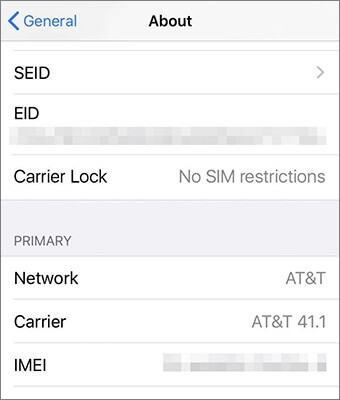
You can check your iPhone's carrier-lock status directly in Settings without installing an app or contacting your carrier first.
Step 1. Open "Settings" on your iPhone.
Step 2. Tap "General", then select "About".
Step 3. Scroll down to "Carrier Lock".
Step 4. Check the status displayed beside it.
If you see No SIM restrictions, your iPhone is unlocked and can generally be used with compatible carriers. If the status shows a carrier restriction, contact your carrier to confirm the unlock requirements. Apple explains that only your current carrier can unlock an iPhone's carrier lock.
Carrier unlocking is often free when your iPhone meets the provider's requirements. However, eligibility rules differ, and a device that is still under a payment plan, reported lost or stolen, or otherwise ineligible may not qualify.
| Carrier | Typical Cost | What to Know |
| AT&T | $0 if eligible | Submit an unlock request and meet AT&T's eligibility requirements, which may include payment and account-status conditions. |
| T-Mobile | $0 if eligible | The device must meet T-Mobile's unlock policy, including applicable account, payment, and usage requirements. |
| Verizon | Check the current policy | Unlocking rules depend on the device and the carrier's current policy. Confirm the requirements directly with Verizon. |
| Other carriers | Varies | Check the provider's official policy for eligibility, fees, and processing time. |
Carrier policies can change, so confirm the current terms with your provider before paying a third party. You can start with the official AT&T unlock information and T-Mobile SIM unlock policy.
Be cautious of third-party websites that promise instant unlocking for a fee. Availability, legitimacy, and results vary, and paying for a service does not guarantee that a carrier will approve an unlock. If your carrier offers a free official process, try that first.
A screen lock prevents access to an iPhone when you don't know its passcode or the device has become disabled after too many incorrect attempts. The cost can be $0 if you use Apple's supported reset methods. Paid unlocking software is another option, but you should check its compatibility and data-erasure requirements before proceeding.
Cost: $0
On supported iPhones and iOS versions, you may be able to erase and reset the device directly from the lock screen. This option may appear as Forgot Passcode? or Erase iPhone, depending on your iOS version and device state.
To use this method, your iPhone generally needs to meet Apple's requirements, such as having a network connection and the Apple Account password associated with the device.
Step 1. On the lock screen, enter the passcode until the reset option appears, if supported.
Step 2. Tap "Forgot Passcode?" or "Erase iPhone", depending on the displayed option.
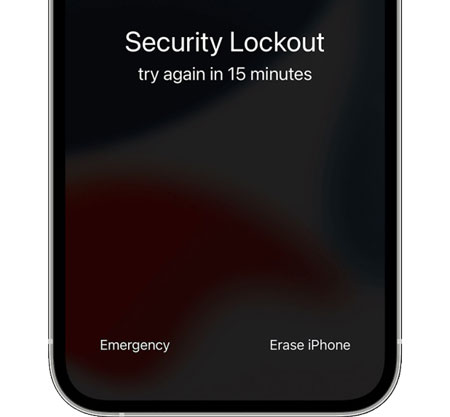
Step 3. Follow the prompts to reset the device.
Step 4. Set up your iPhone again and restore your data from a backup if one is available.
Cost: $0
If Find My was enabled before you lost access to your iPhone, you may be able to erase it remotely using Apple's Find My service. This can help you reset a device when you can't use the lock-screen reset option.
Here's the general process:
Step 1. Visit iCloud.com/find in a browser and sign in with the Apple account associated with your iPhone.
Step 2. Select your iPhone from the list of devices.
Step 3. Choose the "Erase iPhone" option to erase the device and confirm your choice.
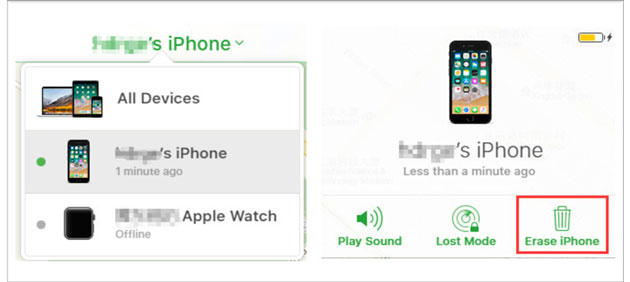
Step 4. Once the erase is complete, set up the iPhone again.
Remote erasure is free, but it deletes the data on the device. You will also need to meet Apple's requirements to use Find My. If Activation Lock remains enabled, the original Apple Account may still be required to reactivate the iPhone after erasure. Erasing a device does not automatically remove Activation Lock.
Cost: Starting at $29.99
If Apple's free reset options aren't suitable for your situation, a third-party tool such as iPhone Unlocker may be another option to consider. Before purchasing, check the software's current price, supported devices, and unlocking requirements to determine whether it fits your needs.
Key features of iPhone Unlocker:
To remove a forgotten iPhone screen passcode using iPhone Unlocker, prepare a computer and a USB cable, then follow these steps.
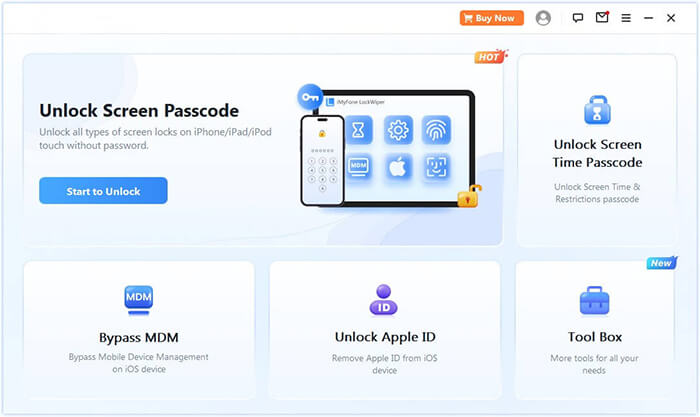
01Open iPhone Unlocker on your computer, select "Unlock Screen Passcode", and click "Start to Unlock". Connect your locked iPhone to the computer using a USB cable, then follow the program's instructions to continue.
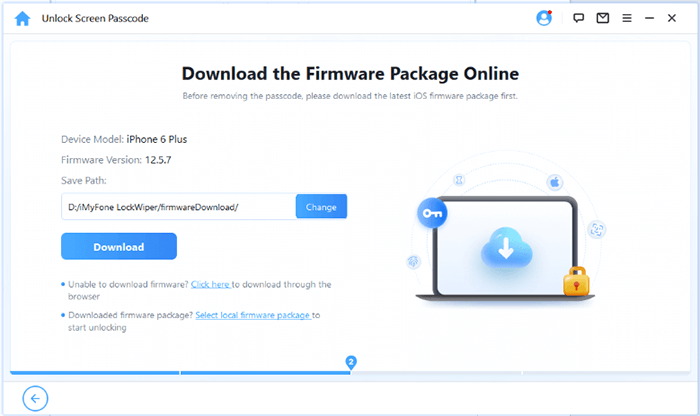
02Follow the on-screen instructions to put your iPhone into Recovery Mode or DFU Mode. Once the software detects your device, select a location to save the firmware package and click "Download" to download the required files.
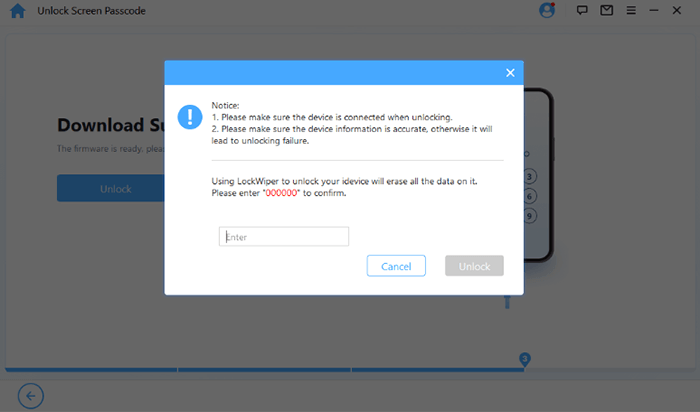
03After the firmware package has downloaded, click "Unlock". Read the warning message carefully, enter "000000" to confirm the operation, and click "Unlock" again to proceed.
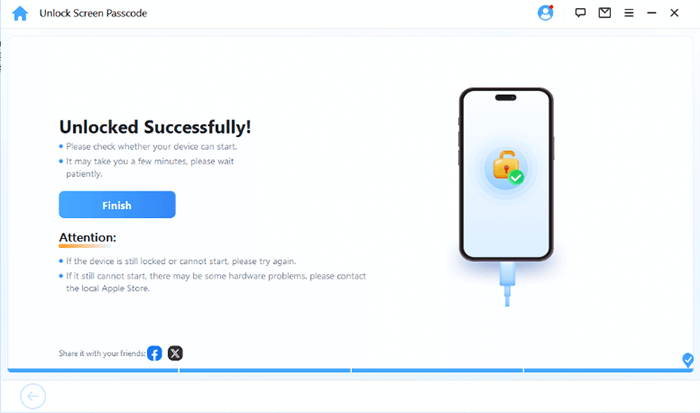
04Wait for the software to finish. If the operation succeeds, your iPhone will be erased, the screen passcode will be removed, and the device will return to its factory settings.
Activation Lock is a security feature associated with Find My. It can appear after an iPhone is erased or restored without first being removed from the previous owner's Apple account. The device may ask for the account credentials linked to it before it can be activated again.
The cost depends on whether you can use Apple's official account-recovery or ownership-verification options, or whether you are considering a third-party bypass tool.
Cost: $0
If you know the Apple account credentials associated with the iPhone, you can usually remove Activation Lock without paying for software.
Step 1. Turn on the iPhone and follow the setup steps until the Activation Lock screen appears.
Step 2. Enter the Apple account and password previously used on the device.
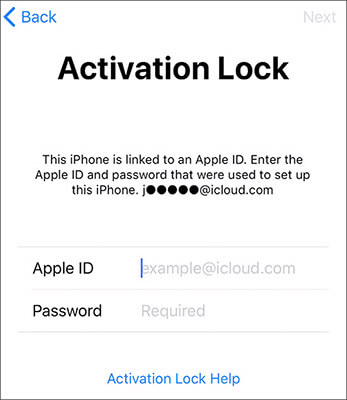
Step 3. Follow the on-screen instructions to complete activation.
If you bought the iPhone second-hand, contact the previous owner and ask them to remove the device from their account. They may be able to do this remotely through their Apple Account or Find My.
If you are the original owner but cannot access your account, try Apple's account-recovery process. You can also submit an Activation Lock support request if you have valid proof of purchase and meet Apple's requirements. Approval is not guaranteed. See Apple's Activation Lock support page.
Cost: Starting at $39.99
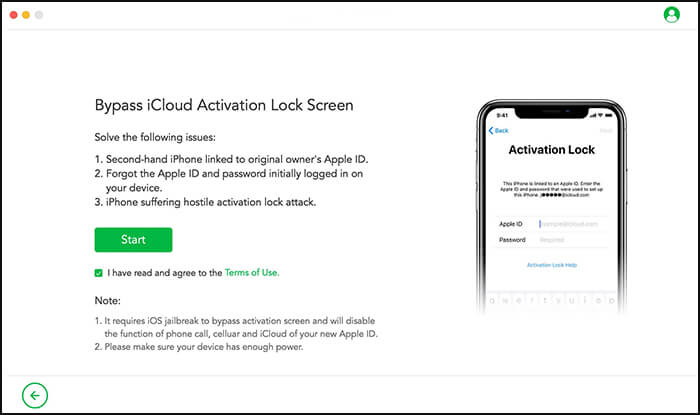
If you cannot access the original Apple account, you may consider a third-party tool such as Activation Unlocker. It is designed to bypass the iCloud Activation Lock screen on certain supported iPhone and iPad models. Before paying, check whether your device and iOS version are compatible and review the limitations of the bypass process.
Key features of Activation Unlocker:
How to bypass iCloud Activation lock?
01Download and launch Activation Unlocker on your computer. Select "Bypass iCloud Activation Lock Screen", click "Start", and connect your iPhone to the computer using a USB cable.
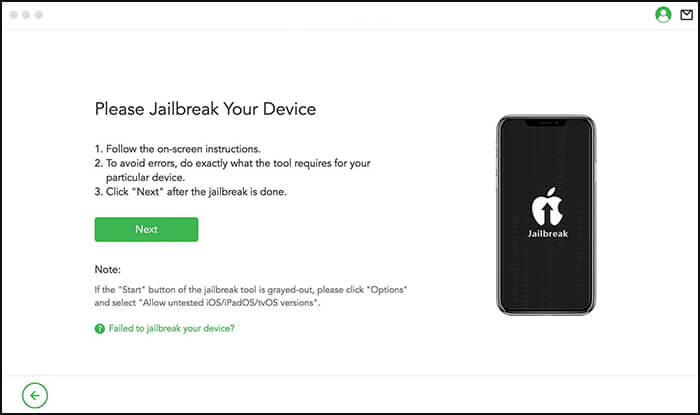
02The tool will download the appropriate jailbreak package for your device if supported. Follow the on-screen instructions to complete the jailbreak, then click "Next".
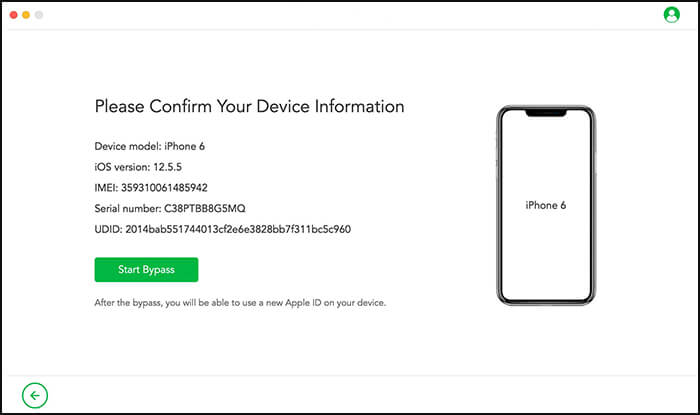
03Check the displayed device details, such as the model and iOS version. If the information is correct, click "Start Bypass" to begin the process.
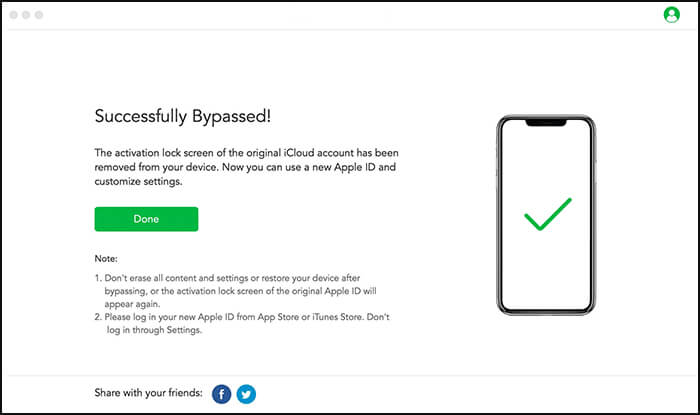
04Wait for the software to finish and follow any remaining prompts. If the bypass succeeds, you may be able to proceed past the Activation Lock screen on the supported device.
If you cannot unlock your iPhone yourself, a phone repair shop may offer assistance. The price depends on the type of lock, the iPhone model, the device's condition, and whether the shop can legally and technically perform the requested service.
| Service | Typical Cost | Notes |
| Carrier unlock assistance | Varies | The carrier usually controls the official unlock process; a repair shop cannot guarantee approval. |
| Screen passcode reset or restore assistance | May be included in a diagnostic fee or charged separately | A reset generally erases the device and may not resolve Activation Lock. |
| Activation Lock assistance | Varies; official resolution may be free | A legitimate provider may help with an ownership-based support process, but no shop can guarantee that Apple will approve a request. |
| Hardware repair affecting access | Depends on the repair | Screen or other hardware damage may require a separate repair before the device can be used. |
There is no single standard repair-shop price for unlocking an iPhone. Ask for a written quote that identifies the exact lock, the service being performed, whether your data will be erased, and whether any fee is refundable if the service fails.
Be wary of shops that promise to remove any lock on any iPhone. A screen passcode, carrier restriction, and Activation Lock are different issues, and solving one does not necessarily solve the others. For carrier restrictions, contact the carrier first; for Activation Lock, begin with the original account holder or Apple.

So, how much does it cost to unlock an iPhone? It depends on the type of lock and the method you choose. If your iPhone is carrier-locked, contact your carrier first, as eligible devices can often be unlocked for free. For screen passcode or Activation Lock issues, Apple's official solutions are also worth trying before paying for a third-party service.
If you need another option, iPhone Unlocker can help remove an iPhone screen passcode, while Activation Unlocker is designed to bypass the iCloud Activation Lock screen. We hope this guide helps you find the right solution for your situation. If you have any questions or tips to share, feel free to leave a comment below.
Related Articles:
Unlock a Network Locked Phone Easily | Full Step-by-Step Guide
How to Unlock iPhone Online: 4 Simple and Fast Solutions
[Updated] How Many Attempts to Unlock iPhone? Answered in 2026




 Free Download for PC
 Free Download for Mac


