It can be incredibly frustrating when you forget your iPhone lock screen password, Apple ID, or when your device gets disabled due to multiple incorrect password attempts. In such cases, many users turn to third-party iOS unlocking tools. Mobitrix LockAway is one such option. So, is Mobitrix LockAway truly safe and effective? What unlocking problems can it solve? And what are its pros and cons? This Mobitrix LockAway review will provide a comprehensive analysis of the software to help you determine whether it's worth using.

Mobitrix LockAway is a desktop-based iOS unlocking tool designed to help users regain access to iPhones and iPads that are locked due to forgotten credentials. It focuses on simplifying complex unlocking procedures and making them accessible to non-technical users. Mobitrix LockAway can unlock multiple types of passcodes, including the Apple ID, iPhone/iPad screen lock, MDM restrictions, and Screen Time passcode.
Mobitrix LockAway is compatible with a wide range of devices, making it a flexible solution for many iPhone and iPad models. It works on both Windows (7/8/10/11) and Mac (Ventura and earlier versions).
Supported Devices:
Its main features are as follows:
1. Bypass iPhone/iPad Lock Screen
2. Erase Apple ID Without Password
3. Bypass MDM (Mobile Device Management) Lock
4. Bypass Screen Time Passcode
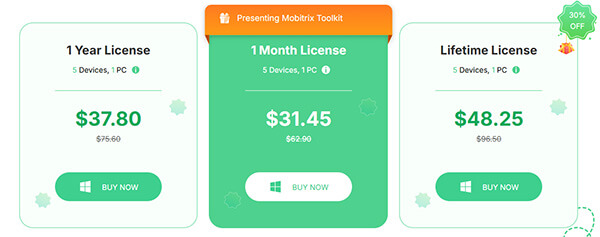
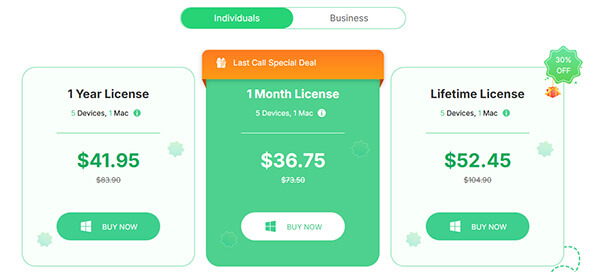
Mobitrix LockAway offers a free trial version with limited functionality. To access all features, you'll need to purchase one of the available packages. The tool offers three different packages.
For Individuals on Windows:
For Individuals on Mac:
For Business on Windows/Mac: $139
Before choosing any iOS unlocking tool, it's important to weigh both advantages and limitations.
Pros:
You can try the app after downloading it before deciding whether to purchase the paid version.
* Unlock your iPhone passcode without using iTunes.
* The application is 100% safe and reliable.
* Support multiple lock types, including passcode, Face ID, Touch ID, Screen Time, Apple ID, and MDM.
* Wide device compatibility, supporting both older models and the latest versions, such as iOS 26.
* Intuitive interface that's easy for beginners to use.
* Support various unlocking scenarios.
* Available for both Windows and macOS.
Cons:
* Data on your iPhone may be erased during the unlocking process.
* The unlocking process can sometimes take a long time.
* Poor after-sales support and slow refund process.
* The free version offers very limited features and requires payment for full access.
* Unlock success is not guaranteed to be 100%.
Here is how to unlock the screen passcode using Mobitrix LockAway:
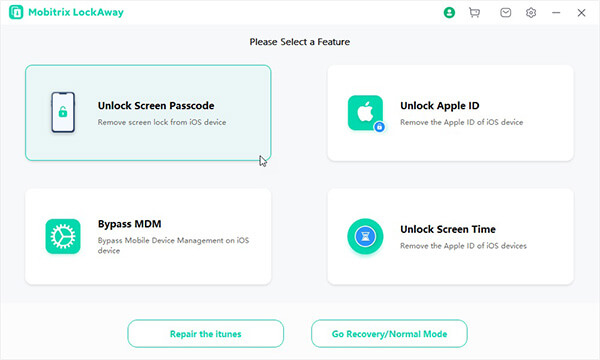
Step 1. Download and install Mobitrix LockAway on your PC or Mac. Launch the program and select the "Unlock Screen Passcode" feature to get started.
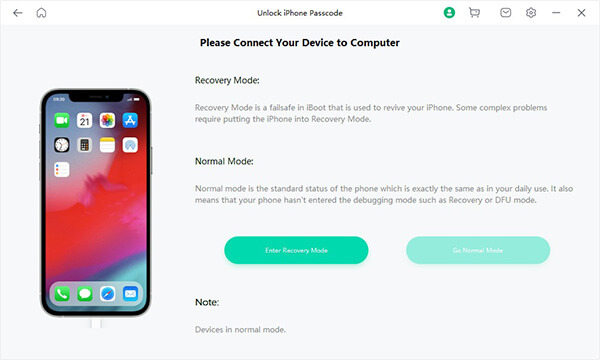
Step 2. Connect your iPhone or iPad to the computer using a USB cable. Once the connection is successful, follow the on-screen instructions to put the device into Recovery Mode or DFU Mode.
Step 3. Read and agree to the terms of use, then click the "Start" button to begin unlocking your device. After clicking "Start", the key file will be detected automatically.
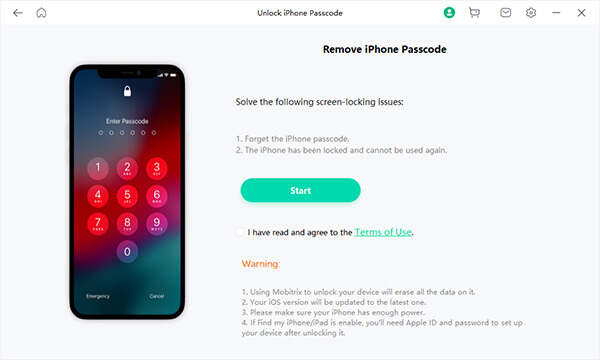
Step 4. Select the version of the key file and download it. Once the download is complete, click "Start Extract".
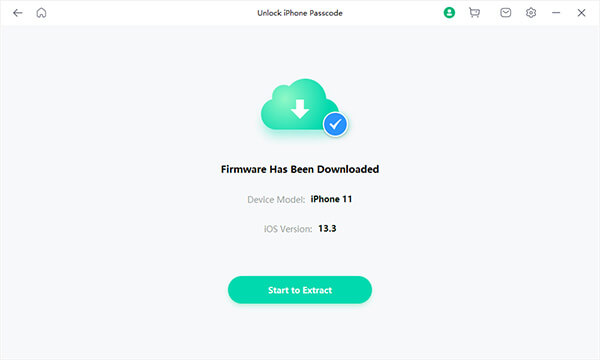
Step 5. After the extraction is finished, click "Start Unlock". Before unlocking, enter "111111" to confirm the operation.
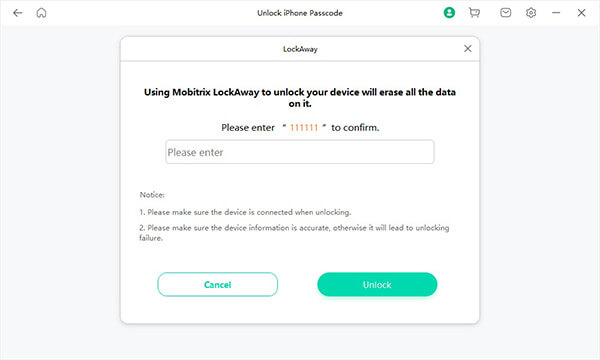
Step 6. Once the screen passcode is successfully removed, you can reset your iPhone settings, including the passcode, Touch ID, and Face ID. If you previously created an iTunes or iCloud backup, you can restore your iPhone from that backup.
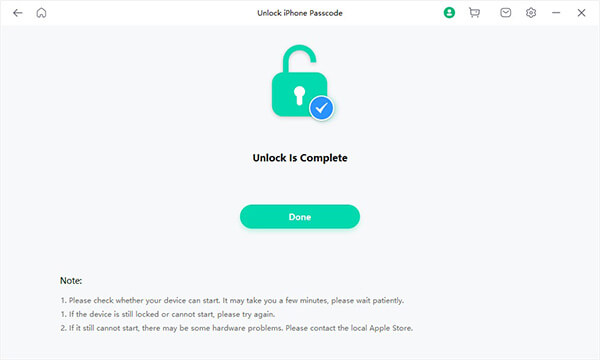
While Mobitrix LockAway provides a reliable solution for unlocking iOS devices, it's worth considering alternative options to ensure you're choosing the best tool for your specific needs. One such alternative is iPhone Unlocker.
iPhone Unlocker offers similar features to Mobitrix LockAway, including bypassing various lock screens. Additionally, it is fully compatible with the latest iOS versions, so you can be confident it will work safely with your device.
Key features of iPhone Unlocker:
Here's how to unlock an iPhone without a passcode using iPhone Unlocker:
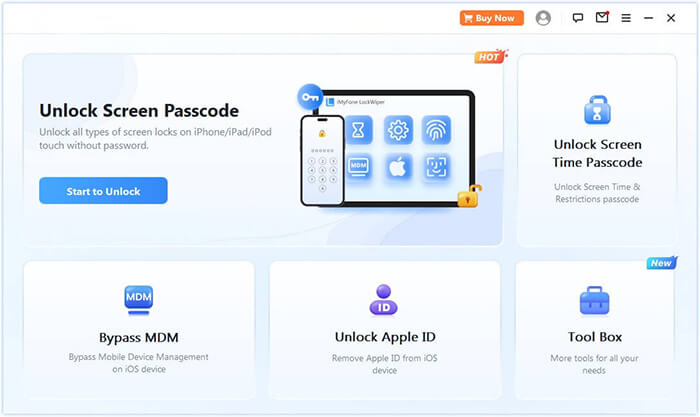
01Launch iPhone Unlocker, select "Unlock Screen Passcode", and click "Start to Unlock". Then connect your iPhone to the computer using a USB cable.
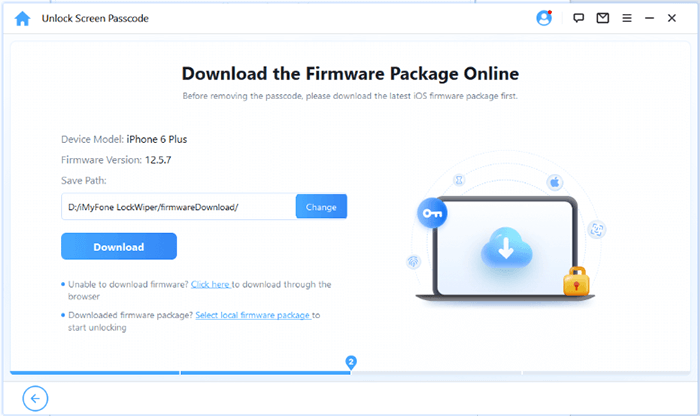
02Follow the on-screen instructions to put your device into Recovery Mode or DFU Mode. Once the device is detected, choose a location to save the firmware package and click "Download".
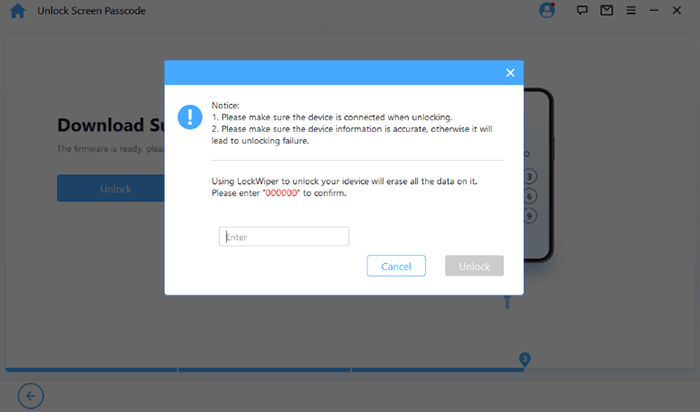
03After the firmware is downloaded, click "Unlock". Read the warning message carefully, enter "000000" to confirm, and click "Unlock" again to proceed.
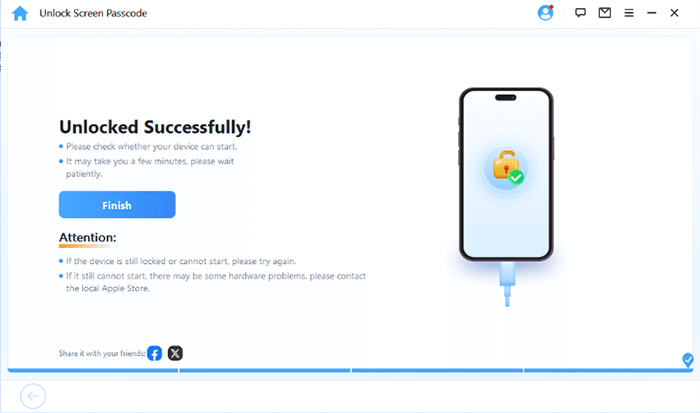
04Within a few minutes, the screen passcode will be removed. You can then set up a new passcode, Face ID, or Touch ID as needed.
This Mobitrix LockAway review shows that Mobitrix LockAway provides a reliable solution for unlocking iPhones and iPads, but it still has room for improvement in terms of reliability and trustworthiness. If you're looking for a safer and more dependable alternative, iPhone Unlocker stands out as a strong choice.
It is widely trusted by millions of users worldwide and is known for its high level of security and reliability. Additionally, it is easy to use, even for users without technical expertise, and poses minimal risk to your device's safety. You can download it now to try the free trial.
Related Articles:
Top 11 iCloud Bypass Tools: Remove Your iCloud Activation Lock
FoneGeek iPhone Passcode Unlocker Review and Alternatives
Apeaksoft iOS Unlocker Review: Features, Price, Pros, Cons & Best Alternative
ApowerUnlock Review: Is It Safe and Worth It for iPhone Unlocking?




 Free Download for PC
  Free Download for Mac


