In the course of daily use of an iPhone, many users may encounter some tricky issues, such as forgetting the lock screen password or being unable to sign out of their Apple ID. These situations often lead to the iPhone becoming unusable. To solve such problems, many iPhone unlocking tools have appeared on the market, with FoneGeek iPhone Passcode Unlocker being one of the more popular options. So, is this software really effective? Are its features reliable?
In this FoneGeek iPhone Passcode Unlocker review, we will thoroughly analyze its features, usage steps, pros and cons, and more. Let's take a look together!
FoneGeek iPhone Unlocker is an unlocking tool specifically designed for iOS devices, primarily aimed at helping users remove various restrictions on their iPhone or iPad within a legal and compliant framework. Whether it's forgetting the lock screen password or being unable to verify the Apple ID, the software claims to provide solutions for these issues.
It supports a wide range of iOS device models and is compatible with newer versions of iOS, making it suitable for everyday users to operate on their computers without the need for professional technical knowledge.
* Unlock various screen locks (4-digit/6-digit passcodes, Face ID, Touch ID) in just 3 simple steps.
* Quickly and easily remove Apple ID from iPhone/iPad without a password.
* Fix disabled iPhones, iPads, or iPod touches without the need for iTunes or iCloud.
* Bypass MDM lock screen and remove MDM profile.
* Unlock Screen Time passcode without the password.
* Fully compatible with iOS 18/26, iPhone 16/17/Air, and more.
After understanding the features, the price is often one of the main concerns for users. FoneGeek iPhone Password Unlocker follows a freemium model, allowing users to download the software for free, but unlocking requires payment. The pricing structure is as follows:
For Standard:
For Full Toolkit:
For Business: $49.99
As a trusted iPhone unlocking tool, FoneGeek iPhone Passcode Unlocker can meet your basic needs. However, it's not without its flaws, so it's a good idea to weigh its pros and cons before downloading.
Pros:
* Support unlocking various scenarios such as lock screen passwords, Apple ID, Screen Time, MDM, and more.
* Compatible with a wide range of iOS devices.
* The unlocking process is relatively efficient when conditions are met.
* The operation is straightforward, allowing even beginners to quickly get the hang of it.
Cons:
* The process will erase all data on your device.
* The free trial does not unlock any features.
User feedback plays an important role when evaluating any unlocking software. Below are some user reviews of FoneGeek iPhone Password Unlocker.
"Great software! My iPhone 12 was disabled because I forgot my screen passcode. FoneGeek iPhone Passcode Unlocker lets me restore the device without deleting my device data."
- by Harold
"I bought this product to unlock the passcode screen, and it didn't work. Please help."
- by mike
"It works perfectly to remove the screen passcode."
- by Helen
"Before using FoneGeek iPhone unlocker, I tried to unlock my iPhone 12 many times but failed. After purchasing FoneGeek software, it indeed unlocked the screen."
- by Willie
After understanding the software's capabilities and limitations, let's now take a closer look at how to use FoneGeek iPhone Passcode Unlocker to unlock your iPhone.
Here are the steps:
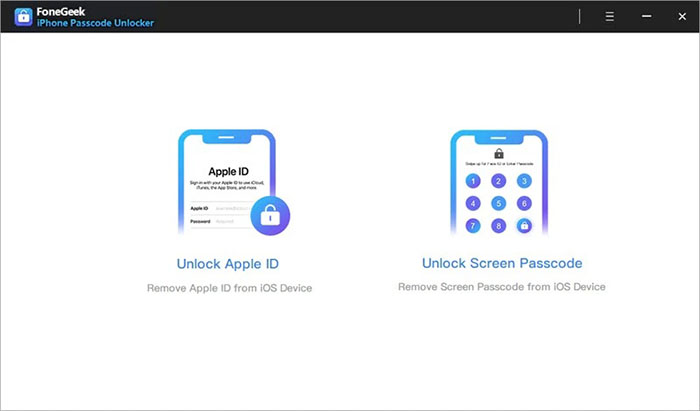
Step 1. Launch FoneGeek iPhone Passcode Unlocker on your computer and select the "Unlock Screen Passcode" option to begin. Next, click "Start" > "Next" and connect your locked iPhone or iPad to the computer using a USB cable.
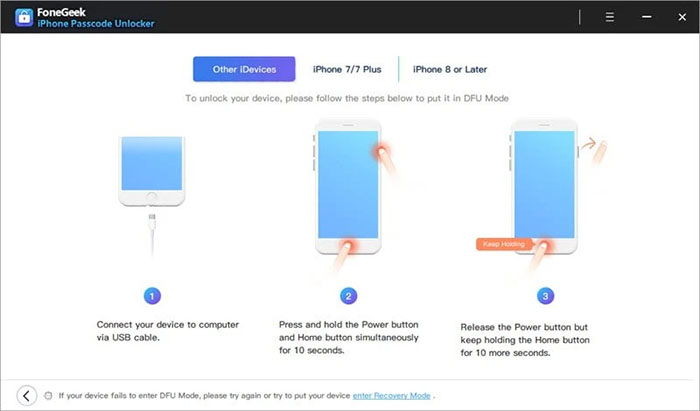
Step 2. To remove the lock screen, follow the on-screen instructions to put your device into DFU or Recovery mode.
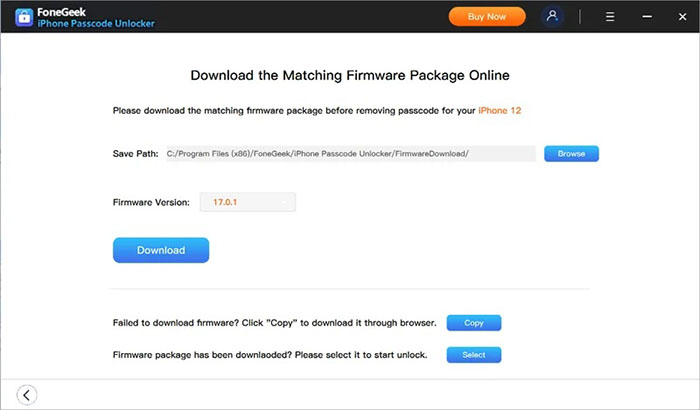
Step 3. Once your device is in Recovery or DFU mode, the program will display the device model and available system versions. Choose the version you prefer and click "Download" to begin downloading the firmware package.
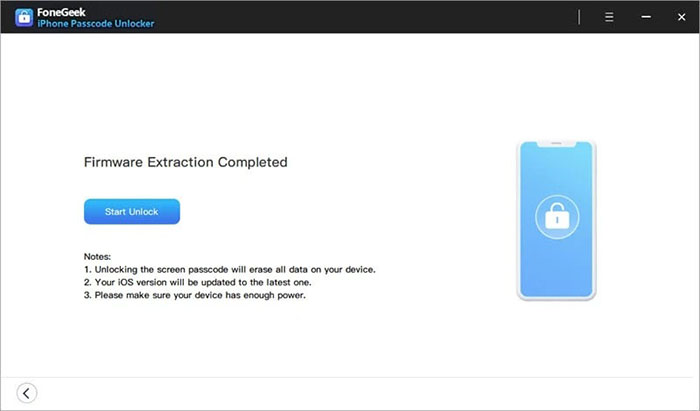
Step 4. After the firmware is successfully downloaded to your computer, click "Start Unlock" to begin removing the iPhone screen passcode.
Step 5. The passcode will be removed from your iPhone or iPad within a few minutes. Once done, you can set up your device as new or restore it from a previous iTunes or iCloud backup.
Although FoneGeek iPhone Password Unlocker is a powerful tool, its success rate is not 100%. If your device is not supported by the software, you may need to look for another unlocking solution. If you're looking for a more comprehensive tool with a wider range of supported scenarios and a higher success rate, then iPhone Unlocker is a great alternative.
Key features of iPhone Unlocker:
* Remove all types of screen locks, including 4-digit/6-digit passcodes, Face ID, and Touch ID.
* Erase Apple ID from your device in minutes; no password needed.
* Bypass MDM (Mobile Device Management) restrictions and remove MDM profiles without login credentials.
* Recover or reset Screen Time passcodes without any data loss.
* Fully compatible with all iPhone models and iOS versions, including the latest iPhone 17 series and iOS 18/26.
Here is how to unlock an iPhone without a passcode using iPhone Unlocker:
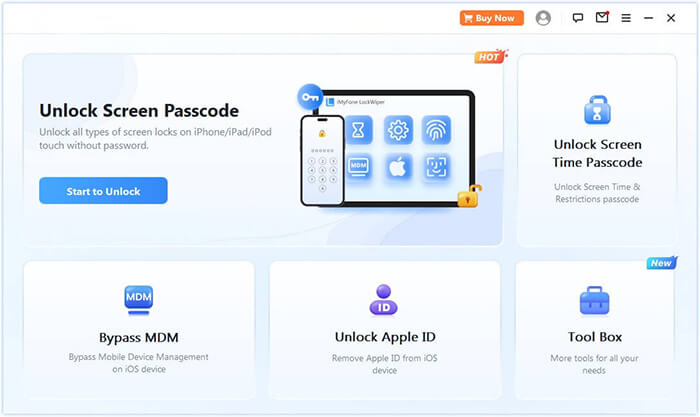
01Open iPhone Unlocker, select "Unlock Screen Passcode" mode, and click "Start to Unlock". Then, connect your iPhone to your computer via USB.
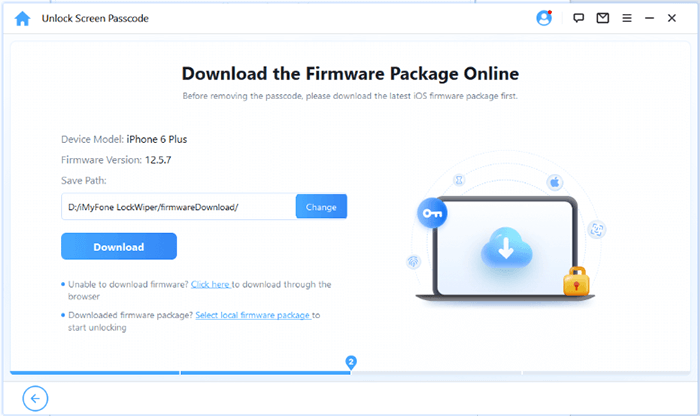
02Follow the on-screen instructions to put your device into Recovery Mode or DFU Mode. Once detected, choose a location to save the firmware package and click "Download".
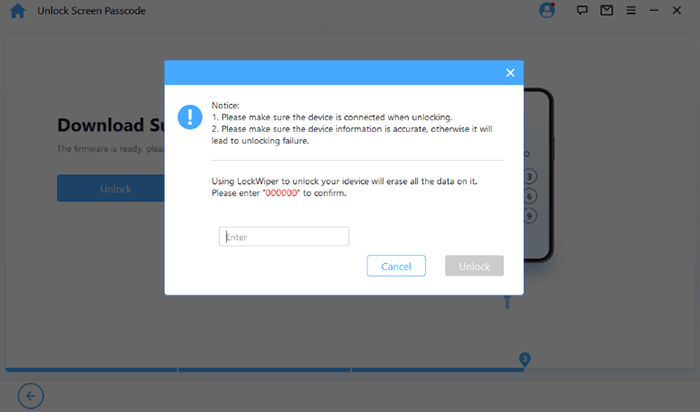
03Once the firmware is downloaded, click "Unlock". Carefully read the warning message, enter "000000" to confirm, and click "Unlock" again to proceed.
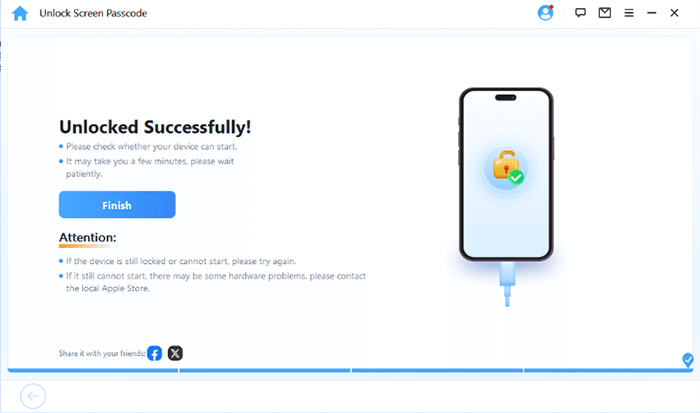
04In just a few minutes, your iPhone's screen passcode will be completely removed. You can now set up a new passcode, Face ID, or Touch ID as needed.
Q1. Is FoneGeek iPhone Passcode Unlocker safe and legit?
From the software itself, it is a legitimate third-party unlocking tool, not a virus or malicious program. However, since the unlocking process involves a system reset, there is a risk of data loss.
Q2. Is FoneGeek iPhone Passcode Unlocker free?
No. The software can be downloaded for free, but the actual unlocking feature requires payment. The free version is only for device detection.
Q3. Can FoneGeek unlock an iPhone without data loss?
No. Using FoneGeek to unlock the lock screen passcode will erase all data on the device, which is a common limitation of such tools.
This FoneGeek iPhone Password Unlocker review shows that the software can handle basic iPhone unlocking tasks, but in terms of feature richness, stability, and user reputation, it is not the best choice in the industry.
If you're looking for a higher success rate, more comprehensive unlocking features, and a more mature user experience, then iPhone Unlocker is undoubtedly a more recommended iPhone unlocking solution.
Related Articles:
How to Bypass iPhone Passcode Without Losing Data [Full Guide]
How to Unlock a Disabled iPhone with Android Phone Step-by-Step
Forgot iPhone Password: 4 Easy Ways to Unlock It without Losing Data
How to Unlock iPhone Without Passcode Using Camera [2025 Updated]




 Free Download for PC
  Free Download for Mac


