TL;DR:
Apeaksoft Broken Android Data Extraction is a Windows tool designed to recover data from Android devices affected by issues like black screens, crashes, or forgotten passwords. It mainly supports Samsung devices and combines system repair with data extraction. This article reviews its features, pricing, pros and cons, usage steps, user feedback, and a practical alternative.
A broken Android phone doesn't always mean your data is lost forever. Whether your device is stuck on a black screen, frozen, damaged, or locked due to a forgotten password, specialized recovery software may help you access important files stored on the device.
One of the tools designed for this purpose is Apeaksoft Broken Android Data Extraction. It claims to repair certain Android system issues and extract data from damaged Samsung devices without causing additional data loss.
But does it really work? In this Apeaksoft Broken Android Data Extraction review, we'll examine its features, pricing, advantages, limitations, user feedback, and a powerful alternative to help you decide whether it's worth using.

Apeaksoft Broken Android Data Extraction is a Windows-based utility that focuses on recovering data from Android devices experiencing system issues such as black screens, system crashes, frozen screens, or forgotten passwords. The software is integrated into Apeaksoft Android Toolkit and primarily supports Samsung devices.
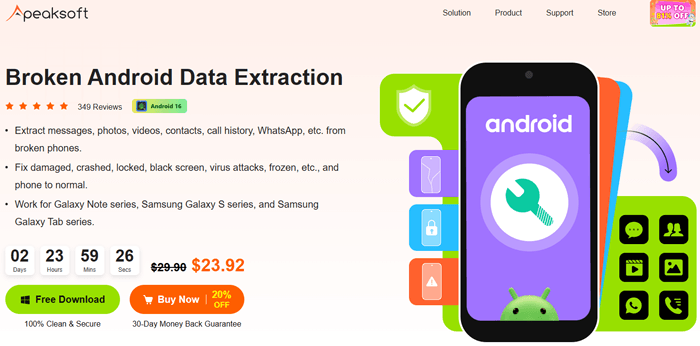
The software offers several recovery and repair functions for damaged Android phones:
At the time of writing, Apeaksoft Broken Android Data Extraction offers several licensing options to meet different user needs:
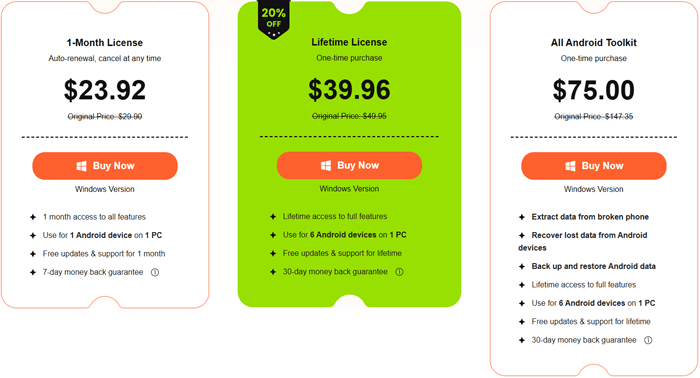
After sorting out core functions and pricing, we summarize the objective advantages and disadvantages of Apeaksoft Broken Android Data Extraction for your reference:
| Pros | Cons |
| Simple and beginner-friendly interface. | Broken Android recovery feature is largely limited to Samsung devices. |
| Supports recovery from multiple Android system issues. | Windows-only software. |
| Can repair some Android system errors before recovery. | Recovery success depends heavily on the severity of device damage. |
| Allows previewing data before extraction. | Limited functionality in the trial version. |
| Supports recovery of various file types. | Not suitable for severe hardware-level failures. |
The operation process of Apeaksoft Broken Android Data Extraction is highly modular and standardized. Below is the detailed step-by-step tutorial for extracting data from broken Android devices:
Step 1. Launch the software and select Broken Android Data Extraction.
Install and open Apeaksoft Android Toolkit on your Windows computer. From the main interface, choose the "Broken Android Data Extraction" module.
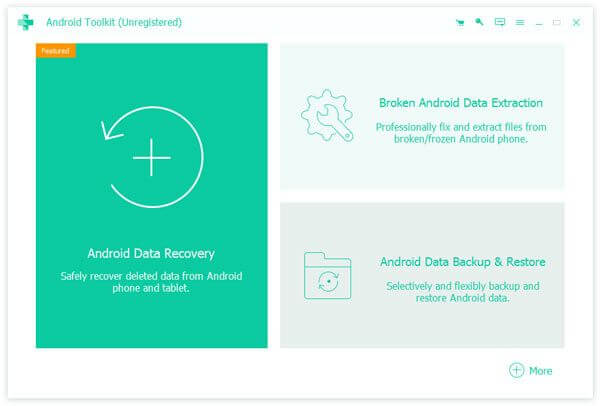
Step 2. Choose the problem affecting your device.
Connect your Android phone to the computer via a USB cable. Click the "Start" button under the Broken Android Data Extraction section and select the issue that matches your situation, such as a black screen, unresponsive screen, broken device, system crash, or forgotten password.
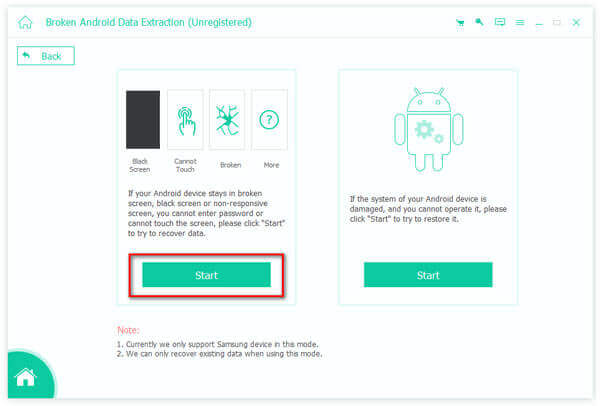
Step 3. Select your device information.
Choose your device name and model from the provided list, then click "Confirm". At present, this feature mainly supports Samsung Galaxy S series and Samsung Galaxy Note devices, so make sure you select the correct model to avoid recovery errors.
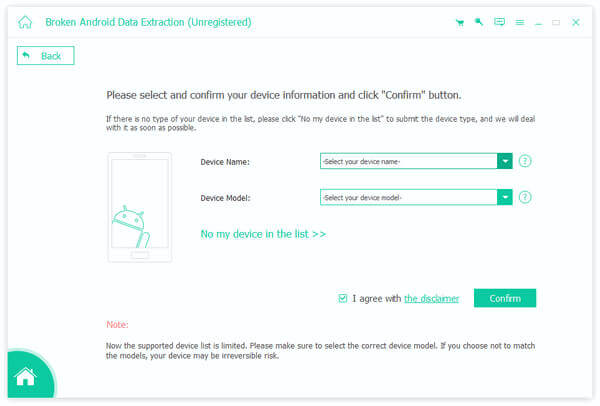
Step 4. Put your phone into Download Mode.
Follow the on-screen instructions to enter Download Mode. Typically, this involves turning off the device and pressing a specific combination of hardware buttons. Once your device enters Download Mode, click the "Start" button to allow the software to analyze and repair the system.
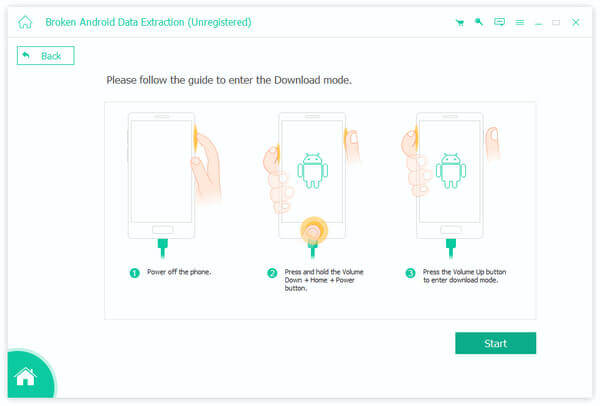
Step 5. Scan, preview, and recover your data.
After the repair process is complete, the software will scan the phone and display all recoverable data. You can preview contacts, messages, call logs, WhatsApp chats, photos, videos, and other files before selecting the items you want to recover and saving them to your computer.
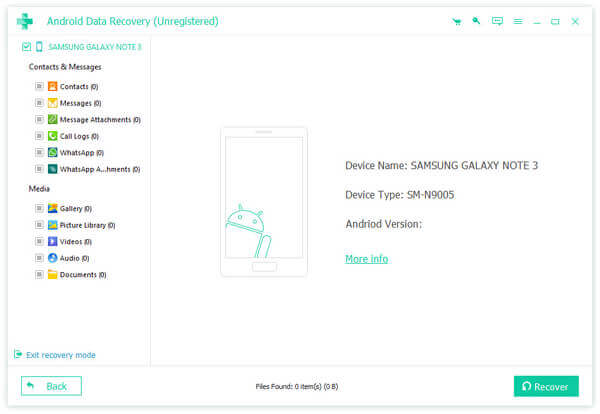
Customer reviews on the official website are generally positive. Some users reported successfully recovering photos and personal data from damaged Samsung devices and fixing phones stuck on startup screens.
Positive comments commonly mention:
However, user expectations should remain realistic. Modern Android devices use advanced encryption technologies that can significantly limit recovery possibilities, especially when data has already been deleted or the device has been factory reset. Many data recovery experts and community members note that no software can guarantee successful recovery in every scenario.
Based on available reviews and technical limitations, Apeaksoft Broken Android Data Extraction appears most useful when:

If Apeaksoft Broken Android Data Extraction does not fully meet your needs, there is another similar Android data recovery solution worth considering - Broken Android Data Recovery. It offers comparable functions for extracting data from broken, frozen, or unresponsive Android devices and is designed to help users retrieve important files when their phones become inaccessible due to system errors or password issues.
Like Apeaksoft, the Broken Android Data Recovery feature mainly focuses on Samsung devices when dealing with severely damaged systems. It allows users to repair certain system problems and recover essential data without requiring the phone to boot normally.
Key features of Broken Android Data Recovery:
How to recover data using Broken Android Data Recovery?
01Download and install the software on your computer, then launch it and choose the "Broken Android Data Recovery" feature from the main interface.
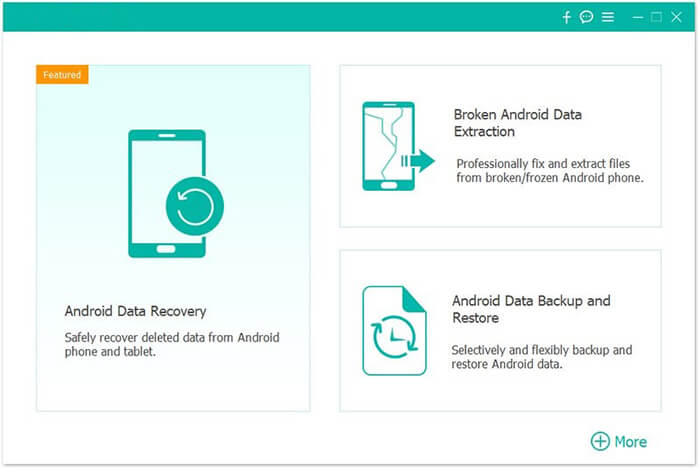
02Connect your Android phone to the computer using a USB cable, then click the "Start" button to proceed.
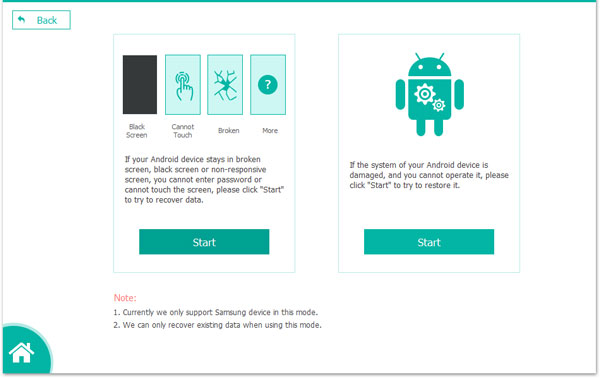
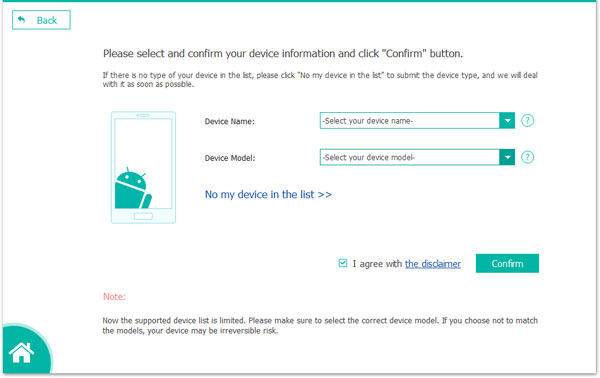
03Select the appropriate repair option according to your device issue, such as a black screen, system crash, or unresponsive screen. After that, choose your device model and confirm your selection. If you are not sure about the model, you can use the built-in help icon for guidance.
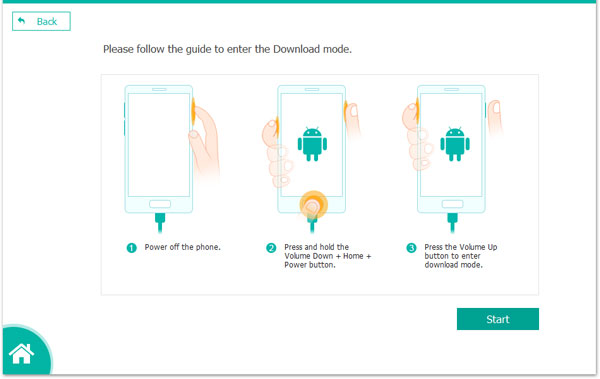
04Follow the instructions displayed on the screen to enter Download Mode. Once your device is in the correct mode, click "Start" again to begin the repair process. Please wait patiently while the program fixes the system and scans your data automatically.
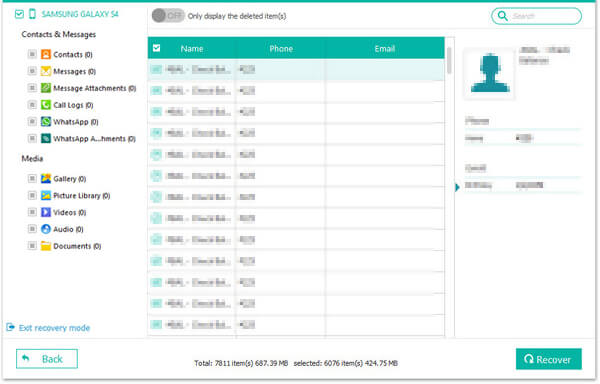
05When the scan is complete, preview the recoverable files, select the items you need, and click "Recover" to save them from your phone to your computer.
Apeaksoft Broken Android Data Extraction is a useful tool for recovering data from Android devices affected by system issues such as black screens, crashes, frozen screens, or forgotten passwords. It combines basic system repair and data extraction features, making it relatively easy to use even for beginners. However, its main limitation is that the broken device recovery function is largely optimized for Samsung devices, which restricts its usefulness for users with other Android brands.
Overall, this tool is suitable for Samsung users dealing with software-related problems and looking for a simple recovery solution. For those who need broader device compatibility or more flexible recovery options, an alternative like Broken Android Data Recovery may be a better choice.
Related Articles:
Apeaksoft Data Recovery Review: Features, Pricing, Pros, Cons & Alternative
Apeaksoft Android Data Backup & Restore Review: Everything You Should Know
Apeaksoft iOS Data Backup & Restore Review: A Comprehensive Guide
Apeaksoft iOS Unlocker Review: Features, Price, Pros, Cons & Best Alternative







 Free Download for PC

 Download for Mac

