Viber is a popular instant messaging app that allows users to send text messages, voice messages, pictures, and videos. However, many people get frustrated when they accidentally delete important Viber messages. So, can I recover deleted Viber messages on my iPhone? How to recover deleted Viber messages on iPhone? In this article, we will introduce several methods for Viber chat history recovery, whether or not you have a backup.
If you have previously made a backup, recovering Viber messages will be relatively easy. Below are three common backup recovery methods, and you can choose the one that best suits your situation.
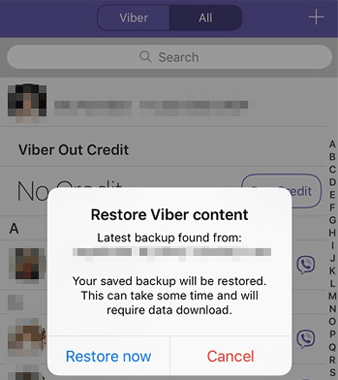
If you've enabled Viber's cloud backup before deleting your messages, recovering them on your iPhone will be straightforward. Simply reinstall Viber and log in to your account. The system will automatically detect the backup and prompt you to restore it.
Here is how to recover Viber messages after reinstall:
Step 1. Uninstall Viber and reinstall it.
Step 2. Sign in using the same phone number. The app will detect the available backup and display a prompt.
Step 3. Click the "Restore now" button in the prompt to begin the recovery process.
If you didn't use Viber's built-in backup but enabled iCloud backup, you can still recover your Viber messages by restoring your entire iPhone. However, keep in mind that this method will erase your current data and replace it with the backup version.
Here is how to restore deleted Viber messages on iPhone from iCloud backup:
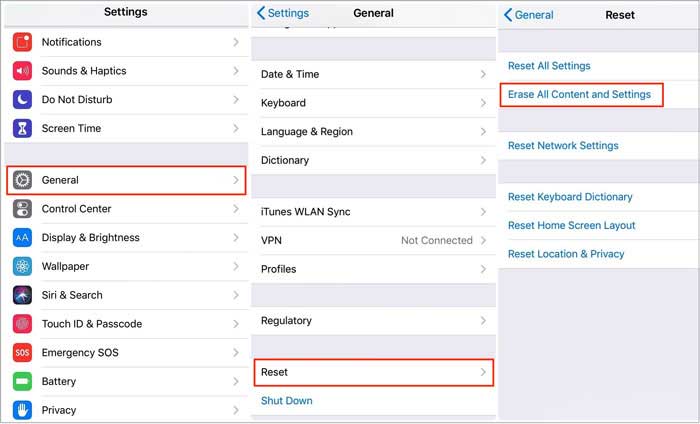
Step 1. Open the "Settings" on your iPhone.
Step 2. Go to "General" > "Transfer or Reset iPhone" and select "Erase All Content and Settings". (iPhone won't erase?)
Step 3. After the device restarts, go to the initial setup screen and choose "Restore from iCloud Backup".
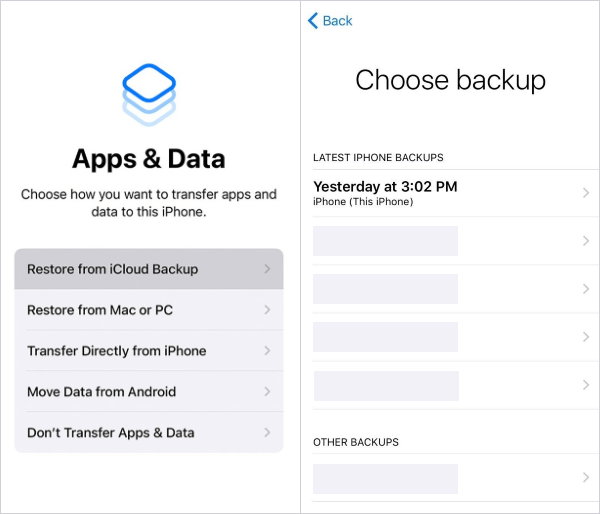
Step 4. Log in with your Apple ID, select a backup that contains your Viber chat history, and wait for the restoration to complete.
Another reliable way to recover deleted Viber messages on iPhone is to use an iTunes (or Finder) backup stored on your computer. This is ideal if you regularly back up your iPhone locally. Like iCloud, this method restores the entire backup, which may not be suitable if you only want specific data.
Here is how to retrieve deleted Viber chat history on iPhone from iTunes backup:
Step 1. Connect your iPhone to a computer using a USB cable.
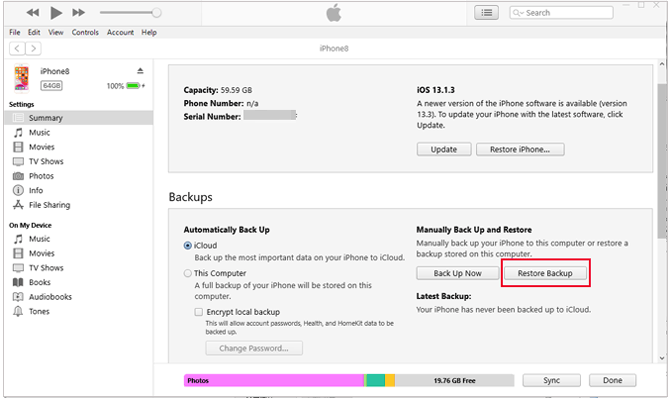
Step 2. Open iTunes or Finder if you're using macOS Catalina or later and select your device.
Step 3. Click "Restore Backup" and choose a backup that includes your Viber messages.
Step 4. Click "Restore" and wait for the process to finish. Then, open Viber to check your recovered chats.
If you don't have any backups, many users may think the data is unrecoverable, but that's not the case. Deleted data is usually still stored on the device for a short period, only marked as "overwritable". With professional iPhone data recovery tools, a deep scan of the device can help recover this data.
We recommend using iPhone Viber Recovery, which supports direct recovery of deleted data from the iPhone. It also allows you to preview and select the content to recover, making it ideal for users without a backup.
Top features of iPhone Viber Recovery:
* 3 recovery modes available: Recover from iOS Devices, Recover from iTunes Backup, Recover from iCloud Backup.
* Multiple data types supported: Viber/WhatsApp/Kik/Line/Messenger messages and attachments, photos, notes, contacts, call history, and many more.
* Extract iTunes backup: Browse all your previous iTunes backup on PC, and selectively extract the required files.
* Restore iCloud backup: View iCloud backup records without wiping your iPhone, directly retrieve the wanted data.
* Wide compatibility: iPhone 17/16/15/14/13/12 Pro Max/12 Pro/12/12 mini/11 Pro Max/11 Pro/11/XS/XS Max/XR/X/8 Plus/8/7 Plus/7/SE/6s Plus/6s/6 Plus/6/5s/5c/5/4S/4.
Here is how to recover deleted Viber messages on iPhone without backup:
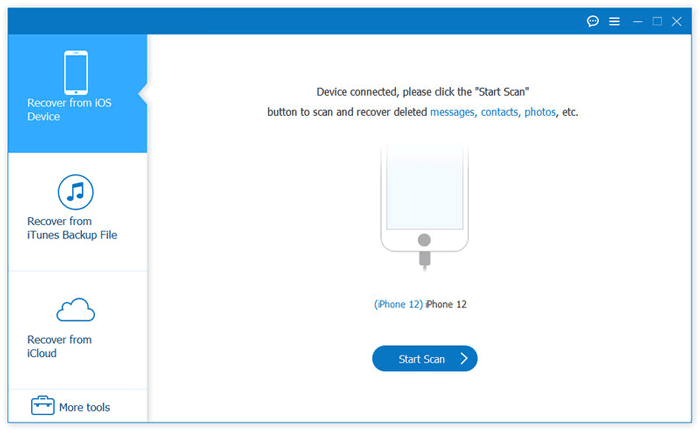
01Download and open the iPhone Viber Recovery tool on your computer, then select the "Recover from iOS Device" mode.
02Connect your iPhone to a computer using a USB cable. After the tool detects your iPhone, click "Start Scan".
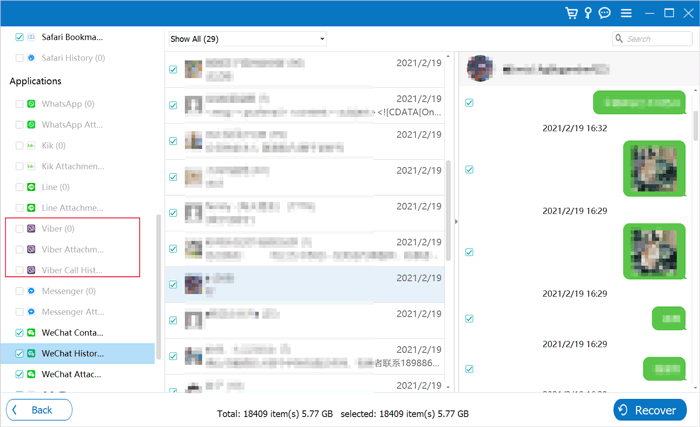
03After scanning, select "Viber", "Viber Attachments", or "Viber Call History" from the left menu; you can then view the deleted Viber data on your iPhone from your PC. Select the conversations or specific chat history you want, and click the "Recover" button to get them back.
After reading this article, hopefully, you can recover Viber chat history on iPhone without trouble. As you can see, the iPhone Viber Recovery tool we mentioned in this article offers a one-stop solution to solve your problem. It helps you perform the Viber data recovery without a backup. Even if you have a Viber backup, we still suggest that you go with this iPhone Viber Recovery tool. It allows you to preview files before recovery and ensures no data loss during the process.
Related Articles:
How to Back up and Restore Viber Messages on iPhone: Full Guide 2026
How to Recover LINE Messages from iPhone with/without Backup?
Android Viber Recovery: Back Up & Restore Viber Messages Easily
How to Recover Deleted WhatsApp Contacts on iPhone with/without Backup?






 Free Download for PC
  Free Download for Mac


