TL;DR:
Aiseesoft WhatsSync is a simple Windows-based WhatsApp transfer tool that helps users move chats, media, and attachments between Android and iPhone while also supporting backup and restore. It works well for basic WhatsApp migration, but its Windows-only limitation and restricted free version may be a drawback for some users.
If you're looking for a more flexible solution with broader device and platform support, WhatsApp Transfer is a stronger alternative worth considering.
WhatsApp has become one of the most important communication tools for both personal and business use. When switching to a new phone, transferring chats, photos, videos, and documents without losing data can be challenging. This is where WhatsApp management tools come in handy.
Aiseesoft WhatsSync is such a tool. But does it really deliver what it promises? In this Aiseesoft WhatsSync review, we'll take a closer look at its features, pricing, advantages, disadvantages, user feedback, how to use it step by step, and the best alternative for it. Let's check it together.
Aiseesoft WhatsSync is a desktop-based WhatsApp transfer and backup program that enables users to migrate WhatsApp data across different devices and operating systems. Whether you are upgrading to a new phone or creating a secure backup of your conversations, the software aims to simplify the entire process.
* Transfer WhatsApp Between Different Devices
One of the biggest strengths of WhatsSync is its ability to transfer WhatsApp data across multiple platforms. It supports:
This flexibility makes it useful for users switching between different mobile ecosystems.
* Transfer Various Types of WhatsApp Data
WhatsSync is capable of transferring almost all WhatsApp content, including:
The software aims to preserve your WhatsApp data intact during the migration process so that important conversations and media files remain accessible on the target device.
* Back Up and Restore WhatsApp Data
Besides transfer functionality, WhatsSync also allows users to back up WhatsApp data to a computer and restore backups whenever necessary.
In addition, the software supports backing up WhatsApp data to Google Drive and restoring it to a new device, making device migration more convenient.
* Broad Device Compatibility
Aiseesoft WhatsSync supports the latest mobile operating systems, including iOS 26 and Android 16.
It is compatible with a wide range of iPhone, iPad, Samsung, Google Pixel, Motorola, Xiaomi, OPPO, vivo, and other Android devices.
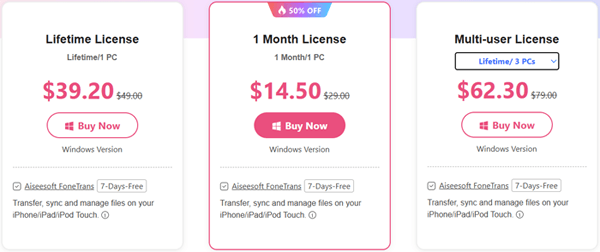
Aiseesoft WhatsSync provides a free trial that allows users to explore the software before purchasing. However, certain functions, such as full WhatsApp transfer and restore capabilities, are restricted until the software is activated.
For individual users, a 1-Month License is available for $14.50, while a Lifetime License costs $39.20 and includes permanent access to the software.
For families, teams, or users managing multiple devices, Aiseesoft also offers a Multi-User License starting at $62.30, which supports up to three devices with lifetime access.
Like most WhatsApp transfer solutions, Aiseesoft WhatsSync comes with several strengths as well as a few limitations that are worth considering before making a purchase.
Pros
Cons
To better understand how Aiseesoft WhatsSync performs in real-world situations, it's helpful to look at what actual users have shared about their experiences.
"I love this program. All my chats, files, funny videos, and stickers stay perfectly well when transferring to my new device."
"I saved lots of space with WhatsSync. My phone used to be very cluttered, and I don't want to delete those WhatsApp messages. WhatsSync saved me, and now I can easily restore my WhatsApp backup from Google Drive to my iPhone."
"The transfer speed was good, and most of my media files were moved correctly. My only complaint is that there isn't a Mac version available."
Aiseesoft WhatsSync allows you to transfer WhatsApp data, create backups, and restore backups to your devices. Here, we'll use the WhatsApp transfer feature as an example.
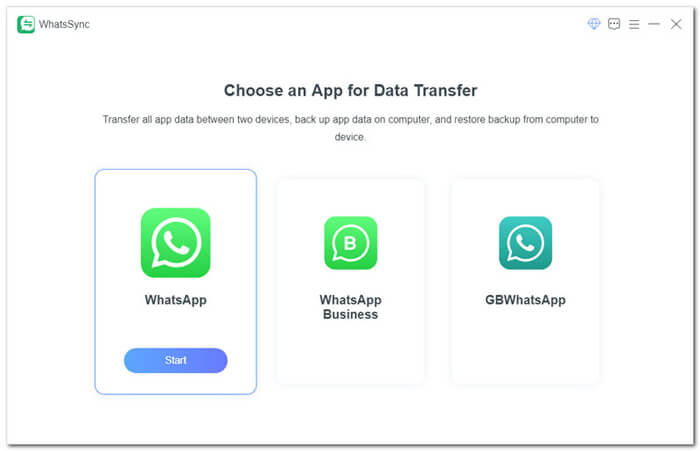
Step 1. Download and install Aiseesoft WhatsSync on your Windows computer. Launch the program, select "WhatsApp", and click "Start".
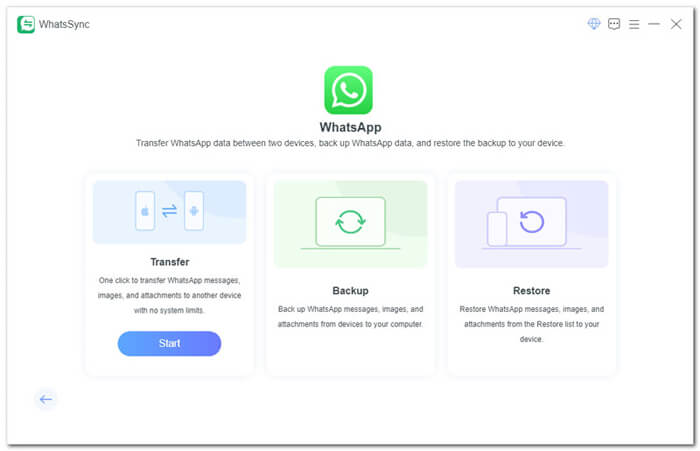
Step 2. Choose the function you want to perform. The software provides three options: Transfer, Backup, and Restore.
Step 3. Connect your devices to the computer. For iPhone, tap "Trust This Computer" when prompted. For Android devices, enable USB Debugging. Some Android devices also support wireless connections.
Step 4. Once both devices are recognized, click the drop-down arrow beside the device name and set the source device and destination device correctly.
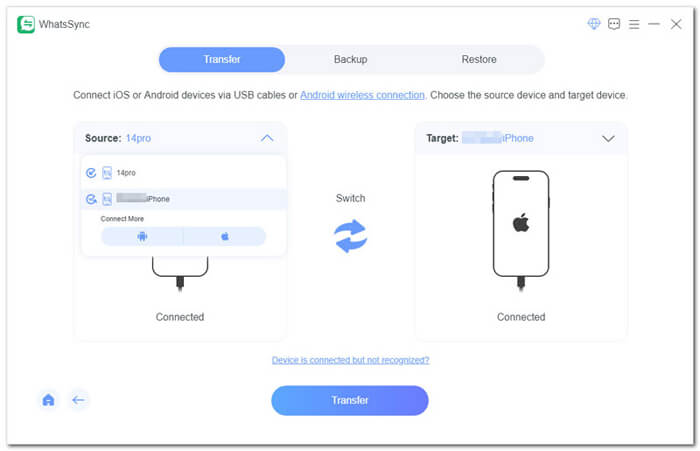
Step 5. Click the "Transfer" button and follow the on-screen instructions. The software will begin transferring WhatsApp data from the source device to the target device.
After the process is completed, your WhatsApp chats and attachments should be available on the destination device.
While Aiseesoft WhatsSync offers useful WhatsApp migration and backup features, some users may need additional functionality, such as Mac compatibility, more flexible backup management, or support for multiple messaging platforms. In such cases, WhatsApp Transfer is a strong alternative worth considering.
WhatsApp Transfer is a comprehensive WhatsApp management solution designed for both Android and iPhone users. Beyond standard WhatsApp transfer capabilities, it also provides advanced backup, restore, and other data management tools, making it suitable for users who frequently change devices or want greater control over their WhatsApp data.
Key features of WhatsApp Transfer:
How to transfer WhatsApp with WhatsApp Transfer?
01Download and launch WhatsApp Transfer on your computer. Connect both the old phone and the new phone using USB cables. If you're using an Android device, enable USB debugging when prompted. For iPhone users, tap "Trust" on the device screen to establish the connection.
02Navigate to the "Transfer" module after both devices are detected. Verify that the device containing your current WhatsApp data is set as the source device and that the receiving phone is listed as the destination. If necessary, click "Flip" to switch their positions.
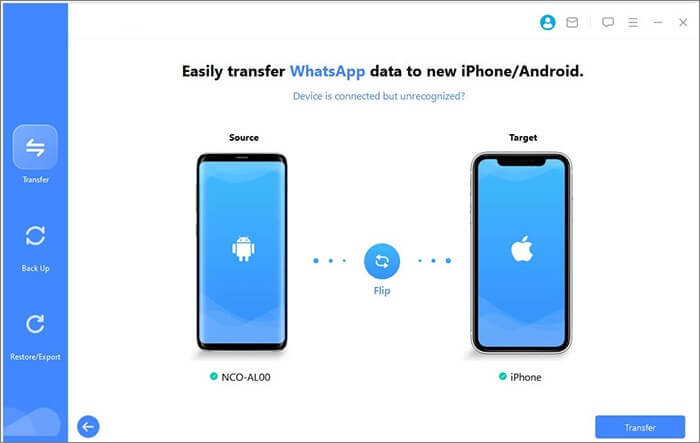
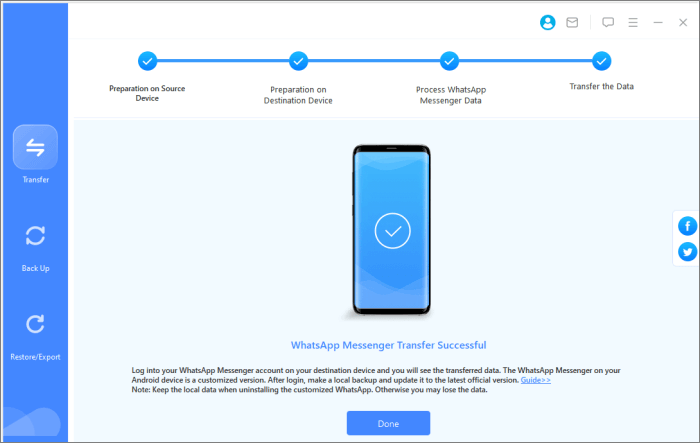
03Once everything is configured correctly, click "Transfer" to start moving your WhatsApp conversations and attachments. Keep both devices connected throughout the process until the transfer is completed successfully.
Aiseesoft WhatsSync is a reliable WhatsApp transfer tool that helps users move chats, photos, videos, documents, and other WhatsApp data between Android and iPhone devices. In addition to transfer capabilities, it also offers backup and restore features, making it a convenient option for users who are upgrading to a new phone or want to keep their WhatsApp data safe. Its simple interface and support for the latest mobile operating systems make it accessible to both beginners and experienced users.
However, if you need more advanced features, such as Mac support, selective data export, or compatibility with additional messaging apps, WhatsApp Transfer may be a better alternative. By comparing the features and limitations of both tools, you can choose the solution that best fits your WhatsApp transfer and backup needs.
Related Articles:
Aiseesoft FoneEraser Review: Is It the Best iPhone Data Eraser?
Alternative to Aiseesoft Fonelab Android Data Recovery [Top 6]
How to Transfer WhatsApp to New Phone with Same Number [4 Methods]
WhatsApp Transfer Software: A Comprehensive Guide to Top Tools






 Free Download for PC
  Free Download for Mac


