If you've ever been locked out of your iPhone due to a forgotten password, a disabled Apple ID, or a stuck screen, you know how frustrating it can be. Many users turn to third-party iPhone unlock tools to regain access to their devices. Among them, Passixer iPhone Unlocker has been gaining attention for its simple interface and multiple unlocking features.
In this comprehensive Passixer iPhone Unlocker review, we'll explore everything you need to know about this software — what it is, how much it costs, its main pros and cons, how it works, and the best alternative. By the end, you'll have a clear idea of whether Passixer iPhone Unlocker is the right choice for you.
Passixer iPhone Unlocker is a software specifically designed for iPhone users, aimed at helping them easily remove various types of iOS lock screen passwords. It supports unlocking 4-digit or 6-digit passcodes, Touch ID, Face ID, and Apple ID locks, and also helps users bypass Screen Time restrictions. Here are its key features:
* Unlock any iOS screen lock, regardless of type.
* Remove an Apple ID without needing the password.
* Bypass or remove MDM restrictions without credentials.
* Bypass iCloud Activation Lock without the associated Apple ID or password.
* Recover access by removing the Screen Time passcode without losing data.
* Remove the SIM lock from an iPhone to use it with major carriers.
* Remove iTunes backup encryption when you don't have the password.
* Support the latest iOS 26.
When it comes to pricing, Passixer iPhone Unlocker is not a free program. It offers several paid plans depending on the duration and the number of devices you need to unlock. According to its official website, here's the general pricing structure:

The Windows version and Mac version are priced the same.
Like any software, Passixer iPhone Unlocker has both advantages and drawbacks. Understanding these will help you decide whether it's the right fit for your needs.
Pros:
* Support various unlocking scenarios, including screen passwords, Apple ID, Screen Time restrictions, etc.
* Simple interface with clear, easy-to-follow steps.
* Compatible with the latest iOS 26 version.
* Available for both Windows and macOS systems.
* Fast unlocking speed, usually completed in just a few minutes.
Cons:
* The free version has limited features and cannot fully complete the unlocking process.
* Data loss may occur during the unlocking process.
* Customer support response time can be slow.
* Success rate varies depending on the device model and iOS version.
The unlocking process with Passixer iPhone Unlocker is straightforward, even for beginners. Below is a detailed step-by-step guide on how it works:
Step 1. Launch Passixer and enter "Wipe Passcode" mode. Then, connect your iPhone or iPad to your computer using a certified USB cable.

Step 2. Verify your device information to ensure it's correct, then click the "Start" button to begin downloading the necessary firmware to unlock your device. After the firmware is downloaded, click "Next".

Step 3. Confirm the unlocking operation by entering "0000" in the field and clicking the "Unlock" button.

Step 4. Passixer will start unlocking your forgotten iPhone/iPad passcode immediately. Keep your device connected throughout the process.

Step 5. Once the unlocking is complete, you will receive a "Wipe passcode successfully" prompt. You can now access your iPhone or iPad without the passcode and set it up as new.

While Passixer iPhone Unlocker is a functional tool, it's not the only option on the market. If you're looking for a more powerful, stable, and higher-success-rate alternative, iPhone Unlocker is worth considering.
iPhone Unlocker is a professional iOS unlocking software that can remove screen locks, Apple IDs, MDM restrictions, and Screen Time passwords with a higher success rate and better compatibility. It's widely trusted by users and tech reviewers for its efficiency and reliability.
Key features of iPhone Unlocker:
How to unlock your iPhone without a passcode using iPhone Unlocker:
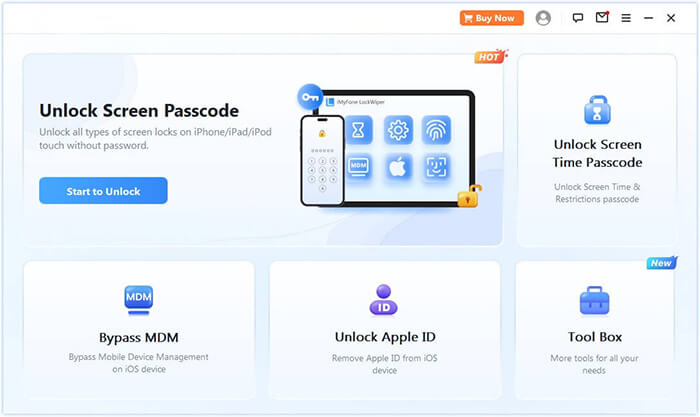
01Download and launch iPhone Unlocker on your computer. Select the "Unlock Screen Passcode" mode, then click "Start to Unlock". Connect your iPhone to your computer via USB.
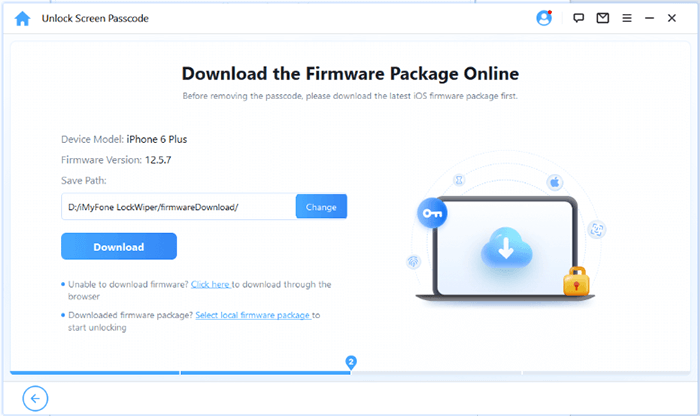
02Follow the on-screen instructions to put your iPhone or iPad into Recovery Mode or DFU Mode. Once your device is detected, choose a location to save the firmware package and click "Download".
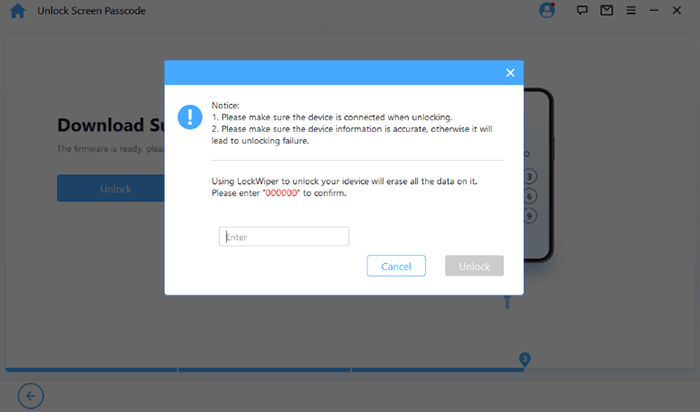
03After the firmware has finished downloading, click "Unlock". Read the warning message carefully, type "000000" to confirm, and click "Unlock" again to proceed.
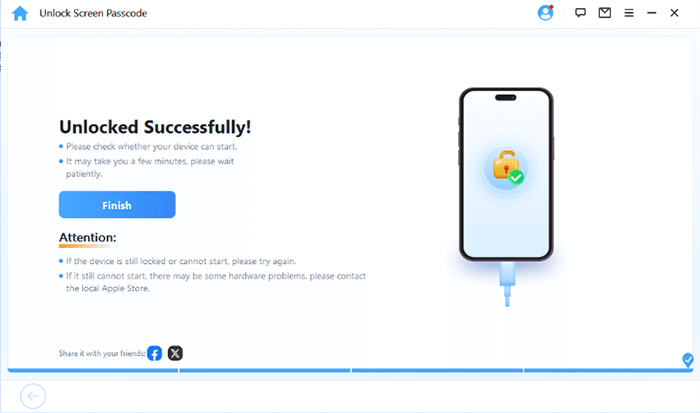
04Within minutes, your iPhone's screen passcode will be completely removed. You can now set up a new passcode, Face ID, or Touch ID as needed.
Q1. Is Passixer iPhone Unlocker safe to use?
Yes, it is safe as long as you download it from the official website. It doesn't contain malware or viruses.
Q2. Is Passixer iPhone Unlocker free?
No. The free version only offers device detection. You must purchase a license to unlock your iPhone.
Q3. Will Passixer erase my data?
Yes, unlocking will erase all data on your iPhone, which is part of Apple's security design.
That's all about this Passixer iPhone Unlocker review. It does an excellent iPhone unlocking tool to help users to unlock their iPhone without a passcode. If Passixer iPhone Unlocker is not working at some time, or if you think it is too expensive, you can use the iPhone Unlocker we mentioned in Part 5 as an alternative. It is also a wonderful iPhone unlocking tool. Download it now to unlock your iPhone without a password effortlessly.
If you have any questions, please leave comments below, and we will help you to solve them.
Related Articles:
How to Unlock iPhone Without Passcode Using Camera [2025 Updated]
How to Unlock iPhone Online: 4 Simple and Fast Solutions
How to Unlock a Disabled iPhone Without iTunes in 4 Easy Ways?




 Free Download for PC
  Free Download for Mac


