TL;DR: This ScreenRec review finds that ScreenRec is a lightweight and beginner-friendly screen recorder with free HD recording, instant cloud sharing, screenshot tools, and no watermark output. It works well for tutorials, meetings, presentations, and quick recordings, but lacks advanced video editing features and may have limitations in long-term or professional use. If you prefer fully private local recording with no uploads, unlimited recording time, HD MP4 output, and built-in screenshot annotation tools, Coolmuster Screen Recorder is a strong alternative worth considering.
When searching for a simple, free screen recording tool, many people come across ScreenRec. It emphasizes being lightweight, watermark-free, and easy to share, making it especially suitable for recording tutorials, meetings, game clips, and work presentations.
But how good is ScreenRec really? What are its pros and cons, and who is it best suited for? This ScreenRec Review provides a comprehensive evaluation from multiple angles, including features, advantages, drawbacks, and user experience, to help you decide whether it's worth using.
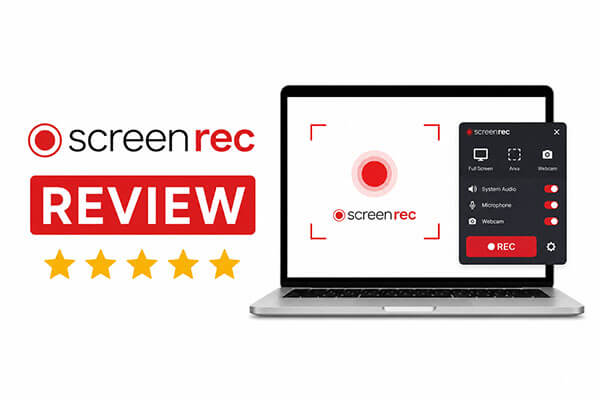
ScreenRec is a screen recording software that focuses on fast recording and instant sharing, compatible with Windows, macOS, and Linux. Its standout features are its lightweight design and built-in cloud storage, allowing users to generate a shareable link immediately after recording, without the need to manually upload videos.
In addition to video recording, ScreenRec also supports screenshots, microphone recording, and system audio capture. As a result, many users utilize it for:
For beginners, ScreenRec offers a very simple interface with a low learning curve, allowing users to start recording without any complicated setup.
The main reason many users try ScreenRec is that it offers simple yet practical screen recording features. Let's take a closer look at its core highlights.
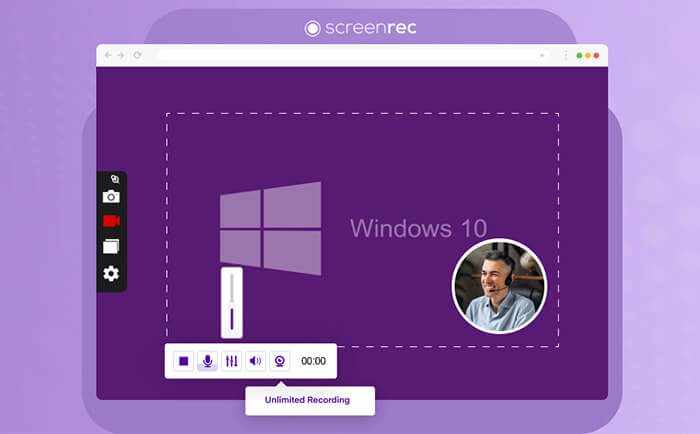
A complete ScreenRec review must include both strengths and weaknesses so users can make informed decisions.
Pros of ScreenRec:
* Core features are completely free with no watermark, including recording, screenshots, cloud storage, and sharing.
* Clean and simple interface, one-click recording, supports hotkeys, beginners can get started in 10 seconds.
* Cloud files use AES encryption with independent user permissions, ensuring privacy and security.
* Installation and operation are clean, no ads, plugins, or bundled software, stable performance.
* Built-in video analytics and file organization tools make it easy to manage and track shared content.
Cons of ScreenRec:
* No video editing features, only recording and basic screenshot annotation, requires third-party software for further editing.
* Unregistered users can only record up to 5 minutes, cannot enjoy unlimited recording or full cloud storage.
* Free version supports only 720P, premium version is relatively expensive, lower long-term cost-effectiveness.
* Cloud upload may fail or be delayed under poor network conditions.
* Limited output formats, not suitable for multi-platform format conversion needs.
To make this ScreenRec review more authentic and credible, we have collected and sorted out genuine user reviews from official platforms, software evaluation websites, and user communities, covering the real experience of different groups such as ordinary users, teachers, and office workers.
"Easy to use and quality of videos/songs. But since account création, I've lost the 3-second timer that was there before starting recording."
- by JCK from Trustpilot
"I just wanted to make some YouTube playthroughs, and I searched for an adequate screen recorder, and I found this, tried the free trial, I loved it, so simple to use, and great quality, now I have a pro subscription."
- by Mr.DahliaKing from Trustpilot
"It's really practical, and it's amazing how it stores over an hour of video for free! Also, I like how you can select what part of the screen you record, and also the selections to turn your mic, camera, and system sound on or off. Finally, a pop-up of a virus prevented me from screenshotting it (Windows+Shift+S), but ScreenRec's Screenshot function came in handy and allowed me to take a picture! Amazing app that you should install."
- by Isaiah Garcia from Trustpilot
"I don't trust this; it put me on the Google login page, but my saved account was not there, and it wanted stuff that can hack my account, and it doesn't like you to use Authenticator."
- by Bertil Hou asbjørn from Trustpilot
"Good app - better features if you become a member. I did have an issue with the pause function. Not sure if it was resolved, because it hasn't happened again to date."
- by Robert Lachapelle from Trustpilot
"It was easy to record and make videos, and also the availability of the videos I recorded and the quality of the videos as well, for my assignments as a student."
- by Nigel Batie from Trustpilot
If you are not completely satisfied with ScreenRec, Coolmuster Screen Recorder is an excellent alternative. Unlike ScreenRec, which focuses on quick cloud sharing, Coolmuster Screen Recorder is designed for high-quality local recording, privacy protection, and professional output control.
Key features of Coolmuster Screen Recorder:
Here is how to record a screen on Windows using Coolmuster Screen Recorder:
01Open Coolmuster Screen Recorder and choose your recording area—either "Full Screen" or "Custom".
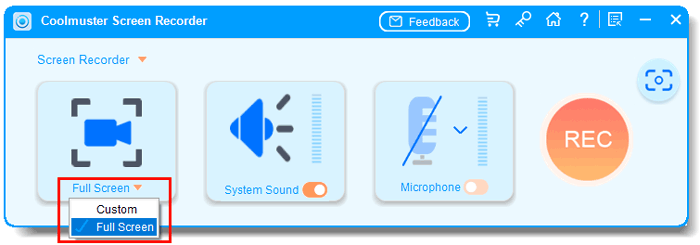
02Select your audio source. Enable "System Sound", "Microphone", or turn them off for silent recording.
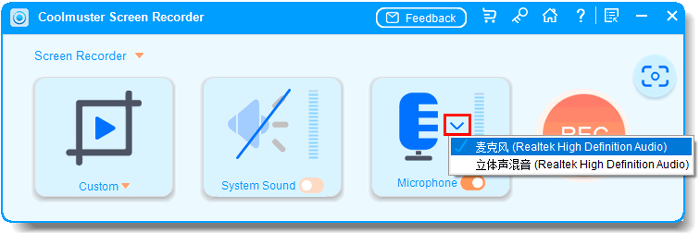
03Click the orange "REC" button and then "Start Recording". A short countdown will appear before recording begins.
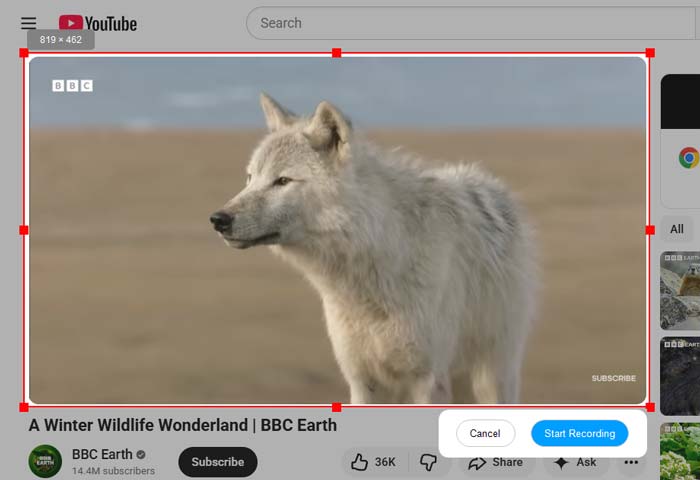
04When you're done, click "Stop Recording". Your video will be saved locally as an MP4 in your chosen folder. Use the "Copy" button to quickly duplicate the file for easy sharing.

Video Tutorial:
Q1. Is ScreenRec safe to use? Is ScreenRec a virus?
ScreenRec is completely safe and virus-free. It is a legitimate and officially certified screen recording software. It has passed security checks from major antivirus programs and browser platforms, and contains no viruses, malicious plugins, or spyware. All user recordings and cloud data are protected with AES end-to-end encryption. The software will not steal, leak, or tamper with user privacy, nor will it automatically upload private files without permission. However, avoid using unofficial download sources to prevent potential malware risks.
Q2. Is ScreenRec free?
ScreenRec provides a permanent free version for all users, covering core functions such as basic screen recording, screenshot capture, 2GB free cloud storage, instant sharing, and zero-watermark output. Free users can enjoy most daily recording functions without paying any fees. However, it has functional limitations: unregistered users have a 5-minute single recording limit, and free registered users can only use up to 720P resolution. If you need unlimited ultra HD recording, larger cloud storage, and exclusive customer service, you need to upgrade to the premium paid version.
Q3. Does ScreenRec have a time limit?
ScreenRec has different time limit rules for different users. Unregistered guest users have a strict single recording time limit of 5 minutes, which is the main restriction for trial users. Registered free users can enjoy unlimited recording duration.
This ScreenRec review shows that ScreenRec is a simple and easy-to-use free screen recording tool, especially suitable for daily office work, online teaching, and quick screen sharing. Its biggest advantages are its lightweight design and cloud sharing features, which are already very practical for ordinary users. If you still have concerns, you might want to try Coolmuster Screen Recorder, which also offers stable screen recording with no time limits.
Related Articles:
Best Screen Recorder for Mac: Top 10 Screen Recording Software for macOS
10 Amazing MP4 Screen Recorder Options: Record MP4 Videos Easily
Comprehensive Review: 7 Best Screen Recorders for Android
Ultimate Guide to Screen Recorders for Windows: 8 Best Tools Inside!






 Free Download for PC


