"I'm tired of my work OneDrive and personal OneDrive fighting each other and misplacing files. I'm going to go ahead and pay for storage that is not affiliated with OneDrive. I know some universities use Dropbox, while other people choose to pay for extra storage on Google Drive. What do you recommend? Is there something better?"
- From Reddit
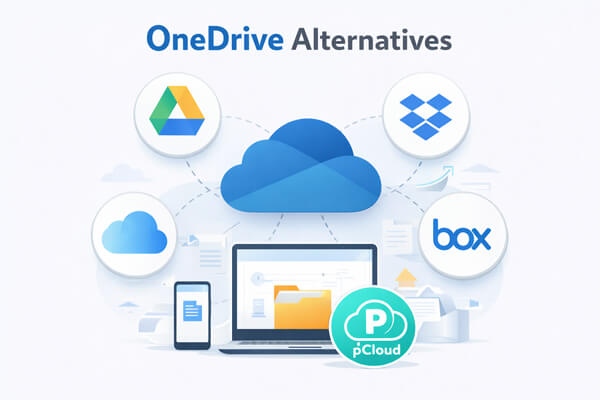
OneDrive is a widely used cloud storage service integrated with Microsoft 365 and Windows. However, many users find its free storage limited, sync speeds inconsistent, and privacy policies less than ideal. Depending on your needs - whether it's better collaboration, stronger security, or more flexible storage - there are several OneDrive alternatives worth considering.
In this article, we've selected 8 of the best OneDrive alternatives, including both cloud storage platforms and specialized device management tools, with clear overviews, pros and cons, and pricing details to help you choose the right solution quickly and confidently.
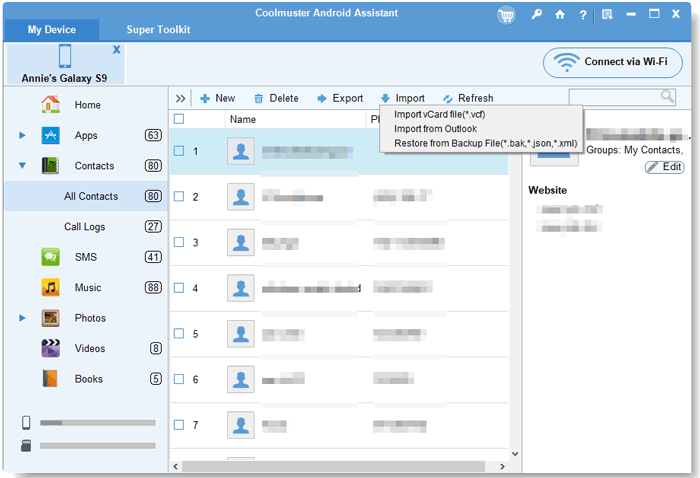
Unlike traditional cloud storage tools like OneDrive, Coolmuster Android Assistant is a specialized device management solution designed to help Android users take full control of their smartphone data. It focuses on local backup, file transfer, and data organization, making it an excellent OneDrive alternative for users who prefer storing data locally (instead of the cloud) or need a more intuitive way to manage Android files.
Note: For iOS users, Coolmuster offers a dedicated tool called Coolmuster iOS Assistant, which provides similar features tailored to iOS devices.
Pros
- Easy to use, even for non-technical users, no complex setup required
- Supports backup, transfer, and editing of all major Android data types (contacts, messages, photos, apps, etc.).
- Works with both USB and Wi-Fi, giving you flexibility in how you connect your device.
- Supports all Android 6.0 and above devices, including Samsung, Huawei, Xiaomi, Motorola, and more.
- No cloud dependency, so you don't have to worry about cloud storage limits or data breaches.
Pricing
- Free Trial: Available (limited features - e.g., preview files, export a small number of items).
- Coolmuster Android Assistant: 1-year license - $29.95; Lifetime license - $39.95 (one-time payment, no recurring fees).
User Guide
01Download and install Android Assistant on your Windows or Mac.
02Launch the program, then connect your Android device to the computer using a USB data cable or Wi-Fi.
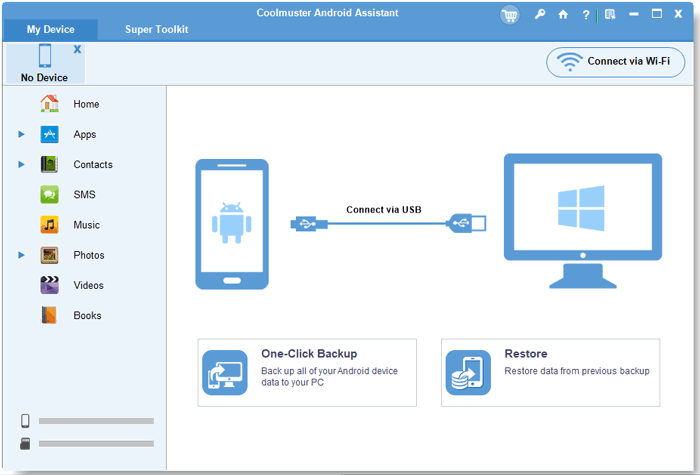
03Once connected, the software will automatically detect your device and display its main data categories on the interface.
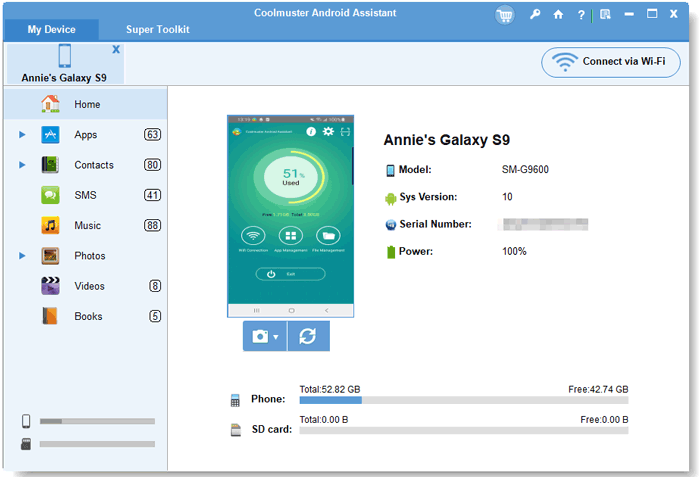
04To manage or back up data: Select the data type you want to handle, preview the files in the right panel, then use the "Export" button to save them to your computer (local backup) or the "Backup" button in the "Super Toolkit" tab to create a full device backup.
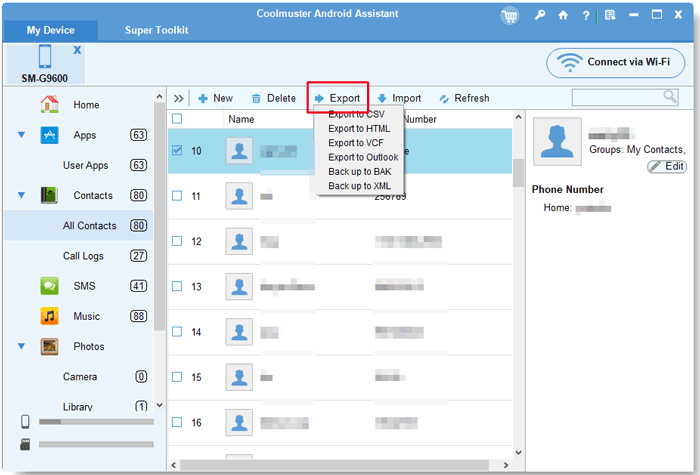
To transfer files: Use the "Import" button to add files from your computer to your Android device without using cloud storage. You can also edit contacts, send text messages, or batch install/uninstall apps directly from the computer interface.
Video Guide
Google Drive is the most popular OneDrive alternative, offering cloud storage, file synchronization, and seamless collaboration tools. It's deeply integrated with Google Workspace (Google Docs, Sheets, Slides, Gmail, Calendar) and works across all devices (Windows, Mac, Android, iOS). With 15GB of free storage (shared across Drive, Gmail, and Google Photos), it's an excellent choice for individuals and teams that prioritize collaboration and cross-platform access.
Pros
- Generous free storage: 15GB of free space (more than OneDrive's 5GB free storage) shared across Drive, Gmail, and Google Photos.
- Top-tier collaboration: Real-time editing, commenting, and sharing with teammates - changes sync instantly across all devices. Perfect for remote teams or co-editing documents.
- Google ecosystem integration: Works seamlessly with Google Docs, Sheets, Slides, Gmail, Calendar, and Chrome - ideal if you already use Google services regularly.
- Cross-platform support: Syncs smoothly across Windows, Mac, Android, iOS, and the web - no device restrictions.
- File version history: Automatically saves previous versions of files, so you can revert to older edits if needed.
Cons
- Storage sharing: The 15GB free storage is shared with Gmail and Google Photos, which can fill up quickly if you receive large emails or store lots of photos.
- Privacy concerns: Google scans files for advertising purposes (though it doesn't share personal data with third parties).
- Inconsistent sync speeds: Some international users may experience slow sync speeds, similar to OneDrive.
Pricing
- Free: 15GB (shared across Drive, Gmail, Google Photos).
- Google One Basic: 100GB - $1.99/month or $19.99/year.
- Google One Standard: 200GB - $2.99/month or $29.99/year.
- Google One Premium: 2TB - $9.99/month or $99.99/year (includes additional perks like Google Photos editing tools and premium support).
- Google Workspace for Teams: Starts at $7/user/month (includes 30GB storage per user; higher tiers offer more storage and advanced features).
Dropbox is a pioneer in cloud storage and file synchronization, known for its rock-solid sync reliability and user-friendly interface. It's ideal for individuals and teams that need frequent file syncing (especially large files) and seamless integration with third-party tools (e.g., Adobe Creative Cloud, Figma, Slack). While its free storage is limited, its sync technology is unmatched, making it a top OneDrive alternative for creative professionals and developers.
Pros
- Superior sync reliability: Uses incremental sync (only syncs changes, not entire files) and file locking to prevent conflicts, perfect for frequent file edits and large file transfers.
- Third-party integration: Works with over 300,000 tools, including Adobe Creative Cloud, Figma, Slack, Trello, and Microsoft 365, great for teams using multiple productivity tools.
- User-friendly interface: Simple, clean design that's easy to navigate, even for first-time cloud storage users.
- Large file support: Supports single files up to 250GB (Dropbox Professional) - larger than OneDrive's 100GB limit.
- Offline access: Allows you to mark files for offline access on mobile and desktop devices, so you can work without an internet connection.
Cons
- Limited free storage: Only 2GB of free storage (less than OneDrive's 5GB and Google Drive's 15GB) - you can earn extra space by referring friends, but it's still limited.
- Expensive pricing: Paid plans are more expensive than OneDrive and Google Drive, especially for teams.
- Basic collaboration features: Collaboration tools are less advanced than Google Drive's (e.g., no built-in online editing for documents).
Pricing
- Free: 2GB (earn up to 16GB extra via referrals).
- Dropbox Plus: 2TB - $9.99/month or $99.99/year (includes advanced sync, file recovery, and offline access).
- Dropbox Professional: 3TB - $16.80/user/month (for individuals; includes 250GB file upload limit, eSignatures, and priority support).
- Dropbox Business Standard: 5TB - $15/user/month (3+ users; includes team collaboration tools and admin controls).
- Dropbox Business Advanced: 15TB - $24/user/month (3+ users; includes advanced security, compliance, and integration features).
pCloud is a Swiss-based cloud storage service that stands out for its media optimization, lifetime storage plans, and strong privacy features. It's an excellent OneDrive alternative for photographers, video creators, and individuals who want to avoid recurring subscription fees. With 10GB of free storage and support for media preview (photos, videos, music), it's perfect for managing large media libraries.
Pros
- Lifetime storage plans: One-time payment for permanent storage, no recurring fees (a rare feature among cloud storage services).
- Media optimization: Built-in media preview, automatic photo/video backup, and music streaming, ideal for photographers and video creators.
- Strong privacy: Uses client-side encryption (optional paid add-on) and is compliant with GDPR and Swiss privacy laws, more private than OneDrive and Google Drive.
- Cross-platform support: Works on Windows, Mac, Android, iOS, Linux, and the web, supports all major devices.
- File versioning: Saves previous versions of files for 30 days (free plan) or up to 1 year (paid plans).
- Large user base: Trusted by over 22 million users worldwide, with a proven track record of reliability.
Cons
- Free storage limitations: 10GB free storage (less than Google Drive's 15GB) - no way to earn extra free space.
- Encryption is optional: Client-side encryption (pCloud Crypto) is a paid add-on ($3.99/month or $39.99/year) - not included in basic paid plans.
- Slower sync speeds: Sync speeds can be slower than Dropbox and Google Drive for large files.
Pricing
- Free: 10GB storage, basic sync, and media preview.
- 1TB lifetime: $199.
- 2TB lifetime: $279.
- 10TB lifetime: $799.
- pCloud Crypto (Optional): $3.99/month or $39.99/year (adds client-side encryption).
Sync.com is a privacy-focused cloud storage service that offers end-to-end encryption (E2EE) for all files, making it the best OneDrive alternative for users who prioritize data security and privacy. It's compliant with GDPR, HIPAA, and other global privacy regulations, making it suitable for individuals, small businesses, and industries with strict compliance requirements (e.g., healthcare, finance).
Pros
- End-to-end encryption (E2EE): All files are encrypted on your device before being uploaded to the cloud, only you have the encryption key (Sync.com cannot access your files).
- Strong compliance: Compliant with GDPR, HIPAA, PIPEDA, and other global privacy laws, ideal for businesses and users with strict privacy requirements.
- User-friendly interface: Simple design that's easy to use, with all the core features (sync, share, backup) clearly organized.
- Generous free storage: 5GB of free storage (same as OneDrive) - no credit card required to sign up.
- Secure sharing: All shared links are encrypted, and you can set expiration dates, passwords, and download limits for shared files.
- Zero-knowledge architecture: Sync.com does not store or access your encryption keys, ensuring complete data privacy and control.
Cons
- Slower sync speeds: End-to-end encryption can slow down sync speeds, especially for large files (slower than Dropbox and Google Drive).
- Limited third-party integration: Integrates with fewer tools than Dropbox and Google Drive - no built-in online editing.
- Expensive team plans: Team plans are more expensive than OneDrive for Business and Google Workspace.
Pricing
- Free: 5GB storage, basic sync, and encrypted sharing.
- Personal 1TB: $16/month, billed monthly; $12/month, billed annually.
- Pro Solo 5TB: $32/month, billed monthly; $28/month, billed annually.
- Pro Solo Unlimited: $54/month, billed monthly; $45/month, billed annually.
- Pro Teams+ Unlimited: $18/per user per month, billed monthly; $15/month, billed annually.
Box (formerly Box.net) is a cloud content management (CCM) platform designed for businesses and enterprises, offering advanced security, compliance, and collaboration features. It's an excellent OneDrive alternative for large organizations, multinational companies, and industries with strict regulatory requirements (e.g., finance, healthcare, legal). While it's overkill for individual users, it's unmatched for enterprise-level file management and governance.
Pros
- Enterprise-grade security: Advanced features like data loss prevention (DLP), granular access controls, two-factor authentication (2FA), and eDiscovery, perfect for large organizations.
- Strong compliance: Compliant with GDPR, HIPAA, SOC 2, FedRAMP, and other global regulations, ideal for regulated industries (finance, healthcare, government).
- Open ecosystem integration: Integrates with over 1,500 third-party tools, including Salesforce, Oracle, Adobe, Microsoft 365, and Slack, and serves as a central content hub for businesses.
- Advanced collaboration: Team folders, real-time commenting, and version history, great for large teams and cross-departmental collaboration.
- Scalable storage: Flexible storage options that grow with your business, no need to switch platforms as your organization expands.
Cons
- Expensive: Much more expensive than OneDrive, especially for small businesses and individuals, and overkill for personal use.
- Limited free storage: Only 10GB of free storage (for personal use), not enough for most users.
- Complex interface: Steeper learning curve than OneDrive and Google Drive, better suited for IT teams and power users.
- Slow access for non-enterprise users: International users (especially outside North America/Europe) may experience slow sync and access speeds due to server locations.
Pricing
- Individual and teams: Free (single user, 10GB of storage, 250 MB file upload limit, 1 file version, 5 Box Sign signature requests per month); Personal Pro (single user, 100GB of storage, 5GB file upload limit, 10 file version, 15 Box Sign signature requests per month) - $10/month billed annually or $14/month billed monthly; Business Starter (minimum of 3 users, 100GB of storage, 2GB file upload limit, 25 file version, 10 Box Sign signature requests per month) - $5/month billed annually or $7/month billed monthly.
- Business (Unlimited storage, 5GB file upload): billed monthly: $20 per user/month, minimum of 3 users; billed annually $15/month.
- Business Plus (Unlimited storage, 15GB file upload): billed monthly: $33 per user/month, minimum of 3 users; billed annually $25/month.
- Enterprise (Unlimited storage, 50GB file upload): billed monthly: $47 per user/month, minimum of 3 users; billed annually $35/month.
- Enterprise Plus (Unlimited storage, 150GB file upload, only billed annually): $50 per user/month, minimum of 3 users.
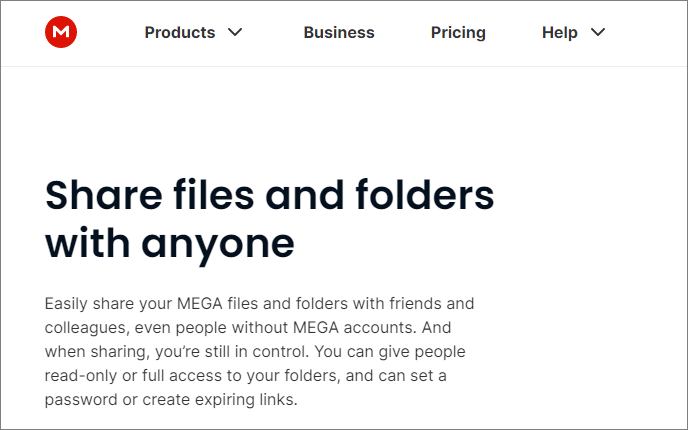
MEGA is a New Zealand-based cloud storage service known for its generous free storage (20GB) and end-to-end encryption. It's an excellent OneDrive alternative for users who want lots of free space without sacrificing privacy. With support for large file transfers (up to 50GB per file) and a user-friendly interface, it's perfect for individuals and small teams on a budget.
Pros
- Generous free storage: 20GB of free storage (4x more than OneDrive's 5GB), you can earn up to 35GB extra via referrals and tasks.
- End-to-end encryption (E2EE): All files, chats, and shared links are encrypted, only you have the encryption key (MEGA cannot access your data).
- Large file support: Supports single files up to 50GB (free plan) and 100GB (paid plans), larger than OneDrive's 100GB limit (paid plans only).
- Free file sharing: Share large files with anyone (even non-MEGA users) via encrypted links, no size limits for shared files.
- Cross-platform support: Works on Windows, Mac, Android, iOS, Linux, and the web, supports all major devices.
- Improved sync speeds: Recent updates have improved sync reliability and speed, addressing past user complaints.
Cons
- Privacy concerns (past): MEGA has a controversial past (founder Kim Dotcom), but it's now a legitimate, regulated service, though some users still have privacy reservations.
- Slow customer support: Free users get limited support; paid users may have to wait days for a response.
- Limited collaboration: Collaboration features are basic (no built-in online editing), not ideal for teams that need frequent co-editing.
Pricing
- Free: 20GB storage (earn up to 35GB extra via referrals/tasks), 50GB file upload limit.
- Pro Lite: $5.95/month charged yearly (750GB of storage, 12TB of transfer).
- Pro I: $9.91/month charged yearly (3TB of storage, 36TB of transfer); $11.89/month charged monthly (3TB of storage, 3TB of transfer).
- Pro II: $19.83/month charged yearly (10TB of storage, 120TB of transfer); $23.78/month charged yearly (10TB of storage, 10TB of transfer).
- Pro III: $29.74/month charged yearly (20TB of storage, 240TB of transfer); $35.68/month charged yearly (20TB of storage, 20TB of transfer).
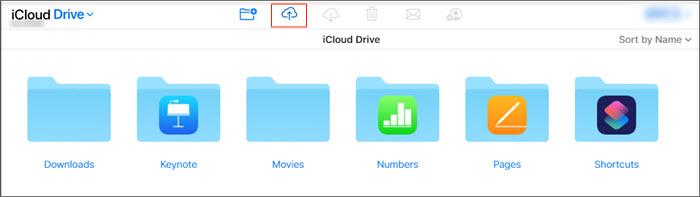
iCloud Drive is Apple's cloud storage service, seamlessly integrated with all Apple devices (iPhone, iPad, Mac, Apple Watch, Apple TV). It's the perfect OneDrive alternative for Apple users who want a unified experience across their devices, with features like automatic photo backup, iCloud Keychain, and integration with Apple's native apps (Pages, Numbers, Keynote). While it's less versatile for non-Apple users, it's unmatched for Apple ecosystem loyalty.
Pros
- Apple ecosystem integration: Syncs automatically across all Apple devices, and photos, documents, notes, contacts, and settings are available everywhere you go.
- Seamless native app integration: Works with Pages, Numbers, Keynote, Notes, Safari, and Photos, no extra setup required.
- User-friendly: Simple, intuitive interface that's consistent with Apple's design language, easy to use for all Apple users.
- Secure: Uses end-to-end encryption for sensitive data (e.g., passwords, health data) and is compliant with GDPR and other privacy laws.
- Family sharing: Share storage plans with up to 5 family members (no extra cost), great for families with multiple Apple devices.
- Hidden features: Includes iCloud Keychain (password sync), Find My (device tracking), and iCloud Backup (automatic device backup) - adding value beyond basic storage.
Cons
- Poor Windows support: The Windows client is basic and buggy, sync speeds are slow, and features are limited compared to the Mac/iOS versions.
- Limited free storage: Only 5GB of free storage (same as OneDrive), fills up quickly with photos and backups.
- Non-Apple device incompatibility: Virtually useless for Android and Linux users, no native app, and web access is limited.
- Sync issues: Some users report occasional sync delays between devices, especially for large files.
Pricing
- Free: 5GB storage (shared across all Apple services).
- iCloud+ 50GB: $0.99/month (family sharing available).
- iCloud+ 200GB: $2.99/month (family sharing available).
- iCloud+ 2TB: $9.99/month (family sharing available; includes additional perks like Hide My Email and Custom Email Domain).
In conclusion, each of the 8 OneDrive alternatives offers distinct advantages. Coolmuster Android Assistant is perfect for Android users who prefer local device management and backup. Google Drive excels in collaboration, with 15GB of free storage and integration with Google's ecosystem. Dropbox stands out with reliable syncing and third-party integrations, ideal for professionals and teams. pCloud offers lifetime storage plans and strong privacy features, making it a great choice for media-heavy users.
Sync.com is the go-to for privacy-focused users, offering end-to-end encryption and strong compliance with privacy regulations. Box is best suited for businesses, providing enterprise-grade security and collaboration tools. MEGA shines with 20GB of free storage and robust privacy features, perfect for personal use and small teams. Finally, iCloud Drive is the best option for Apple users, offering seamless integration across devices, though it is limited for non-Apple users. Each alternative has its strengths, so choose based on your priorities, whether it's storage, security, collaboration, or platform integration.
Related Articles:
How to Migrate from Google Drive to OneDrive? A Comprehensive Guide
How to Back Up iPhone to OneDrive? A Step-by-Step Guide
Guide to Restore OneDrive Backup: For Individual Files & Entire Drive





 Free Download for PC
  Free Download for Mac


