"I'm selling my old Android phone. What do I need to do to protect my data and Google A/C?"
- From the Google Community
With the rapid update cycle of smartphones, many of us find ourselves with an old Android phone gathering dust once we upgrade. To safely sell old Android devices, it's important to take steps that not only help you recoup some of the cost but also ensure your personal data is protected.
Selling your old phone is a great way to reduce electronic waste, but safety should always be the top priority. This guide will walk you through the necessary steps to protect your data and avoid potential risks while selling your device.
Before listing your phone for sale, proper preparation not only helps you get a better price but also lays the groundwork for a transparent transaction.
Be thorough when checking your phone's physical and functional state- buyers appreciate transparency, and dishonesty can lead to disputes or scams. Focus on these key areas:
* Physical appearance
Note any scratches, dents, or cracks on the screen, body, or camera lens. Check if the buttons, ports (like USB-C), and speakers are in good shape. If you've replaced any parts (e.g., a new battery), disclose this upfront.
* Functionality
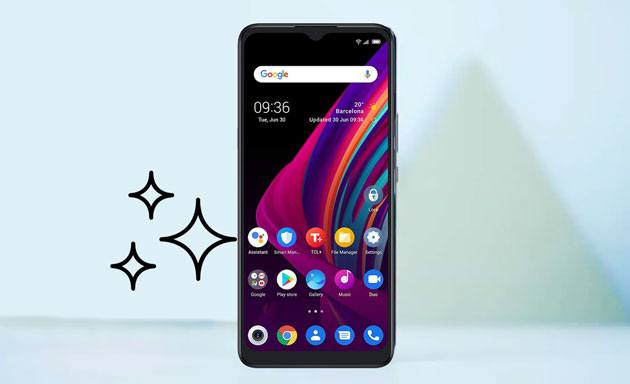
Test the battery life - does it hold a charge as expected, or does it drain quickly? Verify that features like Wi-Fi, Bluetooth, GPS, and the camera work properly. Check if the phone locks and unlocks (via fingerprint, face ID, or password) without issues.
* Software status
Ensure the phone isn't stuck in a boot loop, doesn't crash frequently, and can connect to mobile networks (if it's not a Wi-Fi-only device).
Having the original box, charger, USB cable, and any included accessories (like earbuds or a case) can increase your phone's resale value. If you no longer have these items, be clear about it in your listing; hiding missing accessories will only cause problems later.
The biggest risk of selling an old phone is leaving personal data behind; photos, messages, bank details, social media accounts, and app logins can all fall into the wrong hands. Simply deleting files or apps isn't enough; you need to perform a full factory reset.
Before wiping your phone, it's crucial to back up all important files, such as contacts, photos, videos, and messages. To back up your data safely and efficiently, Coolmuster Android Backup Manager is the perfect solution.
This tool not only allows you to back up your data with a single click, but it also helps you quickly transfer all your important files from your Android device to your computer, preventing data loss. With this tool, you can easily choose the types of data to back up and ensure they are securely stored.
Here's how to do it:
01Download and install Coolmuster Android Backup Manager on your computer.
02Connect your Android phone to the computer via USB cable or Wi-Fi and wait for the program to detect your device. Once connected, you can choose "Backup" from the interface.
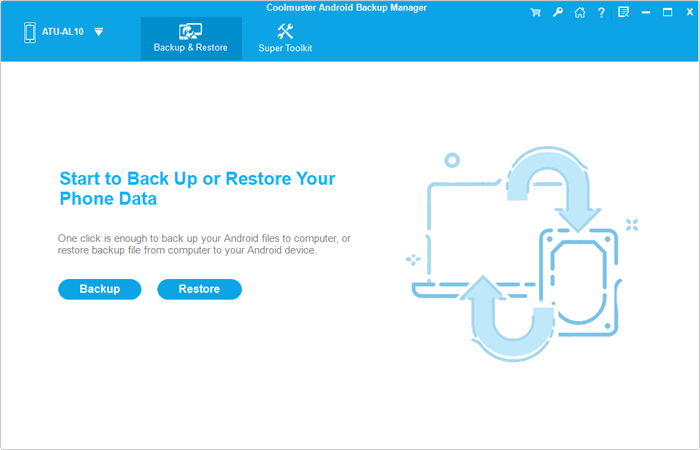
03Select the data types you want to back up (e.g., contacts, photos, messages, apps).
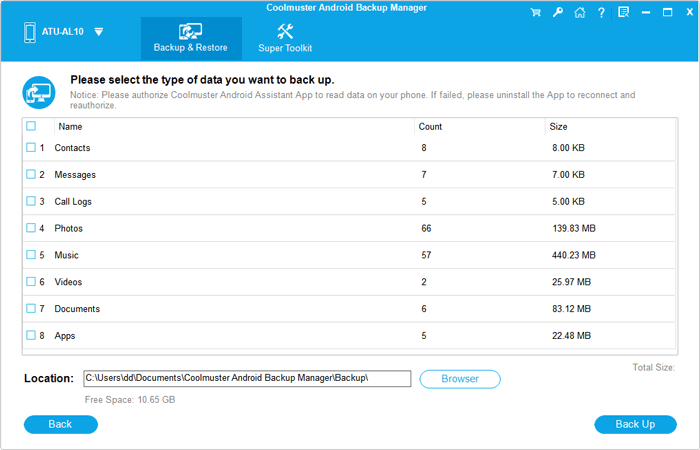
04Click "Back Up", choose the destination folder to save the files. Once done, your files will be securely saved on your computer.
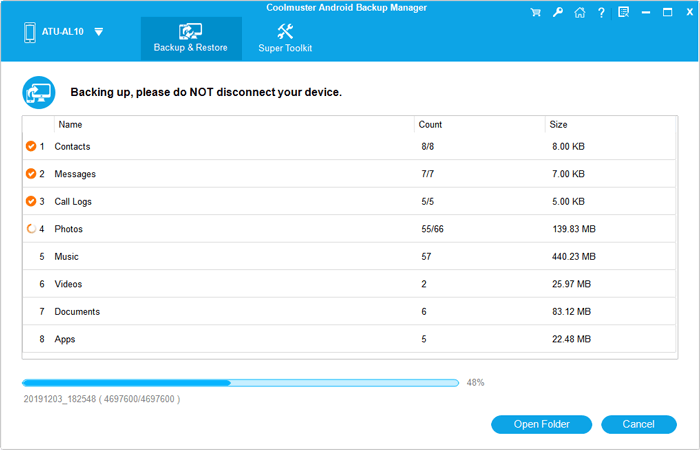
Video guide
A factory reset may not always remove Google accounts (this is a security feature called "Factory Reset Protection" or FRP). To avoid locking the buyer out of the phone, you need to manually remove all accounts first.
Step 1. Go to "Settings" > "Accounts and backup" > "Manage accounts".
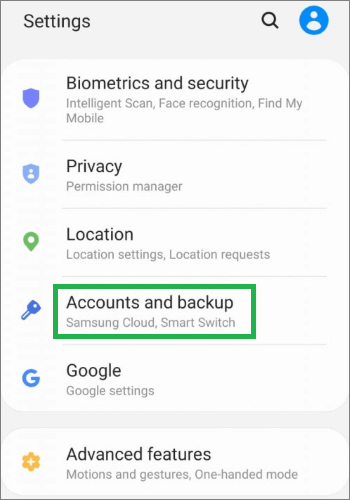
Step 2. Select each account (Google, Facebook, email, etc.), and tap "Remove account".
Once backups and account removal are done, it's time to wipe the phone. The process is as follows:
Step 1. Go to "Settings" > "System" > "Reset" (on some Samsung devices, it's in "General management").
Step 2. Select "Factory data reset" (or "Erase all data").
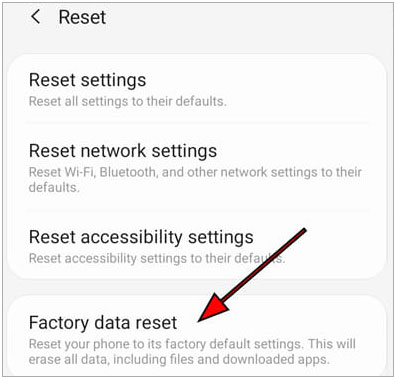
Step 3. Enter PIN/password and confirm.
If you want to ensure data is permanently deleted and unrecoverable, consider using Coolmuster Android Eraser. You can find more details in the article "How to Delete Data from Android Phone Permanently".
The platform you choose will affect both the ease of sale and your safety. Common platforms include:
Selling in person lets you verify the buyer and receive payment immediately, lowering the risk of online fraud. Common options include:
If you want to reach more buyers, online platforms are better but come with higher fraud risks. Stick to reputable sites:
Selling your old Android phone is a great way to recover some costs and reduce e-waste, but protecting your personal data should always come first. By assessing the phone's condition, backing up data with Coolmuster Android Backup Manager, and performing a factory reset, you ensure that your privacy remains safe.
Finally, choose a secure platform for selling, whether in-person or online, to complete the transaction smoothly. Following these steps will help you safely sell your old Android phone and protect your personal information.
Related Articles:
How to Wipe Android Phone Completely Before Selling? [Must Read]
8 Best Android Data Eraser Software: Erase Your Android Permanently
How to Wipe a SIM Card with Android Safely (Full Guide)
How to Clear Cache on Android [App Cache and Chrome Browser Cache]





 Free Download for PC
  Free Download for Mac


