With the official release of the iPhone 18 series, including the iPhone 18, iPhone 18 Pro, and iPhone 18 Air models, Apple fans worldwide are already asking one key question: How can I pre-order the iPhone 18 as soon as possible?
Can you pre-order iPhone 18? Absolutely. This guide will walk you through the pre-order timeline, available channels, and essential preparations, making sure you secure the new device without missing a beat.
For those asking when the iPhone 18 is coming out or when the iPhone 18 will be released, the official iPhone 18 launch date in 2026 is expected in mid-September, with shipping likely starting around September 18. To secure your device and avoid delays, prepare early so you can be among the first to buy a new iPhone without worrying about stock shortages.
Many users ask, how does iPhone pre-order work? Apple provides multiple official channels for pre-ordering:
Using these channels wisely will help you secure your preferred iPhone 18 model, especially the high-demand iPhone 18 Pro Max.
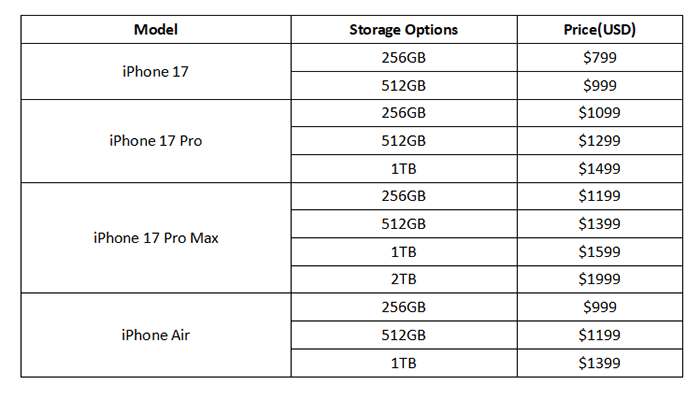
When planning to buy a new iPhone, knowing the official iPhone 18 price across all models is crucial. Apple offers different storage configurations for the iPhone 18, iPhone 18 Pro, iPhone 18 Pro Max, and iPhone Air, giving buyers flexibility based on budget and storage needs. Below is the detailed pricing table for the iPhone 18 lineup in 2026:
Not sure which model to choose? You can read this article to understand the differences and make an informed decision.
Compare iPhones: iPhone 18 Pro vs iPhone Air vs iPhone 18 [The Newest]If you're preparing for your iPhone 18 Pro Max pre-order or looking to buy a new iPhone at the best value, exploring deals from carriers and Apple itself is a smart move. Each provider offers unique promotions that can help reduce the iPhone 18 price or add extra benefits. Here's a breakdown:
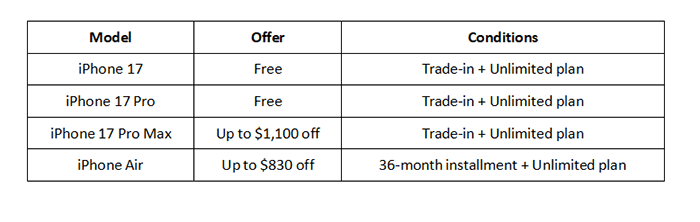
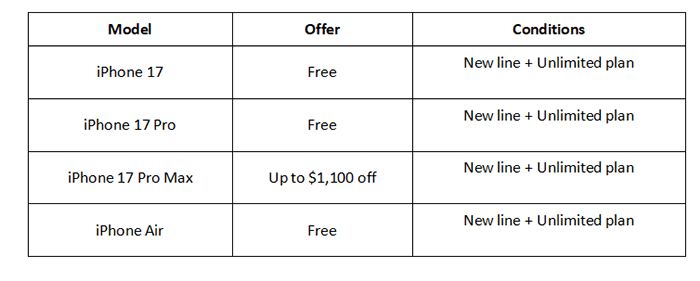
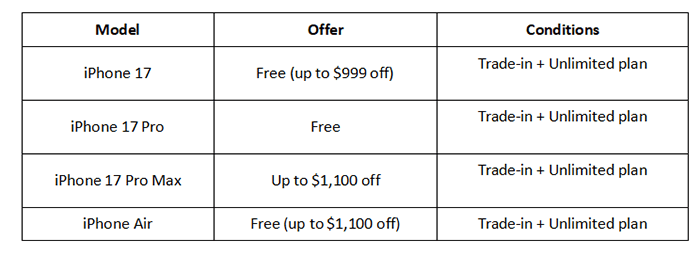
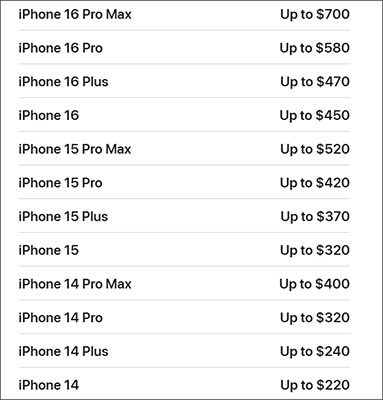
The Apple Store is offering up to a $700 credit when you trade in your old smartphone for one of the new iPhone 18 models.
Once you successfully buy a new iPhone 18 through pre-order, the most important step is transferring your data so you can start using your new device immediately. While Apple offers iCloud and Quick Start, these methods can be slow, require large storage space, or sometimes fail. (Quick Start not working?)
A faster and safer solution is to use Coolmuster Mobile Transfer, which allows you to migrate all your essential data from your old iPhone to your brand-new iPhone 18, iPhone 18 Pro, or iPhone 18 Pro Max in just minutes.
Key features of Mobile Transfer:
How do I transfer data from an old iPhone to the new iPhone 18? Follow the steps below:
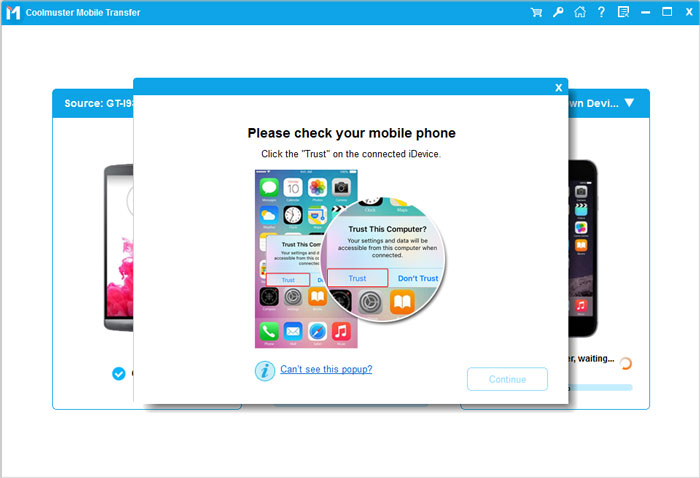
01Download, install, and launch the tool on your computer. Connect your old iPhone and your new iPhone 18/iPhone 18 Pro/iPhone Air to your computer using USB cables. When prompted, tap "Trust" on each iPhone to establish the connection.
02Once both devices are connected, the program interface will appear. Ensure the source and target devices are correctly identified. If not, click the "Flip" button to switch them.
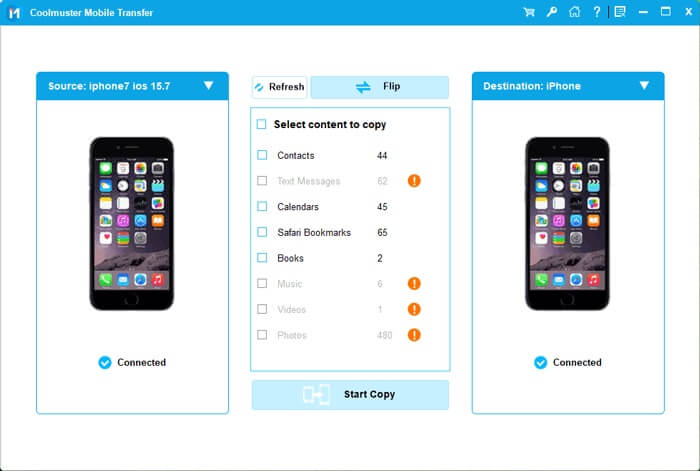
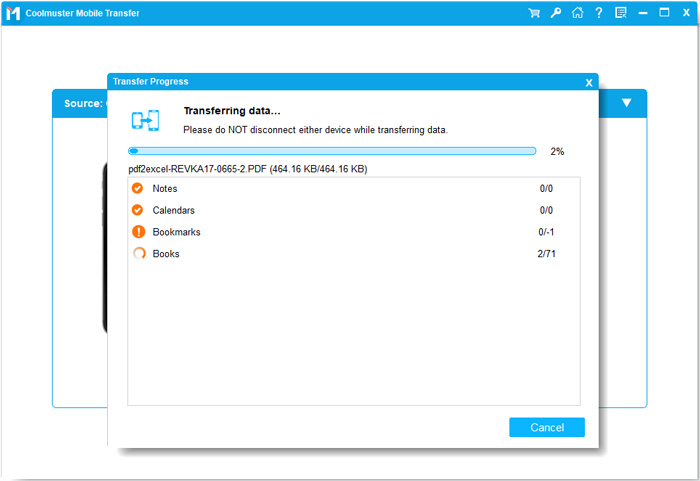
03Choose the items you want to transfer from the content list, such as Contacts, Notes, Calendars, Bookmarks, and Books. Then, click the "Start Copy" button to begin the transfer process automatically.
Video Tutorial:
Successfully pre-ordering your new iPhone 18, iPhone 18 Pro, or iPhone Air is more than just clicking "buy". The ultimate guide involves knowing the release date, selecting the right pre-order channel, preparing payment and personal information, and most importantly, setting up a data migration tool. With this preparation, you can ensure that the moment you receive your device, all your data is ready and your new iPhone works perfectly from day one.
Related Articles:
Best iPhone in 2025: iPhone 18, iPhone Air, or iPhone 18 Pro?
How to Prepare iPhone for Trade-In? Find Out the Tips Here!
Sell Your Broken iPhone: Best Ways to Get Cash for a Damaged Device






 Free Download for PC
  Free Download for Mac


