In the ecosystem of OnePlus devices, OnePlus Switch, now officially renamed Clone Phone, has long been a go-to tool for users needing to transfer data between OnePlus phones or between OnePlus and other Android devices. It offers basic functions like contacts, photos, and app transfer, which cater to simple migration needs.
However, when it comes to cross-platform transfer (such as between Android and iOS), large-scale file transmission, or offline usage without a network, OnePlus Switch (Clone Phone) shows obvious limitations. This is why many users are actively seeking a powerful OnePlus Switch alternative to meet more diverse data transfer demands. Below, we will detail 5 outstanding alternatives, covering their product introductions, core functions, applicable scenarios, downsides, and download links to help you make an informed choice.
Coolmuster Mobile Transfer is a professional cross-platform data transfer tool tailored for users with multi-device migration needs. It stands out in the market with its high compatibility and stable transmission performance, and is widely recognized as a top-tier OnePlus Switch alternative for both individual and small business users.
* Wide Compatibility: Supports Android 6.0+ and iOS 5.0+ systems, compatible with all OnePlus models (including OnePlus 15/13/12 series), as well as iPhone, Samsung, Huawei, Xiaomi, and other mainstream brands.
* Comprehensive Data Support: Transfers over 10 types of data, including contacts, SMS, call logs, photos, videos, music, apps, etc.
* Multiple Transfer Modes: Realizes four transfer scenarios: Android to Android, iOS to iOS, iOS to Android, and Android to iOS, breaking the system barrier that OnePlus Switch cannot overcome.
* Secure and Stable: Adopts end-to-end encryption technology to ensure no data leakage during transmission; the transmission process is not interrupted by the network, and the success rate is as high as 99%.
It's a paid tool, though a free trial is available with limited functionality.
01Begin by downloading and installing Coolmuster Mobile Transfer on your computer. You can download it by clicking the button below.
02Next, use USB cables to connect both your source device (e.g., the old OnePlus or iPhone) and destination device (e.g., the new OnePlus) to the computer.
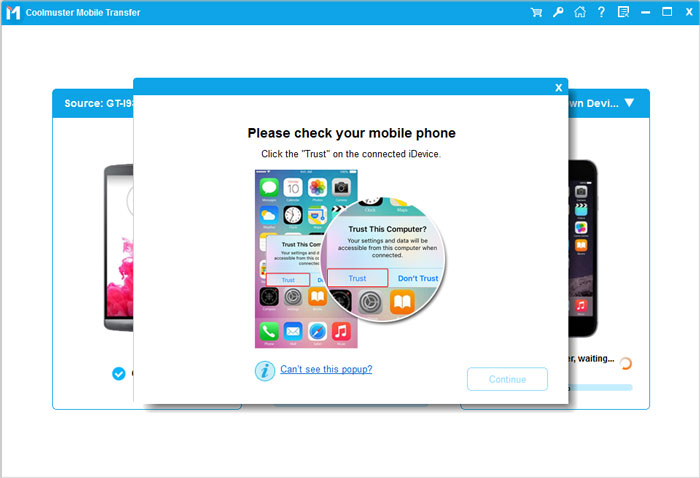
03After successful connection, the tool will automatically recognize the two devices and display them as "Source" and "Destination" on the main interface (taking Android-to-Android transfer as an example). If the positions are reversed, click the "Flip" button in the middle to swap them.
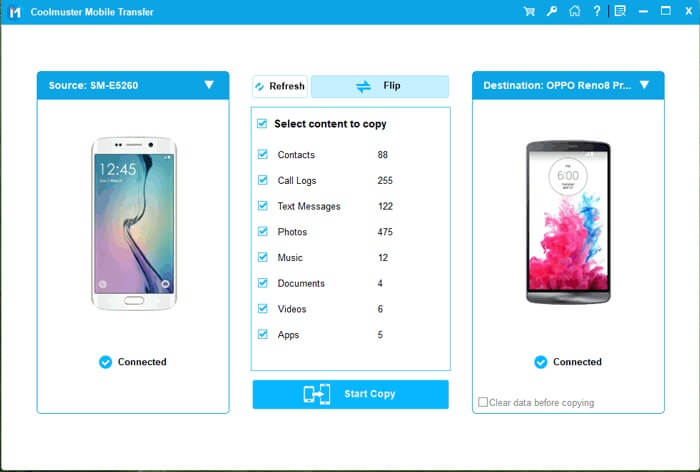
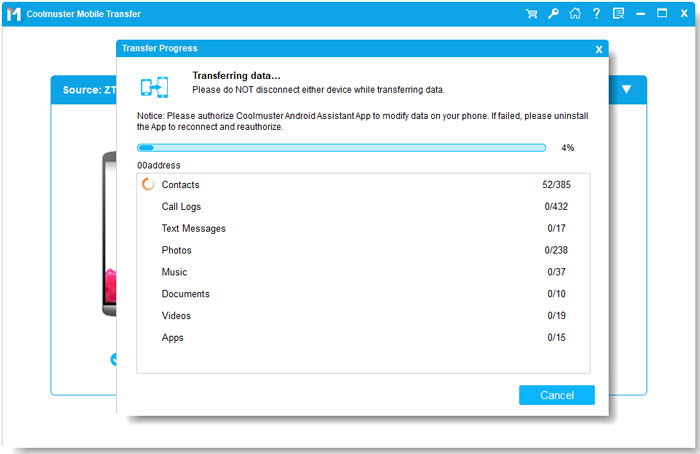
04Choose the types of data you want to transfer (contacts, photos, messages, etc.), and then click "Start Copy" to begin the transfer process.
Xender is a popular cross-device wireless transfer tool with hundreds of millions of users worldwide. It focuses on fast transmission and is a preferred OnePlus Switch alternative for young users who need quick file sharing.

* Ultra-fast Transfer Speed: Up to 40Mb/s-200 times faster than Bluetooth and 10 times faster than OnePlus Switch's wireless speed.
* Multi-Device Connection: Connect up to 4 devices simultaneously for easy group file sharing.
* Rich Transfer Modes: Transfers via Wi-Fi hotspot, QR code scanning, and even supports cross-platform transfers between mobile phones and computers (Windows/Mac) without a client.
* Additional Functions: Built-in file manager and "phone clone" feature for full data migration.
SHAREit is another global mainstream wireless transfer tool, which is as famous as Xender. It has a high market share in emerging markets and is a practical OnePlus Switch alternative for users who focus on cross-device and cross-system transfer.

* Strong Cross-platform Support: Transfer files between Android, iOS, Windows, Mac, and even Linux.
* Offline Transfer: Direct Wi-Fi connection, no internet required.
* Large File Support: Handles ultra-large files like 4K videos and CAD files without issues.
* Value-added Services: Includes app recommendations, video playback, and file compression.
Wondershare MobileTrans is a professional data transfer tool under Wondershare Technology, focusing on "one-click migration" and "data security". It is favored by business users and is a high-end OnePlus Switch alternative with comprehensive functions.
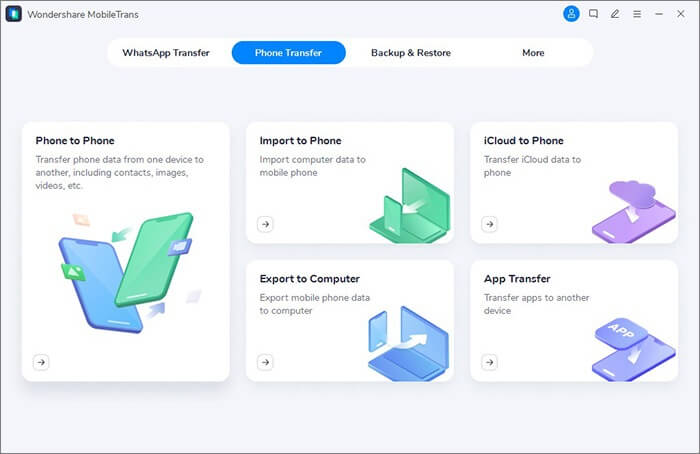
* One-Click Full Migration: Transfer all data (contacts, SMS, photos, videos, apps, etc.) with a single click.
* High Compatibility: Supports over 8000 models and is compatible with Android 4.6+ and iOS 6.0+.
* Data Backup & Restore: One-click backup and restore your data to protect your data.
Official website: https://mobiletrans.wondershare.com/ (supports Windows and Mac systems; mobile phones need to install the supporting app for connection)
LocalSend is an open-source and free cross-platform transfer tool that has emerged in recent years. It is loved by technical enthusiasts and privacy-focused users for its "open source, no ads, and strong privacy protection". It is a distinctive OnePlus Switch alternative.

* Open-Source & Free: No hidden charges or ads, with full access to the source code.
* Privacy-Focused: End-to-end encryption ensures your data is transferred securely without third-party involvement.
* Cross-Platform: Supports Android, iOS, Windows, Mac, and Linux.
* Simple Operation: No registration required, just connect to the same local network and start transferring.
These OnePlus Switch alternatives cover a wide range of data transfer needs, whether you need fast, offline file sharing, cross-platform compatibility, or full device migration. Xender and SHAREit are great for quick, large-file transfers; Wondershare MobileTrans handles comprehensive phone-to-phone migration, including social app data; LocalSend focuses on privacy and open-source flexibility; and Coolmuster Mobile Transfer provides stable, cross-platform support for almost all types of data. For an all-in-one and reliable solution, Coolmuster Mobile Transfer is highly recommended.
Related Articles:
How to Transfer Music from OnePlus to OnePlus (5 Proven Ways)
What If OnePlus Switch Not Working Occurs? (Troubleshooting & Alternative)
How to Fully Back Up OnePlus Phone to PC with 5 Methods
How to Transfer Data from Huawei to OnePlus with 5 Practical Ways






 Free Download for PC
  Free Download for Mac


