TL;DR: Wondering how to recover WeChat messages from iCloud? If you previously enabled iCloud Backup, you can restore deleted WeChat chats through Apple's official iCloud restore or use iPhone Data Recovery to recover WeChat messages without resetting your iPhone. This guide also explains how to transfer and restore WeChat history to a new iPhone step by step.
Losing WeChat messages on your iPhone can be frustrating, even if you already have a backup. Many users panic after accidentally deleting chats, resetting their device, or switching to a new iPhone because important conversations, photos, and files may suddenly disappear. Fortunately, if you previously enabled iCloud Backup, there is still a good chance of recovering your lost WeChat history.
In this guide, you will learn how to recover WeChat messages from iCloud in several effective methods, whether you want to restore chats directly from an iCloud backup or recover them without resetting your iPhone. Let's get started.

Yes, but with important limitations. On an iPhone, an iCloud device backup can include data from WeChat, including chat history, if:
However, WeChat chat history is not separately viewable inside iCloud like Photos or Notes. It's stored inside the full iPhone backup.
If you want to recover WeChat messages from iCloud without erasing your iPhone, using professional iPhone data recovery software is usually the safest and easiest solution. iPhone Data Recovery is a powerful iOS recovery tool that allows users to download and extract iCloud backup data selectively. Unlike Apple's official recovery method, it lets you preview and restore only the WeChat messages you need.
Key features of iPhone Data Recovery:
Here is how to restore WeChat messages from iCloud using iPhone Data Recovery:
01Download and install the software, then choose "Recover from iCloud". Sign in to your iCloud account using your Apple ID and password. If two-factor authentication is enabled, tap "Trust" on your iPhone and enter the verification code sent by Apple into the software.
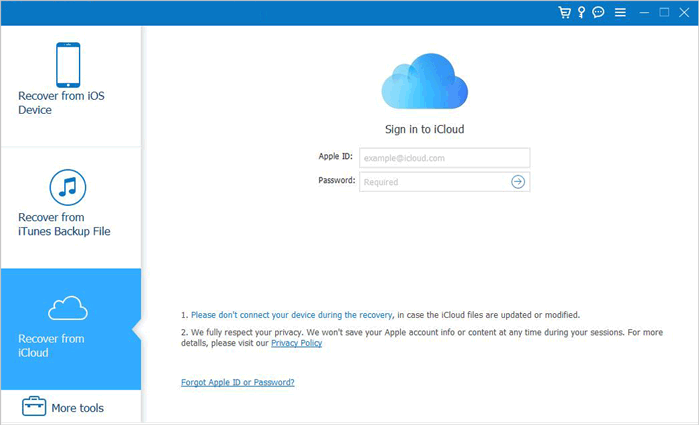
02After logging in, select "iCloud Backup" and click "Start" to scan your iCloud backups.
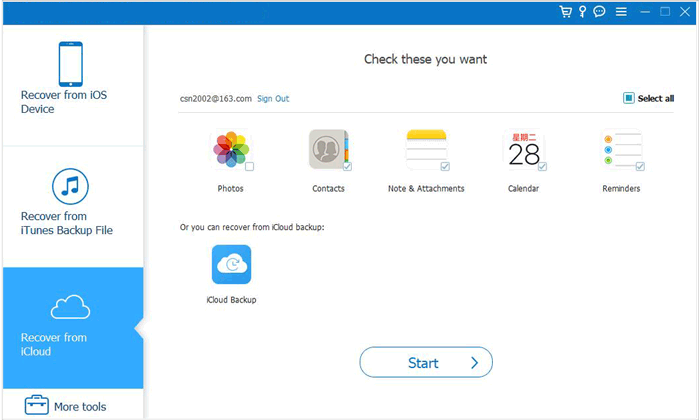
03The program will display all backup files linked to your iCloud account. Choose the backup you want based on the device name and backup date, then click "Download".
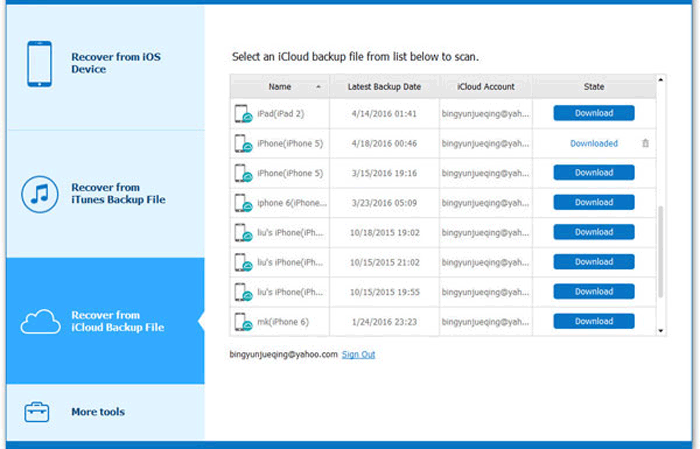
04A pop-up window will appear showing all available data types in the backup. Select "Messages" and "Message Attachments", then click "Next". The software will begin scanning the iCloud backup immediately.
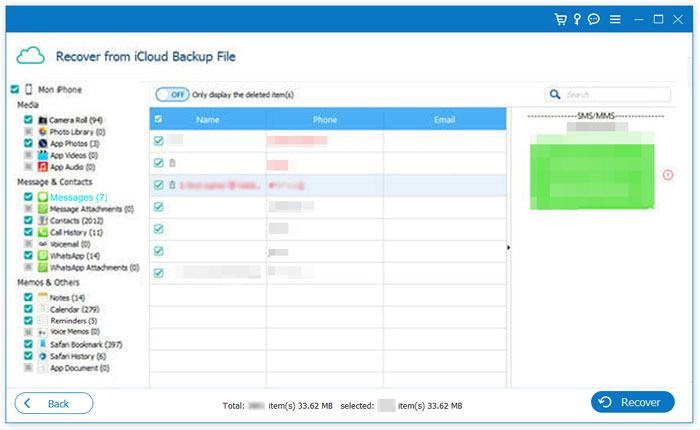
05After the scan is complete, click "WeChat" or "WeChat Attachments" on the left panel to view chat history and attachments. Select the deleted WeChat messages you want to recover, then click "Recover" to save the data to your computer in CSV and HTML formats.
If you don't mind erasing your current iPhone, you can also restore the entire iCloud backup using Apple's official method. However, this will overwrite your existing data, so it's recommended to back up your current iPhone first to avoid losing any new data.
Here is how to restore WeChat history from iCloud backup:
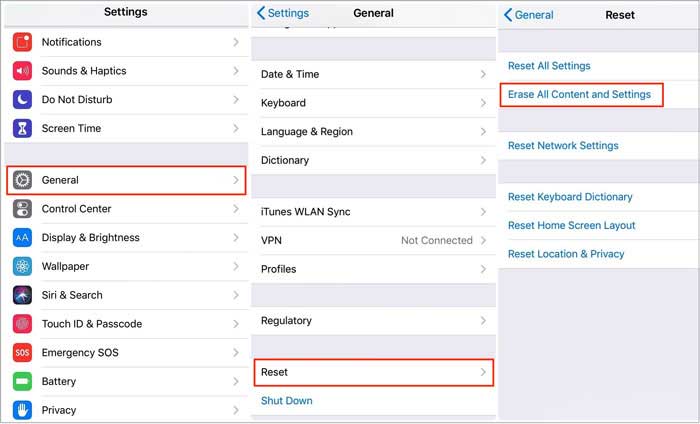
Step 1. Open "Settings" > "General" > "Reset" > "Erase All Content and Settings". Enter your passcode to erase the iPhone. (iPhone won't erase?)
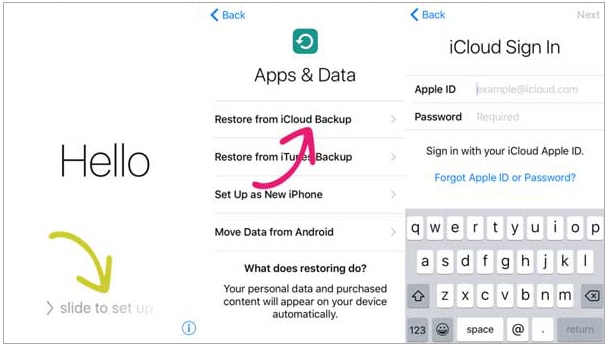
Step 2. After the iPhone restarts, follow the setup instructions and select "Restore from iCloud Backup". Sign in with your Apple ID and password.
Step 3. Choose the desired iCloud backup to restore your WeChat history.
If you get a new iPhone, you can also restore your WeChat history from an iCloud backup with ease. Follow these steps:
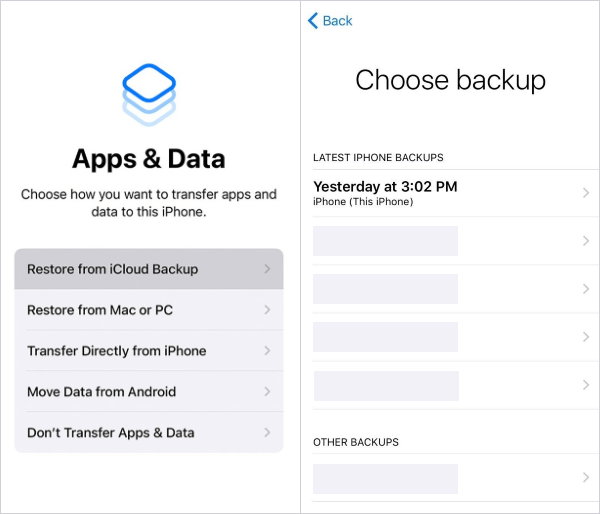
Step 1. Turn on your new iPhone and follow the on-screen setup instructions until you reach the "Apps & Data" screen.
Step 2. Tap "Restore from iCloud Backup", then sign in with your Apple ID and password.
Step 3. A list of available backups will appear. Select the most recent backup that contains your WeChat data to restore your chat history.
That's all about how to recover WeChat messages from iCloud. If you are looking for a more flexible and secure way to restore WeChat history from an iCloud backup, iPhone Data Recovery is worth trying. Unlike Apple's official recovery method, it does not require you to erase your iPhone and also supports previewing and selectively restoring WeChat chat history. It is especially useful for recovering deleted WeChat data, restoring chats to a new iPhone, or extracting old conversations.
Related Articles:
A Complete Guide on How to Recover Deleted WeChat Messages on iPhone
How to Recover Deleted WeChat Photos from iPhone with/without Backup?
WeChat Backup and Restore Guide: Back Up and Restore WeChat History with Ease







 Free Download for PC
  Free Download for Mac


