Losing important data from your iPhone can be a frustrating and stressful experience, whether it's precious photos, crucial contacts, vital messages, or essential app data. When facing such a situation, a reliable iPhone data recovery tool becomes a lifesaver. In this 4Easysoft iPhone Data Recovery review, we will comprehensively analyze this popular data recovery software, including its main features, pricing plans, pros and cons, step-by-step usage guide, and the best alternative to help you make an informed decision. If you're searching for a trustworthy solution to recover lost iPhone data, this 4Easysoft iPhone Data Recovery review is your ultimate reference.
4Easysoft iPhone Data Recovery is a specialized software designed to retrieve lost or deleted data from iOS devices, iTunes backups, and iCloud backups. It caters to both ordinary users and IT professionals, solving data loss issues caused by various scenarios such as accidental deletion, system crashes, device damage, failed iOS updates, forgotten passwords, and more.
This 4Easysoft iPhone Data Recovery review will break down every aspect of the software to help you understand its performance, functionality, and value for money.
When evaluating any iOS recovery software, features are the most critical factor. 4Easysoft iPhone Data Recovery is designed to handle various data loss scenarios, including accidental deletion, system crashes, or factory resets.
Here are its key features:
* Provide three recovery modes: Recover from iOS Device, Recover from iTunes Backup, and Recover from iCloud Backup.
* Support over 20 file types, including contacts, messages, call history, photos, videos, notes, reminders, Safari bookmarks, app documents, and WhatsApp data.
* Feature a file preview function, allowing you to check recoverable files before restoration to avoid unnecessary data recovery and save storage space.
* Fully compatible with all iOS versions, including the latest iOS 17/18/26.
* Support all iPhone models, from older versions to the latest iPhone Air, iPhone 17/17 Pro/17 Pro Max.
* Suitable for various data loss scenarios, such as accidental deletion, system failure, device damage, etc.
When choosing a data recovery tool, pricing is an important factor for most users. This 4Easysoft iPhone Data Recovery review will detail its pricing plans to help you evaluate its cost-effectiveness.
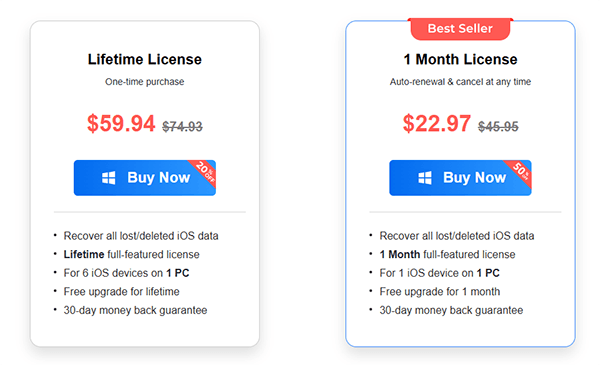
4Easysoft offers both a free trial and paid versions. However, the free trial only provides basic scanning functions; you need to purchase a license to unlock the data recovery feature. The pricing details for the paid versions are as follows:
To provide a fair and objective 4Easysoft iPhone Data Recovery review, we have summarized the software's advantages and disadvantages based on its performance, functionality, and user feedback.
Pros:
* User-friendly, wizard-based interface, suitable for non-technical users with no experience.
* Provide three flexible recovery modes: iOS Device Recovery, iTunes Backup Recovery, and iCloud Backup Recovery.
* Cover most iOS data loss scenarios.
* Selective recovery feature allows users to preview and recover only the files they need, saving time.
* Support a wide range of iOS devices and versions, ensuring broad compatibility.
* 24/7 free technical support and a 30-day money-back guarantee.
Cons:
* The free trial version only offers data scanning functionality and cannot recover data, so users can't fully test the recovery performance before purchasing.
* Limited to the iOS ecosystem; cannot be used for data recovery on Android devices or other systems.
* Success rate of recovery depends on the data loss situation, with more difficulty in recovering permanently deleted or overwritten data.
* Pricing is on the higher side, especially for short-term licenses, compared to similar tools on the market.
* Scanning can be slow for devices with large storage.
Understanding how the software works is just as important as knowing its features. In this part of the 4Easysoft iPhone Data Recovery review, we'll guide you through the exact steps to recover deleted data from your iPhone.
Step 1. Download and launch 4Easysoft iPhone Data Recovery on your computer and connect your iOS device via USB cable. If you're using iOS 11 or later, make sure to unlock your device and tap "Trust" on the screen.
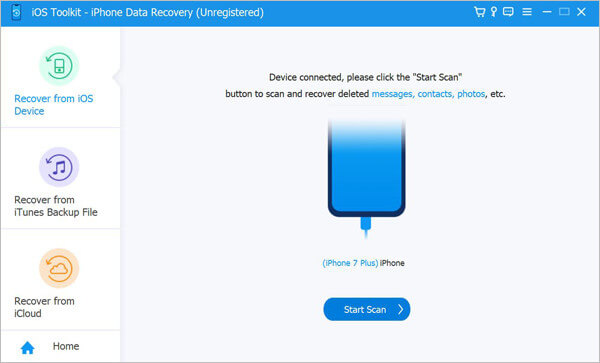
Step 2. Next, select the "iPhone Data Recovery" option on the main interface and go to the "Recover from iOS Device" tab. Click the "Start Scan" button to begin scanning for all deleted data on your device. The scanning time will vary depending on the number of files.
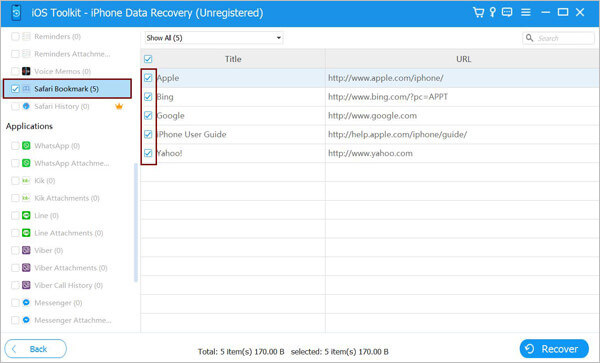
Step 3. Once the scan is complete, the data will be organized into different file types and displayed in the program. You can double-click any file to preview it and then check the ones you wish to recover. Finally, click the "Recover" button to restore all the selected files at once.
While 4Easysoft iPhone Data Recovery is a reliable tool, it does have some limitations, such as a limited free trial, relatively high pricing, and so on. If you are looking for a more cost-effective, user-friendly, and powerful alternative, Coolmuster iPhone Data Recovery is the best choice. It is a professional iOS data recovery tool that helps users recover lost or deleted data from iOS devices, iTunes backups, and iCloud backups. Compared to 4Easysoft iPhone Data Recovery, Coolmuster offers a more user-friendly interface, higher recovery success rates, and more flexible pricing plans, making it the top alternative for iOS data recovery.
The highlights of Coolmuster iPhone Data Recovery:
Here's how to use iPhone Data Recovery to recover data from iOS devices without a backup:
01Download and install the program on your computer, then connect your iOS device using a Lightning cable. When prompted, tap "Trust" on your device.
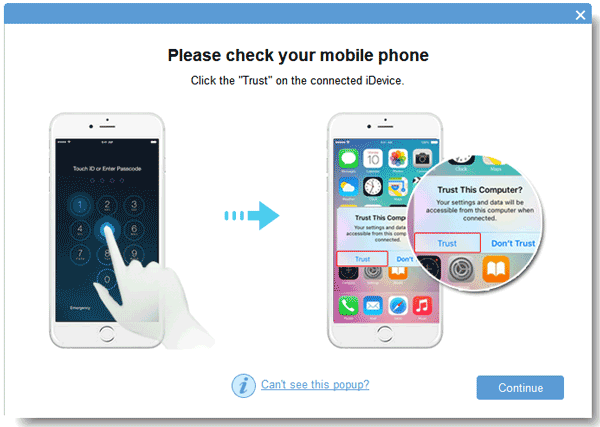
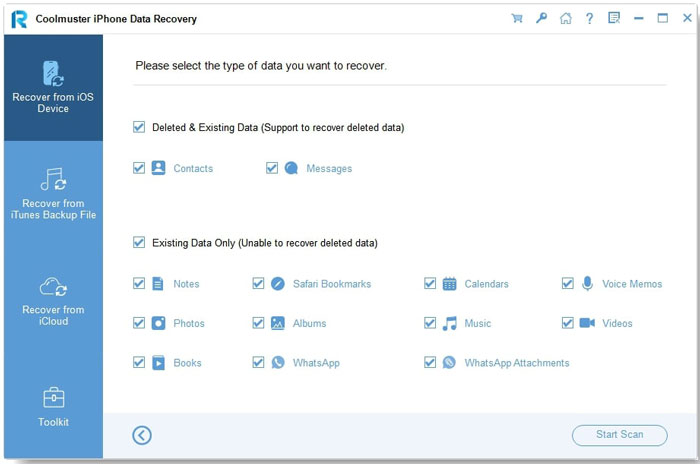
02Once the device is recognized, all data on your iPhone will appear on the screen. Select the types of data you want to recover and click "Start Scan" to begin.
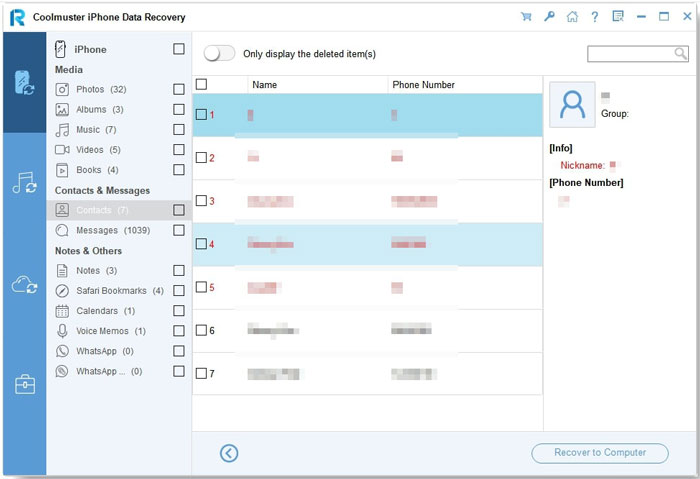
03After the scan is complete, you can preview both existing and deleted files. Use the left panel to choose a category, and the details will appear in the right panel. After selecting the files to recover, click "Recover to Computer" to restore them.
Video Tutorial:
To make this 4Easysoft iPhone Data Recovery review more helpful, here are answers to some frequently asked questions users often have before using the software.
Q1. Can I use 4Easysoft iPhone Data Recovery for free?
No. The free version only allows scanning and previewing files. Recovery requires a paid license.
Q2. Is it safe to use?
Yes. The software operates in read-only mode and does not overwrite or damage your existing data.
Q3. Can I recover iPhone data that was deleted a long time ago?
Yes, it is possible, but the success rate depends on the current status of your iPhone. If you've been using your device regularly, the deleted data may have been overwritten. This is because deleted files are stored in a special database with limited space, and older data can be replaced by newer files.
Q4. Can I recover data from my iPhone if the screen is disabled or broken?
If your device is running an iOS version lower than iOS 11, which doesn't require Trust confirmation, you can still recover data from a broken screen. You just need to ensure that your device is recognized by 4Easysoft iPhone Data Recovery. (How to recover data from a dead/broken iPad/iPhone?)
Q5. Why can't I find any data using the "Recover from iOS Device" mode?
It's possible that the deleted data has been overwritten by new data on your iOS device. However, if you have a backup in iTunes, you can switch to the "Recover from iTunes" mode to access all your deleted data.
To sum up this 4Easysoft iPhone Data Recovery review, the software is a reliable and beginner-friendly solution for recovering lost iPhone data. It offers useful features and a simple interface, making it suitable for everyday users. However, if you're looking for faster performance, deeper recovery, and better overall value, Coolmuster iPhone Data Recovery is a more powerful and dependable choice.
Related Articles:
FonePaw iPhone Data Recovery Review: Features, Pros, Cons, Price & Best Alternatives
Apeaksoft iPhone Data Recovery Review: Features, Pros & Cons
Stellar Data Recovery for iPhone Review: Features, Pros & Cons and Pricing
A Comprehensive iBeesoft iPhone Data Recovery Review in 2026






 Free Download for PC
  Free Download for Mac


