After accidentally deleting photos or text messages or losing iPhone data due to system issues, many users begin searching for third-party iOS data recovery tools. Apeaksoft iPhone Data Recovery is a relatively well-known iPhone data recovery software on the market, designed to recover lost data from the device itself, iTunes backups, and iCloud backups. So, how well does this software actually perform? Is it worth buying? In this Apeaksoft iPhone Data Recovery review, we provide an in-depth evaluation from the perspectives of features, user experience, as well as pros and cons.
Apeaksoft iPhone Data Recovery is an iOS data recovery software designed for Windows and macOS users. It is mainly used to recover data lost due to accidental deletion, system errors, or device damage. The software supports data recovery from the iOS device itself, iTunes backups, and iCloud backups, covering a wide range of common usage scenarios.
The core features of Apeaksoft iPhone Data Recovery mainly include the following aspects:
* Recover deleted or lost data directly from iOS devices as well as from iTunes and iCloud backups.
* Restore a wide range of iOS data types, including photos, contacts, WhatsApp messages, notes, call history, videos, and app data.
* Retrieve data lost due to factory resets, accidental deletion, system crashes, or other unexpected issues.
* Preview both existing and deleted iOS files in detail before performing recovery.
* Fully compatible with all iOS devices and iOS versions, including iOS 26/iPadOS 26 and iPhone 17.
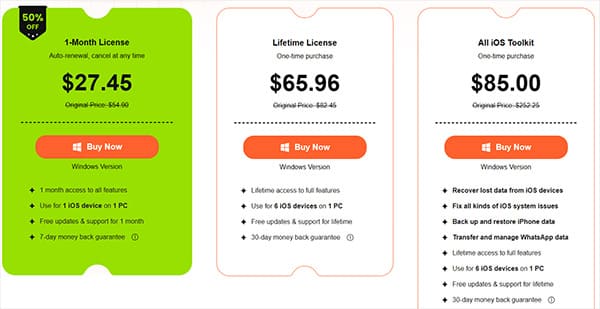
After understanding the features, price is often one of the key concerns for users. Its pricing structure is roughly as follows (prices may vary due to promotions). The Windows and Mac versions are priced the same.
No data recovery software is perfect. Based on overall functionality, user experience, pricing, and user feedback, the pros and cons of Apeaksoft iPhone Data Recovery are as follows:
Pros:
* Support data recovery from multiple sources, including the device itself, iTunes, and iCloud.
* Clear recovery process with a beginner-friendly interface.
* Support recovery of many common iOS data types.
* Allow preview of scan results to avoid blind recovery.
* Compatible with both Windows and macOS.
* Offer a 30-day money-back guarantee if you're not satisfied.
* Provide a free trial version.
Cons:
* The free version only supports scanning and preview; recovery requires payment.
* Scan speed can be slow when dealing with large amounts of data.
* Data recovery success rate is not always stable.
* Pricing is relatively high compared to similar software on the market.
Here are some real user reviews to help you better understand the software.
"First of all, their free trial wasn't helpful at all. I purchased this software in hopes of recovering a single file, which was really important to me. The name of the file was visible, but the 'preview wasn't available' on their free trial. I purchased and downloaded my file, and it was corrupted, even when I downloaded it in a different place. It never opened, and my money went to waste. Now that I am asking for a refund because they clearly stated that there was a 7-day money-back guarantee if their software didn't work, they are very noncompliant. They have horrible customer service, and they are not providing a refund when their software doesn't work! All of my money went to waste!"
- by Muzna Riaz
"Promised a 100% success rate, but after purchasing a lifetime license, the software failed to recover my ipad. I followed all instructions and contacted support, and eventually I got a refund. Very disappointed at first and told them to review again."
- by John Kenneth
"The support team from Apeaksoft solved our issue very competently and quickly. Thanks a lot for this great support."
- by Stefan
After understanding its capabilities, many users want to know whether Apeaksoft iPhone Data Recovery is easy to use in real-world scenarios. Fortunately, the software follows a standard recovery workflow that most users can handle without technical knowledge.
Here is how to use Apeaksoft iPhone Data Recovery to recover data from iOS devices:
Step 1. Install Apeaksoft iPhone Data Recovery on your Windows or Mac computer. Double-click the software icon to launch the program, then select the "iPhone Data Recovery" option. Connect your iOS device to the computer using a USB cable.
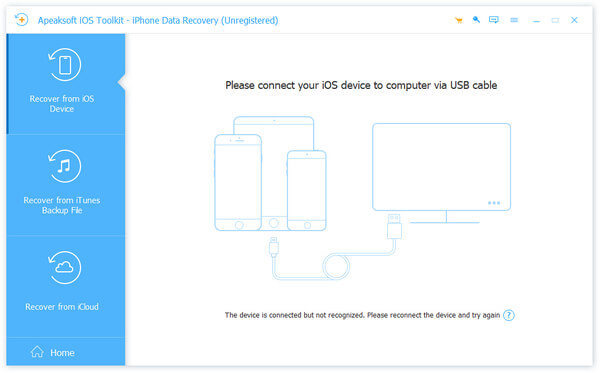
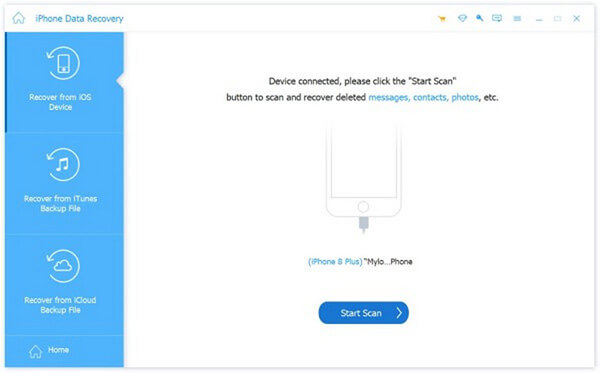
Step 2. The program will prompt you to unlock your device and ask whether you trust the computer. Select "Trust", then click "Next". After that, click the "Start Scan" button, and the software will begin scanning all data on your iPhone.
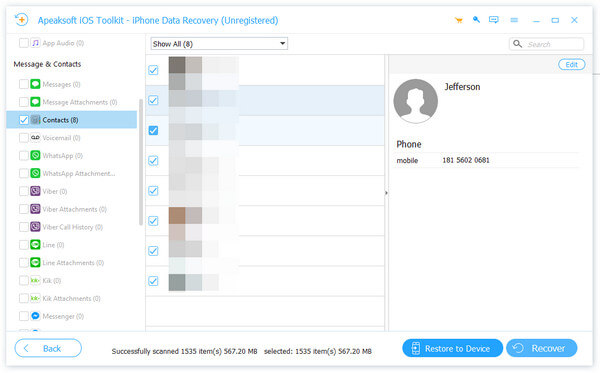
Step 3. The left sidebar will display all the scanned data from your device, including both existing and deleted items, allowing you to recover any data type. At the top, you can choose to view all results or only deleted items, and you can preview details, such as contact information, in the right sidebar.
Step 4. After selecting the data you want to recover, click the "Recover" button at the bottom right. A window will appear prompting you to choose a save location on your computer—set the path, and the software will save the recovered data as a backup.
If you find the scan results unsatisfactory when using Apeaksoft, or if you are looking for a cost-effective yet fully featured iPhone data recovery software, Coolmuster iPhone Data Recovery is worth considering. It offers similar features to Apeaksoft, including recovery from iOS devices, iTunes, and iCloud backups, while generally being more affordable. For users who value both reliability and value for money, Coolmuster is a dependable choice for efficiently recovering lost iPhone data.
Main features of Coolmuster iPhone Data Recovery:
Here is how to use iPhone Data Recovery to recover data from iOS devices:
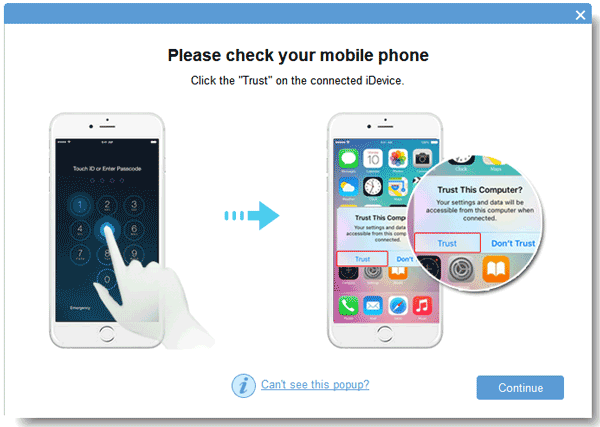
01Download and install the program on your computer, then connect your iDevice using a Lightning cable. Tap "Trust" on your device when prompted.
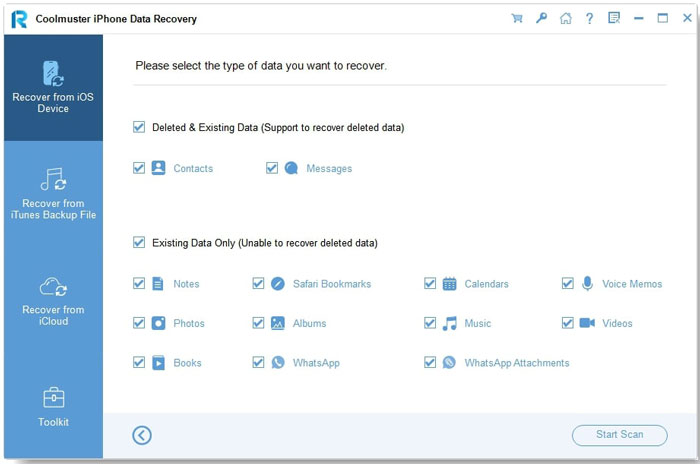
02Once recognized, all data on your iPhone will appear on the screen. Select the data types you want to recover and click "Start Scan" to begin.
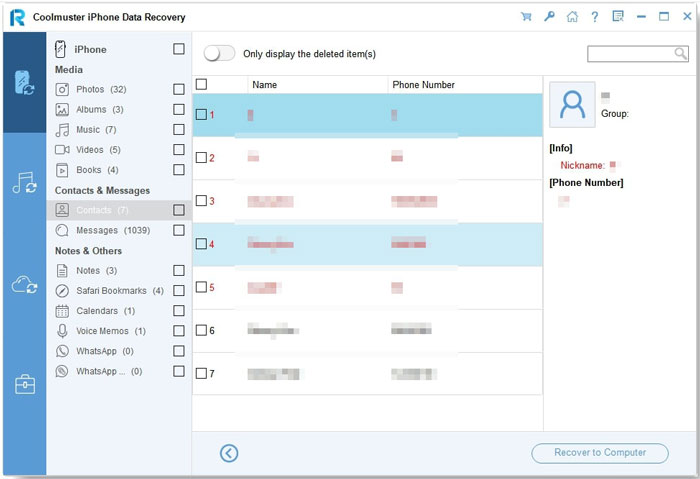
03After scanning, you can preview both existing and deleted files. Use the left panel to choose a category and view its details in the right panel. Once you've selected the files to recover, click "Recover to Computer" to restore them. (Tip: Enabling the "Only display deleted item(s)" option will show only deleted files.)
Video Tutorial:
Q1. Is Apeaksoft Data Recovery safe or legit?
Yes, Apeaksoft iPhone Data Recovery is a tool released by a legitimate software developer and is generally safe and legal to use. However, it is recommended to always download and install it from the official website to avoid risks associated with modified third-party versions.
Q2. Is Apeaksoft iPhone Data Recovery free to use?
It is not completely free. The free version only allows scanning and previewing data; to actually recover and export files, you need to purchase a paid license.
Q3. Can Apeaksoft iPhone Data Recovery recover data without a backup?
Yes. Apeaksoft can scan and recover data directly from your iPhone without a backup, but the success rate depends on whether the data has been overwritten.
This Apeaksoft iPhone Data Recovery review shows that the software is suitable for basic iOS data recovery tasks, especially when users want preview-based restoration. However, its inconsistent success rate and pricing may limit its appeal.
For users who prioritize recovery reliability, speed, and overall value, Coolmuster iPhone Data Recovery stands out as a smarter and more dependable alternative.
Related Articles:
Apeaksoft iOS Unlocker Review: Features, Price, Pros, Cons & Best Alternative
iPhone Data Recovery: Recover Lost Data/Files with or without Backup
FonePaw iPhone Data Recovery Review: Features, Pros, Cons, Price & Best Alternatives
Leawo iOS Data Recovery Review: Features, Price & Best Alternative






 Free Download for PC
  Free Download for Mac


