TL;DR:
Want to download full-resolution photos from iCloud without losing image quality? This guide covers several easy methods to help you save original iCloud photos to different devices:
iCloud Photos makes it easy for Apple users to store, sync, and access photos across iPhone, iPad, and Mac devices. However, when Optimize iPhone Storage is enabled, your device may only keep space-saving versions of photos while the original full-resolution files remain in iCloud. If you want to download and save your photos in their original quality, you need the right method. In this guide, we will show you how to download full-resolution photos from iCloud to iPhone, iPad, Mac, and Windows PC.

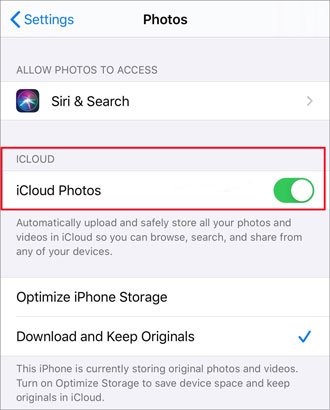
If you have enabled "Optimize iPhone Storage" on your iPhone or iPad, your device may only keep smaller versions of photos to save storage space, while the original full-resolution photos remain stored in iCloud. To download the original photos from iCloud, you can enable "Download and Keep Originals" in the Photos settings. Before starting, make sure your iPhone has enough storage space and a stable Wi-Fi connection. (iPhone storage full?)
Here are the specific steps:
Step 1. Open the "Settings" app on your iPhone or iPad.
Step 2. Tap your name and profile picture at the top to access your Apple ID settings.
Step 3. Select "iCloud" and tap "Photos".
Step 4. Choose "Download and Keep Originals" under iCloud Photos. Your device will start downloading the original full-resolution photos stored in iCloud.
Step 5. Keep your iPhone/iPad connected to Wi-Fi and wait for the download process to complete. The time required depends on the number and size of your photos.
If you only want to download certain original photos instead of all photos, follow these steps:
Step 1. Open the "Photos" app on your iPhone or iPad.
Step 2. Select the photos you want to download.
Step 3. Tap the "Share" button (the square icon with an upward arrow).
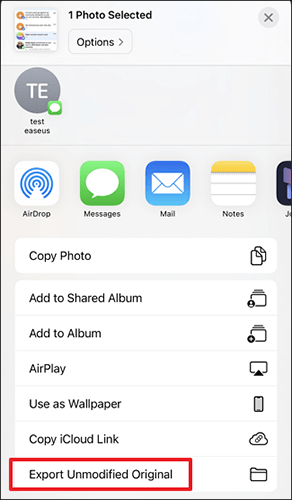
Step 4. Choose "Save to Files" or select "Export Unmodified Original" if this option is available.
After that, the selected photos will be saved in their original resolution without quality loss.
You can also access iCloud and download full-resolution photos from iCloud to your Mac using the built-in Photos app. By enabling the option to download original photos, your Mac will keep the full-quality versions instead of only optimized copies.
Follow these steps:
Step 1. Open the "Photos" app on your Mac.
Step 2. Click "Photos" in the top menu bar, then select "Settings" (or "Preferences" on older macOS versions).
Step 3. Go to the "iCloud" tab.
Step 4. Select "Download Originals to this Mac" under iCloud Photos.
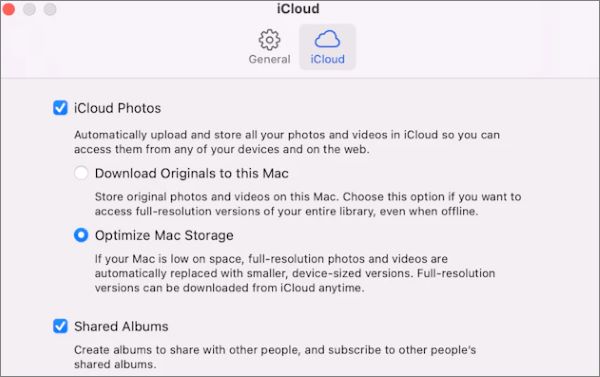
Your Mac will start downloading the original full-resolution photos from iCloud. The download time depends on your photo library size and internet speed.
If you only need to download specific photos in their original quality, you can export them directly from the Photos app.
Step 1. Open the "Photos" app and select the photos you want to download.
Step 2. Click "File" in the menu bar, then choose "Export" > "Export Unmodified Original for [number] Photos".
Step 3. Select the file format and destination folder, then click "Export".
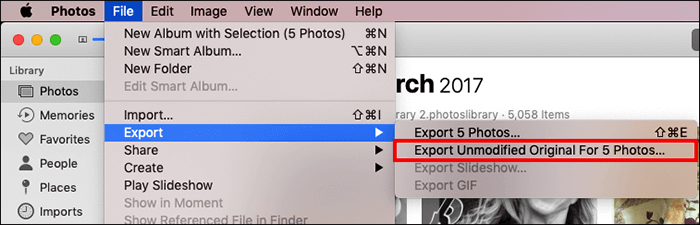
The selected photos will be saved to your Mac in their original resolution without any quality loss.
Note: Make sure iCloud Photos is enabled and your Mac is signed in with the same Apple ID as your iPhone/iPad. Also, keep enough free storage space available because full-resolution photos may take up significantly more space than optimized versions.
Windows users can download photos from iCloud to computer through iCloud.com. This method allows you to save selected original photos directly to your computer without installing additional software.
Follow these steps:
Step 1. Open a web browser on your Windows PC and visit iCloud.com.
Step 2. Sign in with the Apple ID associated with your iCloud Photos.
Step 3. Click "Photos" and browse your iCloud photo library.
Step 4. Select the photos you want to download.
Step 5. Click the "Download" button (the downward arrow icon) in the top-right corner.
Step 6. Choose "Unmodified Original" if prompted, then confirm the download.
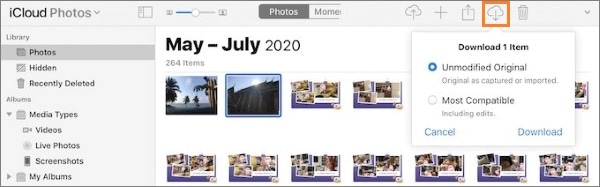
The selected photos will be downloaded to your PC in their original resolution and quality.
Note: If you need to download a large number of photos from iCloud, downloading them individually through iCloud.com can be time-consuming. In this case, you can use iCloud for Windows or a professional iCloud backup tool to manage and export your photos more efficiently.
Coolmuster iCloud Backup Recovery is a professional iCloud data recovery tool designed specifically for extracting files from iCloud backups. It allows users to efficiently and selectively download full-resolution photos from iCloud backups, enabling direct saving of high-quality images without complicated steps. Whether you're downloading a single photo or a large batch, this tool can handle it effortlessly, ensuring that the original resolution is preserved without any loss.
Highlights of Coolmuster iCloud Backup Recovery:
Here is how to download full-resolution photos from iCloud using iCloud Backup Recovery:
01Download, install, and open this software on your computer to access the main interface.
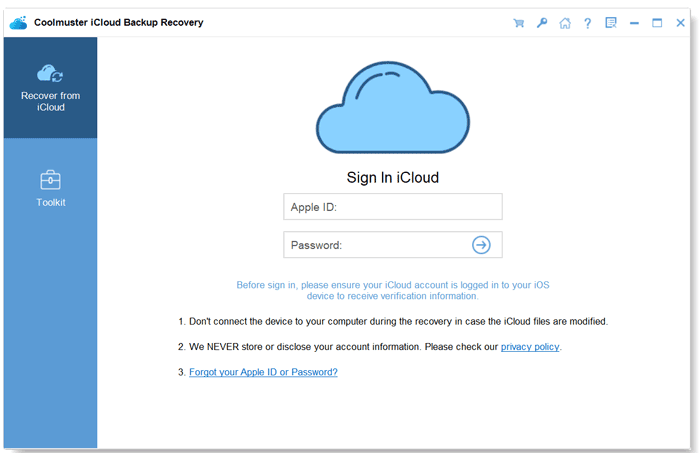
02Enter your Apple ID and password, then click the arrow icon to log in.
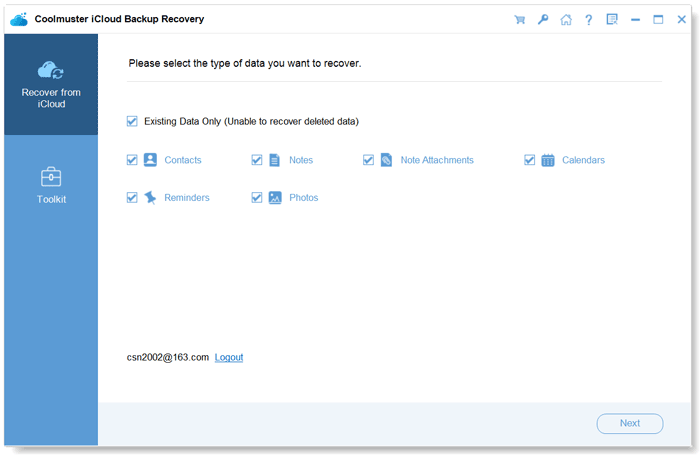
03Choose the file types you wish to restore and click the "Next" button. The software will scan and display your iCloud backup files.
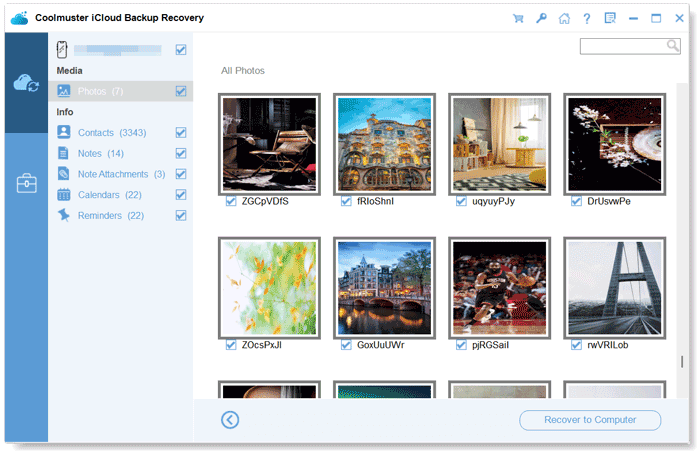
04Click on "Photos" to preview the photos in your iCloud backup. Select the photos you want, then click "Recover to Computer" to download them to your PC.
Video Tutorial:
Q1. Why are my iCloud photos not downloading in full resolution?
Your iCloud photos may not appear in full resolution if "Optimize iPhone Storage" is enabled on your device. In this case, your iPhone or iPad keeps smaller versions locally while the original photos remain in iCloud. You need to enable "Download and Keep Originals" or export the original files to get the full-quality versions.
Q2. Does iCloud reduce photo quality?
No. iCloud Photos stores your photos and videos in their original resolution and quality. However, if your device uses optimized storage, it may temporarily store smaller versions to save local storage space.
Q3. How long does it take to download full-resolution photos from iCloud?
The download time depends on several factors, including the number of photos, file sizes, available storage space, and internet speed. A large photo library with thousands of high-resolution images may take several hours or longer to complete.
Q4. Why can't I download photos from iCloud?
You may encounter download issues due to insufficient device storage, unstable network connections, disabled iCloud Photos, or incorrect Apple ID sign-in. Checking your iCloud settings and freeing up storage space can usually help resolve the problem.
Q5. What is the difference between iCloud Photos and iCloud Backup when downloading photos?
iCloud Photos is designed to sync your photo library across Apple devices, while iCloud Backup saves device data for restoration purposes. If you want to retrieve photos from a device backup rather than your synced photo library, you may need a backup recovery tool to extract the photos.
Downloading full-resolution photos from iCloud is simple once you choose the right method for your device. Whether you use an iPhone, iPad, Mac, or Windows PC, you can access and save your original photos through iCloud settings, the Photos app, or iCloud.com. If you need to recover and export photos from an iCloud backup, Coolmuster iCloud Backup Recovery provides a convenient way to extract and save your photos while preserving their original quality.
Related Articles:
How to Transfer iCloud Photos to External Hard Drive with Ease
How to Access iCloud Photos on Android [Easy & Fast]
How to Transfer Photos from One iCloud Account to Another on PC/Mac, iPhone/iPad?
[2026 Updated] 12 Expert Solutions for iCloud Photos Not Loading






 Free Download for PC
  Free Download for Mac


