"My iPhone 7 was showing no service and said cellular data could not be updated. I reset to factory setting and now it is telling me unable to activate. I connected to my Mac, then iTunes, and the message I got while using the Mac is that the iPhone could not be activated because the activation information could not be obtained from the device."
- from Apple Community
Seeing the error "iPhone could not be activated because the activation information could not be obtained" can be frustrating. This error message is quite rare, and if you've encountered it, don't worry. We'll walk you through how to fix it and explain the potential causes, so you can avoid running into this issue again. Let's look together.
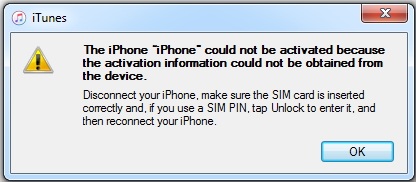
There are several reasons why the activation process may fail. Below are the possible causes for the "iPhone could not be activated because the activation information could not be obtained" error.
* Unstable network connection (issues with Wi-Fi or cellular data).
* Apple servers are busy or experiencing outages.
* Your device may not be compatible with the carrier SIM card currently inserted.
* Activation Lock could be enabled through Find My iPhone.
* The iOS version on your iPhone may no longer be supported by Apple's servers.
* The iOS firmware might not have been installed correctly on your device.
After you know the reasons, let's go over some solutions that should help resolve this activation problem on your iPhone.
When activating an iPhone, the device must be connected to a stable network to communicate with Apple's servers. If the connection is unstable, it may fail to obtain the activation information.
Make sure you're connected to a reliable Wi-Fi network. Try switching to a different Wi-Fi network, and if that still doesn't work, attempt activation using cellular data instead.
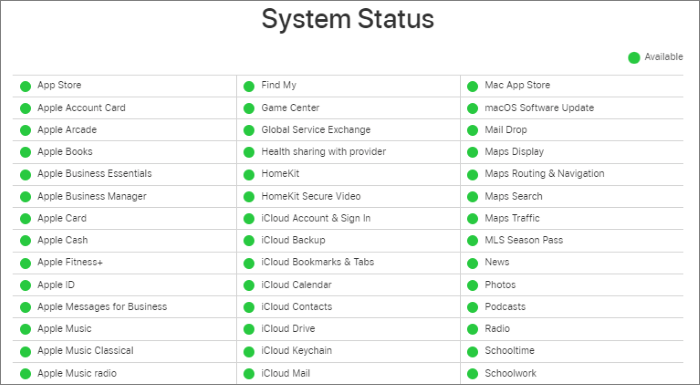
Sometimes, the issue isn't on your side. Apple's activation servers may be temporarily down, which can trigger your iPhone could not be activated because the activation information could not be obtained.
To check, visit Apple's System Status page and look for the "iOS Device Activation" indicator. If it's green, the service is working normally. If it appears yellow or red, the activation service is currently unavailable. In that case, wait until it turns green and then try again.
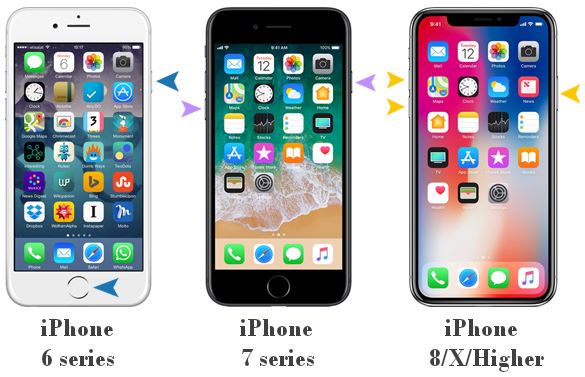
Temporary system glitches can prevent activation. A force restart refreshes the system and can resolve minor bugs causing the issue.
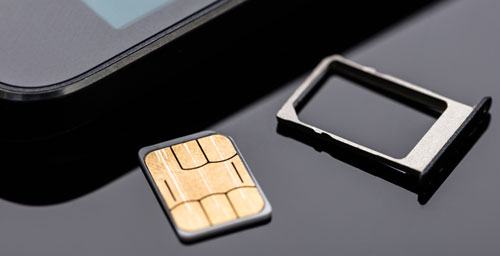
Your iPhone may need a valid SIM card to complete the activation process. If the SIM card is damaged, improperly inserted, or not recognized, the activation may not go through.
To fix this, turn off your iPhone and use a SIM eject tool to remove the card. Check it for any damage or dirt, then reinsert it or try a different SIM card. Power your device back on and attempt activation again. If it still doesn't work, contact your carrier for assistance.
The error message "the iPhone could not be activated because the activation information could not be obtained" may also appear if you are using an outdated version of iTunes. If you haven't updated it recently, make sure you install the latest version on your computer before connecting your iPhone.
To update iTunes, follow the steps below:
Step 1. Launch iTunes on your computer and make sure it has fully loaded.
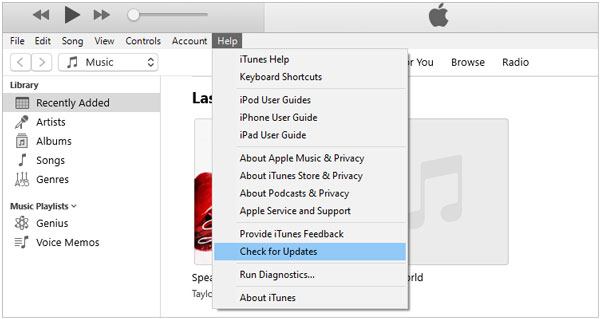
Step 2. At the top of the iTunes window, click the "Help" menu, then choose "Check for Updates" from the drop-down list.
Step 3. If an update is available, a prompt will appear. Follow the on-screen instructions to download and install the latest version of iTunes.
To resolve the "iPhone could not be activated because the activation information could not be obtained" issue, you can also try restoring your device using DFU mode via iTunes or Finder. Please note that this process will erase all data on your iPhone. (How to back up iPhone data?)
Here is how to do it:
Step 1. First, open iTunes or Finder if you're using macOS Catalina or later and connect your iPhone to the computer.
Step 2. Then, put your iPhone into DFU mode. Once your device is in DFU mode, the screen will remain completely black.
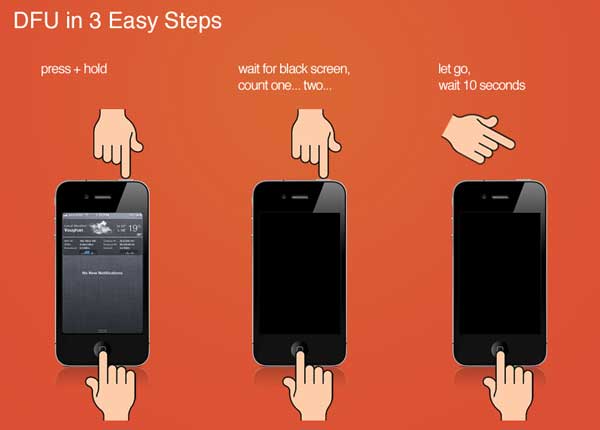
Step 3. Your iPhone should be automatically detected, and a pop-up will appear on your computer. Click "Restore" and confirm your choice to begin the process.
Step 4. After the restore is complete, you can set up your iPhone and restore your data from your most recent backup if available.
If you don't want to use DFU mode (which will erase your data), you can choose a safer tool such as iOS System Recovery. It is designed to fix iOS system issues, including activation failures. It can repair system errors without data loss, making it especially suitable for regular users.
Why choose iOS System Recovery?
* Quickly resolve the iPhone activation error without data loss.
* It supports a variety of iOS system and iTunes issues, including iPhone that won't turn on, the black/green/blue/white screen of death, devices stuck in recovery or DFU mode, and more.
* Effortlessly upgrade or downgrade your iOS version.
* Compatible with most iOS versions and iPhone models, including the latest iPhone 17 series and iOS 26.
* Work seamlessly on both Mac and Windows.
Here is how to fix iPhone could not be activated because the activation information could not be obtained without losing data:
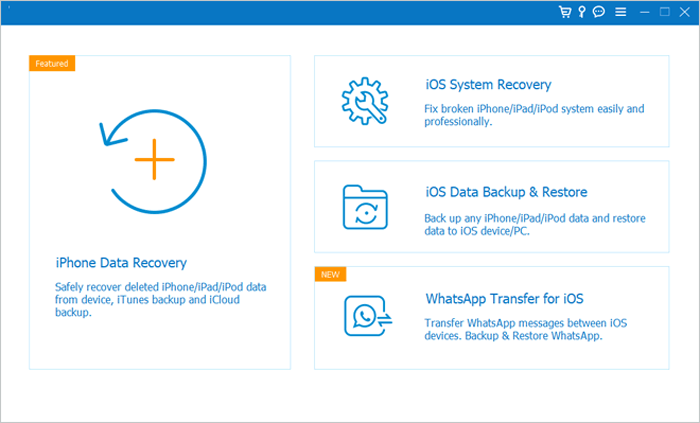
01Launch the program on your computer and connect your iPhone via USB cable. It will automatically detect your device and show the interface. Next, click "More Tools" and select "iOS System Recovery".
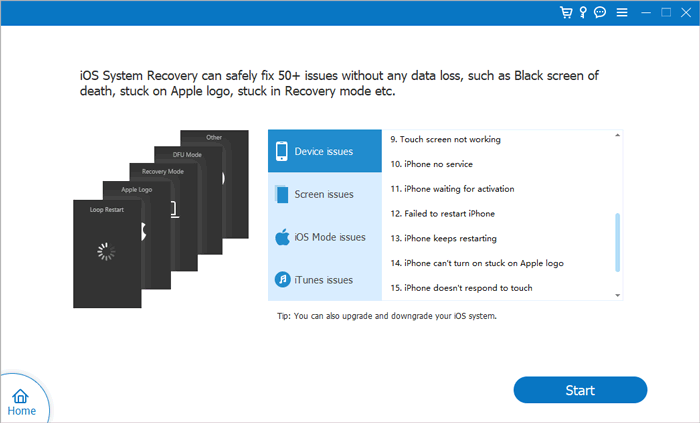
02The program will scan your device for issues, such as being stuck on the Apple logo, in Recovery mode, iTunes errors, or screen problems. Click "Start" to proceed.
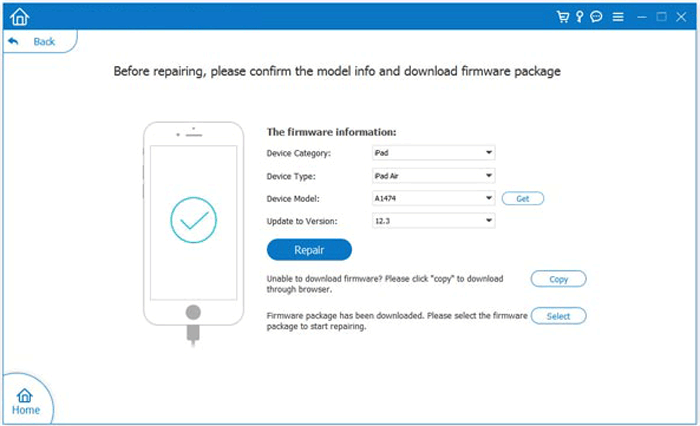
03Verify your iPhone's details, and if everything looks correct, click "Repair" to begin the fix. The program will detect your current iOS version and download the latest firmware for your device.
If you're still seeing the error message "the iPhone could not be activated because the activation information could not be obtained from the device", it's best to visit the nearest Apple Store. The issue may be related to a hardware fault, and Apple's technicians can help diagnose and fix it.
The error "iPhone could not be activated because the activation information could not be obtained" is usually caused by network issues, server problems, or system glitches. Fortunately, most cases can be resolved with the methods above.
If you want a quick, reliable, and no-data-loss solution, iOS System Recovery stands out as the best option. It simplifies the repair process and helps you fix activation errors efficiently.
Related Articles:
iPhone Force Restart Not Working? - 8 Effective Solutions Inside!
How to Fix iPhone Won't Restore in Recovery Mode? - 7 Effective Ways
6 Solutions to Fix the SIM Not Supported on iPhone Error
How to Reset iPhone without Apple ID or Password: 3 Easy Ways

 iPhone Recovery
[Solved] iPhone Could Not Be Activated Because the Activation Information Could Not Be Obtained
iPhone Recovery
[Solved] iPhone Could Not Be Activated Because the Activation Information Could Not Be Obtained




 Free Download for PC
  Free Download for Mac
