When discussing professional screen recording tools, Camtasia screen recording software is almost always part of the conversation. For years, Camtasia screen recorder has been widely used by educators, trainers, marketers, and content creators who need more than basic screen capture. But is Camtasia still the best choice today? And more importantly, what are the best Camtasia alternatives available if you want better pricing, lighter performance, or different features?
In this guide, we'll first review Camtasia in detail, then explore the most reliable Camtasia alternatives for screen recording, including both free and premium options.
Camtasia is a professional screen recording and video editing software developed by TechSmith, designed to provide users with an all-in-one solution from recording to final production. It is not just a screen recording tool, but a complete video creation platform, suitable for various scenarios such as education and training, online course creation, software demos, and corporate internal training.
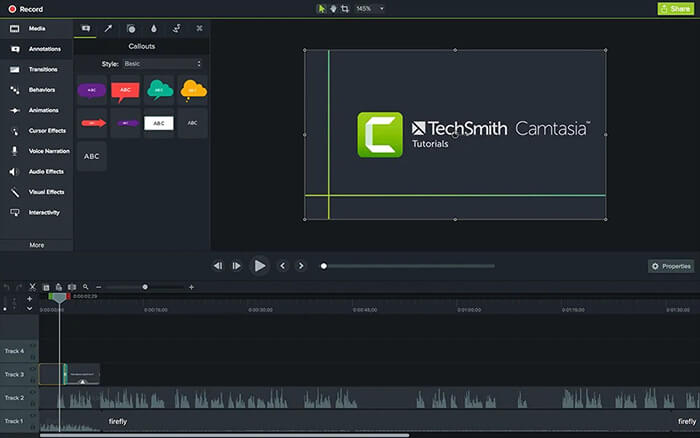
The core features of Camtasia:
Pros:
* All-in-one solution that integrates recording, editing, and post-production.
* User-friendly and easy to use, perfect for beginners.
* High-quality recording with support for 4K/60fps.
* AI features like automatic captions, translations, and voiceovers.
* Interactive elements that are ideal for educational videos and training materials.
* Cross-platform support for both Windows and macOS.
* Extensive asset library with royalty-free templates, transitions, and music.
Cons:
* High price with a one-time purchase or annual subscription.
* Resource-intensive, potentially slowing down low-powered devices.
* Steep learning curve for mastering advanced features.
* Limited support for multi-camera editing, not ideal for multi-video source projects.
* No free version, only a trial is available.
* It may feel overly complex if only basic recording features are needed.
Although Camtasia screen recording software is a powerful tool, its high cost, resource demands, and learning curve make it unsuitable for some users. Fortunately, there are many Camtasia alternatives on the market that offer similar or even more advanced screen recording capabilities, catering to different budgets, skill levels, and specific needs. This section will provide a detailed overview of 7 excellent alternatives.
Coolmuster Screen Recorder is a lightweight yet powerful screen recording tool designed for users who want smooth recording performance without dealing with overly complicated settings. As one of the practical Camtasia alternatives for screen recording, it focuses on delivering high-quality recordings with a simple and beginner-friendly experience.
Unlike Camtasia, which emphasizes advanced editing and production workflows, Coolmuster Screen Recorder prioritizes fast setup, stable recording, and efficient performance. It is suitable for recording online meetings, tutorials, gameplay, presentations, streaming videos, and more.
Key features of Coolmuster Screen Recorder:
Here is how to use this Camtasia alternative for Windows screen recording:
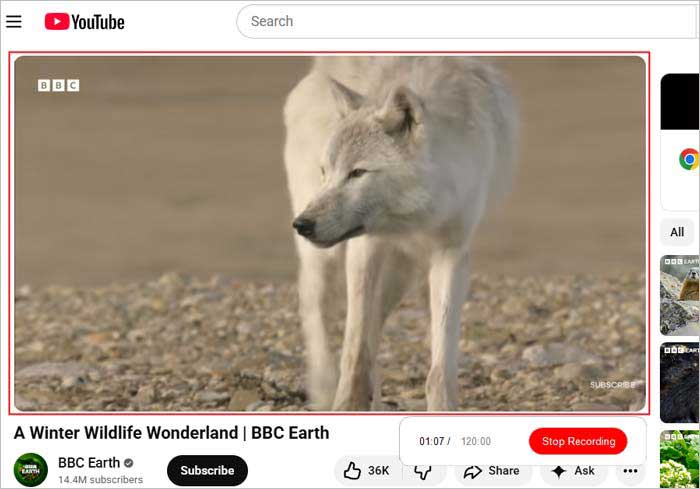
01Open the software and choose "Full Screen" or "Custom" to set the recording area.
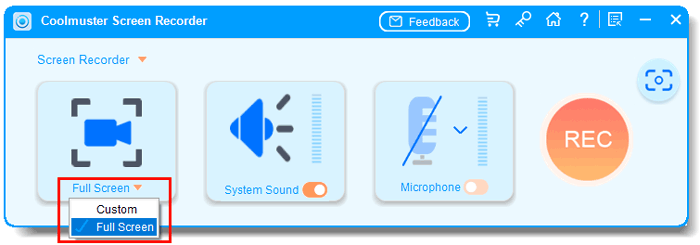
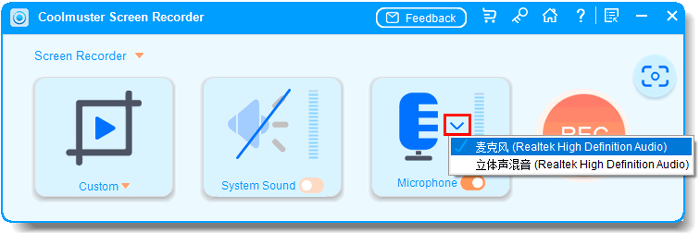
02Select your audio source: "System Sound", "Microphone", or mute audio completely.
03Click the orange "REC" button, then choose "Start Recording". A short countdown will begin automatically.
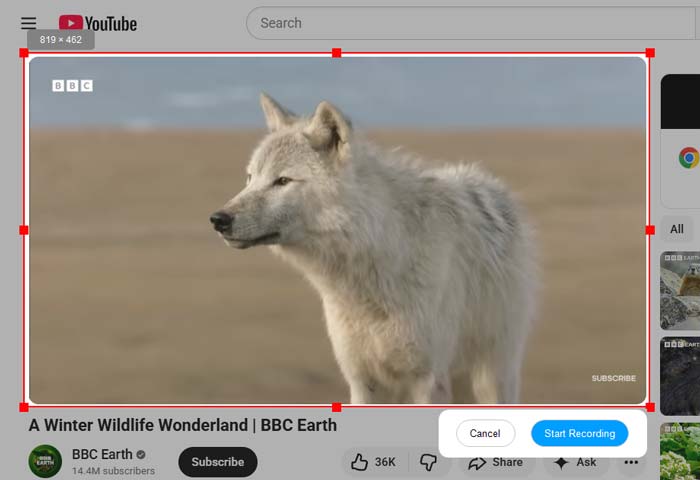
04When finished, click "Stop Recording". Your video will be saved locally as an MP4 file, with a "Copy" option for quick sharing.
Video Tutorial:
Pros:
* Easy-to-use interface suitable for beginners.
* Smooth HD recording with low system resource consumption.
* Support screen and audio capture.
* No complicated setup process.
* Good choice for tutorials, meetings, and online videos.
Cons:
* Editing tools are relatively basic compared to Camtasia.
* Lack advanced animation and interactive features.
* Not designed for professional-level video production workflows.
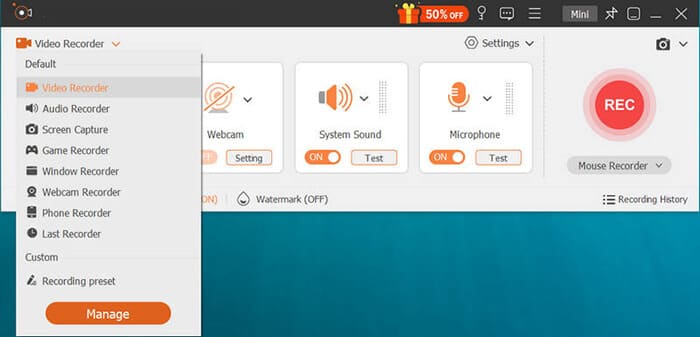
Aiseesoft Screen Recorder is widely regarded as one of the best Camtasia alternatives, especially for users who prioritize performance, simplicity, and affordability. Available for both Windows and macOS, it offers high-quality screen capture and flexible settings, making it ideal for recording tutorials, meetings, gameplay, and streaming content. Unlike Camtasia, this software focuses on high-quality recording while minimizing the impact on system resources.
Pros:
* Support both Windows and macOS, offering great compatibility.
* Offer full-screen, window, and custom region recording, suitable for various needs.
* Can record system sound, microphone, or both, with independent volume control.
* Simple and user-friendly interface, ideal for beginners.
* Adjustable resolution, frame rate, and output format to balance quality and file size.
* Support webcam recording, perfect for adding personal commentary.
* Provide basic annotation and editing tools for quick edits.
Cons:
* Free trial is limited to 3 minutes and premium features are restricted.
* Editing tools are basic, lacking advanced features.
* No advanced tools like instant replay, not ideal for capturing fast-paced content.
* May run slowly on low-end devices, especially when recording high-resolution content.
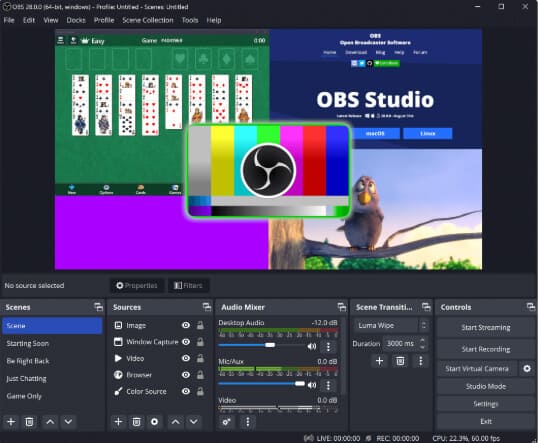
OBS Studio is a free, open-source alternative to Camtasia, popular with gamers, streamers, and content creators. Unlike Camtasia, it offers full features at no cost, making it a great option for budget-conscious users. OBS is designed for high-performance screen recording and live streaming, supporting Windows, macOS, and Linux. It handles high-resolution recordings (up to 8K) and high frame rates (up to 120fps), perfect for gaming and live events. It also offers features like scene switching, audio mixing, and plugin support, allowing for easy customization.
Pros:
* Free and open-source, no cost, ads, or feature limitations.
* Support 8K resolution and 120fps recording, perfect for high-quality gaming and professional content.
* Offer multi-scene switching, audio mixing, and plugin support for a personalized setup.
* Direct integration with platforms like Twitch, YouTube, and Facebook, great for live streaming.
* Cross-platform support for Windows, macOS, and Linux.
* Use GPU encoding to reduce CPU load and ensure smooth recording.
* Active community with tutorials, plugins, and support.
Cons:
* Complex interface with a steep learning curve, not ideal for beginners.
* No built-in editing features, requires separate software for post-production.
* Demand a powerful computer, may experience lag on lower-end devices.
* Limited default assets, lacks pre-built templates and royalty-free media library.
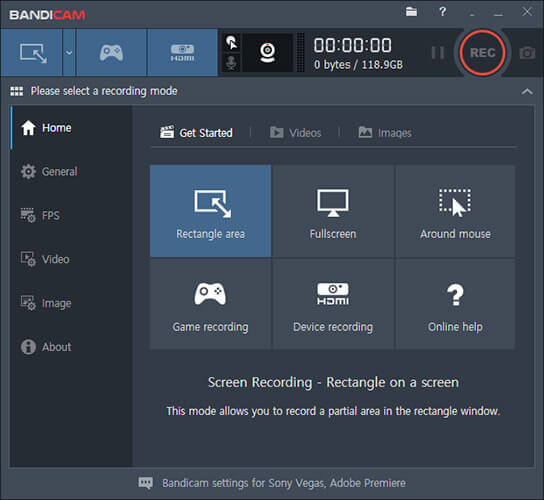
Bandicam is a lightweight, fast alternative to Camtasia, designed for capturing games, tutorials, and desktop activities, and is compatible with Windows. Known for its low CPU usage and high-quality recordings, it's perfect for gamers and content creators who need smooth videos.
Unlike Camtasia, Bandicam focuses more on screen recording with some basic editing features. It supports MP4 and AVI formats, up to 4K resolution, and includes features like real-time drawing, webcam overlay, and scheduled recording. With its simple interface and fast performance, it's ideal for users looking for ease and efficiency.
Pros:
* Low CPU usage, ensuring smooth recording during high-intensity tasks.
* Support 4K resolution and 120fps, providing clear video quality.
* Fast startup and smooth performance, even on mid-range computers.
* Basic editing built-in: trim, add text, and draw in real-time.
* Optimized for game recording, with support for DirectX/OpenGL and frame rate display.
* Webcam picture-in-picture recording, perfect for commentary.
* Scheduled recording, ideal for meetings or live streaming.
Cons:
* Windows-only, not available for macOS or Linux.
* Limited advanced editing features, lacking AI captions and interactive elements.
* Free version includes a watermark.
* No cross-platform sync for recorded files and settings.
* Traditional UI design.
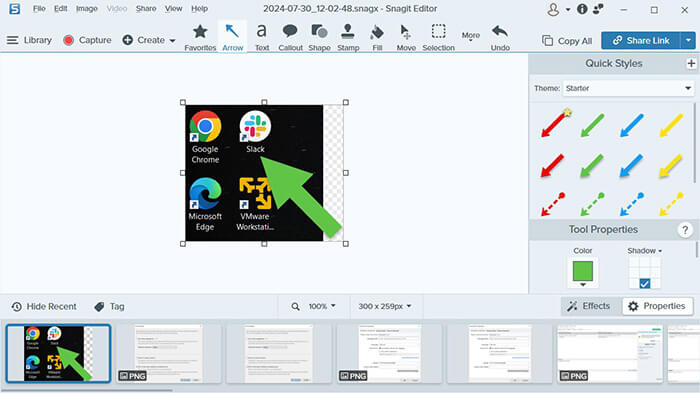
Snagit is a tool developed by TechSmith, focused on screen capture and image editing, with basic screen recording features. Unlike Camtasia, Snagit is lighter and focuses on quick, high-quality captures. It supports scrolling screenshots, video recording, and simple editing, making it ideal for content creators, educators, and business professionals. Snagit's intuitive interface and seamless integration with other TechSmith tools make it a simple and reliable choice.
Pros:
* Support scrolling, panoramic, and region capture, ideal for capturing long documents or web pages.
* Record high-quality videos and audio, perfect for short tutorials or product demos.
* Built-in editing tools with arrows, text, and blur features.
* Extract text from screenshots, saving time on transcription.
* Available for both Windows and macOS, offering flexibility.
* Seamlessly integrates with other TechSmith tools (like Camtasia) and popular platforms.
* Simple and easy to use, suitable for beginners.
Cons:
* Limited video editing features, lacks advanced editing tools.
* Paid tool, which may be expensive for casual users.
* No Linux support.
* Not ideal for long recordings, best for short videos (under 10 minutes).
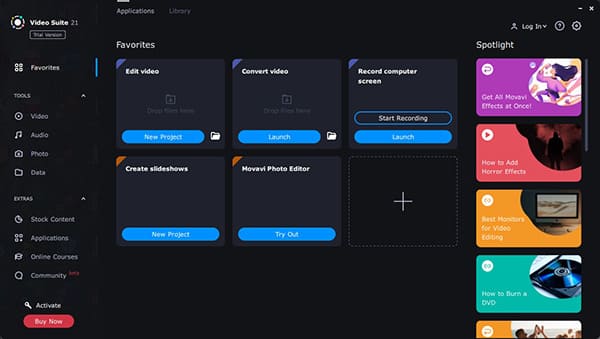
Movavi Video Suite is an all-in-one multimedia tool that combines screen recording, video editing, and video conversion, making it a powerful alternative to Camtasia screen recording software. Unlike Camtasia, which mainly focuses on educational videos, Movavi offers a wider range of features, ideal for content creators and filmmakers. It supports screen recording up to 4K, advanced editing tools like chroma key, slow motion, and motion tracking, and video conversion for different formats. With its user-friendly interface and fast processing speed, Movavi is a great choice for users looking for an affordable solution.
Pros:
* All-in-one solution combining screen recording, video editing, and video conversion
* Advanced editing features like chroma key, slow/fast motion, motion tracking, and 3D editing
* Support 4K recording and fast rendering for professional-quality results
* Intuitive interface, ideal for beginners, with advanced features for experienced users
* Support both Windows and macOS, catering to a wide range of users
* Allow video burning to DVD or Blu-ray, a feature not available in Camtasia
* Optimized for performance, running smoothly even on low-spec computers
Cons:
* Lack Camtasia's quiz and SCORM export features, making it less interactive
* Fewer screen recording customization options compared to Camtasia
* No free version, only a limited trial
* Basic color adjustment tools, lacking advanced correction features
* Smaller library of pre-built templates and assets compared to Camtasia
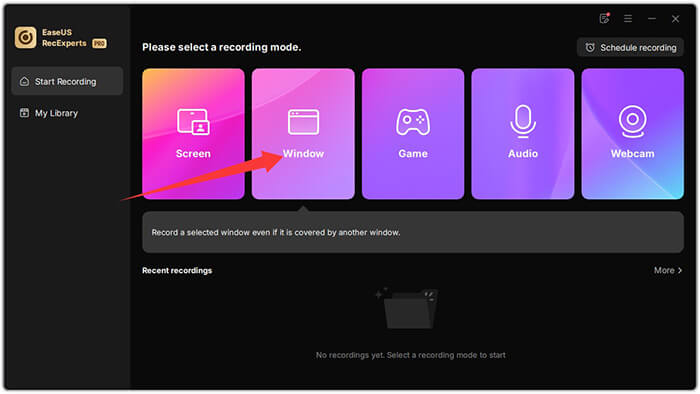
EaseUS RecExperts is a reliable and feature-rich Camtasia alternative for screen recording, offering high-quality screen recording and basic video editing tools for both Windows and macOS. It supports multiple recording modes (full screen, custom region, audio-only) and includes features like scheduled recording and audio enhancements such as noise reduction. The free version is suitable for casual users, with limited features that still meet basic recording needs. RecExperts also provides basic editing tools like trimming, compression, and playback speed adjustment, and its simple, user-friendly interface has earned positive reviews.
Pros:
* Free version with basic features, ideal for users on a budget.
* Support 4K resolution and 60fps recording for clear video quality.
* Include noise cancellation and microphone enhancement features for better audio.
* Support scheduled recording, perfect for online meetings, webinars, and live streaming.
* Offer basic editing tools like trimming, compressing, and adjusting playback speed, simplifying post-production.
* Compatible with both Windows and macOS, catering to different user needs.
* Support multiple output formats, ensuring compatibility with various devices and platforms.
Cons:
* Does not support Linux, limiting its accessibility.
* Free version has recording time limits and a watermark, requiring a subscription for full features.
* Lack advanced editing tools like motion graphics and AI captions.
* Subscription cost is relatively high, more expensive than some other alternatives.
There's no denying that Camtasia screen recorder remains one of the most complete solutions for professional video tutorials and training materials. However, its price, system demands, and complexity make many users search for the best Camtasia alternatives. If you want a solution that is:
Then Coolmuster Screen Recorder stands out as one of the most practical Camtasia alternatives for screen recording. It delivers excellent recording quality, smooth performance, and a much more accessible learning curve.
Ultimately, the right choice depends on your workflow, but today's market offers far more flexibility than ever before.
Related Articles:
Ultimate Guide to Screen Recorders for Windows: 8 Best Tools Inside!
Best Screen Recorder for Mac: Top 10 Screen Recording Software for macOS
How to Screen Record on Mac Step by Step: Comprehensive Guide
A Comprehensive AZ Screen Recorder Review and 4 Best Alternatives






 Free Download for PC
  Free Download for Mac


