Many users accidentally delete important photos while cleaning up their Facebook albums or Messenger chats. Whether it's travel photos, work screenshots, or precious memories with friends, once deleted, many people worry about whether they can be recovered. So, how to recover deleted photos from Facebook?
In fact, as long as you act promptly, there is still a chance to restore deleted Facebook photos. This article will provide a detailed guide on various methods to recover deleted Facebook photos, helping you retrieve lost images as much as possible.

Yes, you can, but it depends on how the photos were deleted on Facebook.
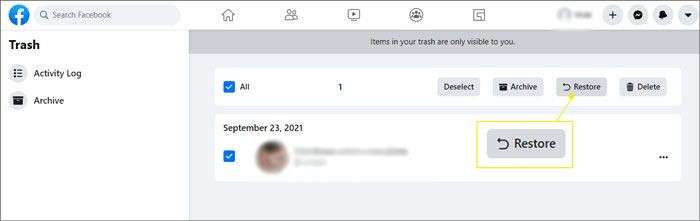
First, photos deleted via posts go to Trash for 30 days, allowing you to restore the post and recover them.
Second, if you deactivate or delete your account, temporarily deactivated accounts can be reactivated to regain access, while permanently deleted accounts can be recovered within 30 days or requested from Facebook within 90 days.
Third, photos deleted directly from your Profile or Albums are permanently removed, but can be restored from a backup or recovered using professional data recovery tools.
Facebook automatically deletes photos from the Trash folder after 30 days. If your photos or posts were moved to Trash within this period, you can restore them:
Step 1. Click your account avatar and go to "Settings & Privacy".
Step 2. Open "Activity Log", then select "Trash".
Step 3. Browse your deleted photos, images, and videos, select the one you want to recover, and click "Restore" to return it to your profile.
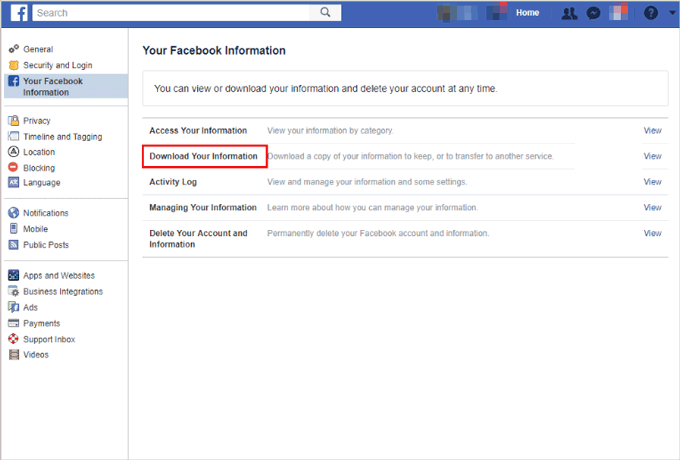
If the photos can no longer be found in Trash, your Facebook data archive is also worth trying. Facebook offers a "Download Your Information" feature, and many deleted or older photos may still be stored in the archive. If you've previously uploaded a large number of photos, it's recommended to try this method.
Here is how to recover deleted photos from a Facebook album:
Step 1. Log in to your Facebook account, tap your profile picture, and go to "Settings & Privacy" > "Settings". Then navigate to "Privacy" > "Your Facebook Information".
Step 2. Select "Download Your Information", then choose the format, media quality, and date range. Use the date range to target deleted photos from your timeline.
Step 3. Tap "Request a Download". Once ready, you can access and recover all your deleted posts and photos.
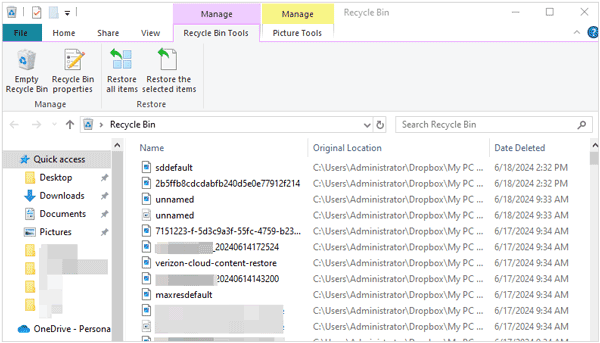
If you've also removed your Facebook photos from your computer or phone, this trick could prove useful. How do I recover my old Facebook photos?
If you're on a Mac, open the "Trash" app to see if your deleted photos are there. Windows users can do the same in the "Recycle Bin". Once you locate your photos, select them, right-click, and choose the option to restore them to their original location.
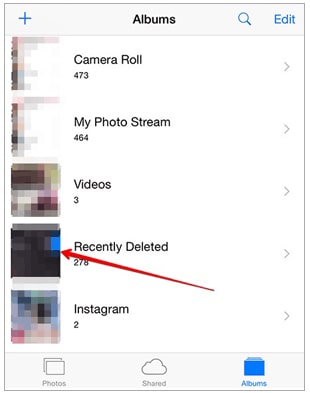
Both iOS and Android devices have a Recently Deleted folder in the Gallery that keeps deleted photos for up to 30 days. Open your phone's Gallery, go to the "Recently Deleted" folder, select the photos you want to recover, and choose the restore option from the menu.
How to recover deleted photos from Facebook after 30 days? If the photos come from Facebook Messenger and there's no backup, using a professional data recovery tool is a more effective solution. For iPhone users, we recommend iPhone Data Recovery, which can deeply scan your iPhone to recover accidentally deleted Messenger photos, chat attachments, and other iOS data.
Key features of iPhone Data Recovery:
Here is how to recover deleted photos from Facebook Messenger on iPhone without a backup:
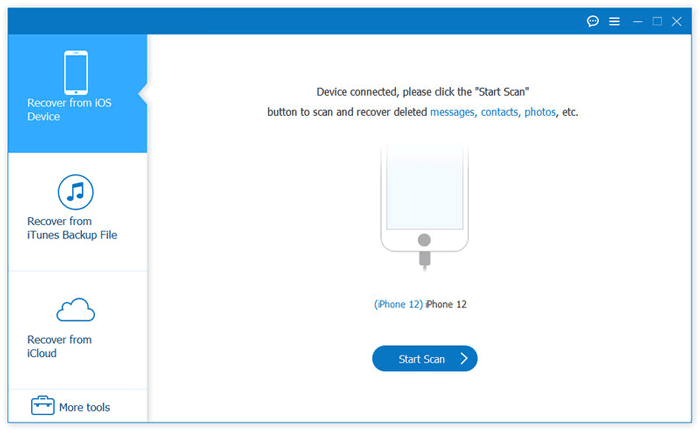
01After installing the program on your PC, launch it and connect your iPhone using a USB cable.
02Select the "Recover from iOS Device" mode from the left panel. Click "Start Scan" to scan your iPhone for data, including Facebook Messenger messages and other files.
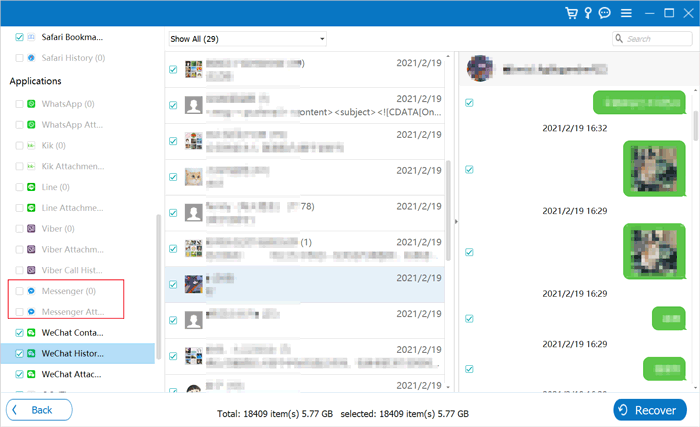
03Once the scan is complete, choose "Messenger" or "Messenger Attachments" from the left sidebar, preview and select the files you want to recover, and then click "Recover" to begin the recovery process.
If you've previously backed up your Facebook photos, recovering deleted photos is straightforward. Here are some methods:
No more worrying about lost Facebook photos ever! This article on how to recover deleted photos from Facebook is the way to get back any of your lost Facebook photos. Therefore, if you have any lost Facebook photos, just follow these steps. More importantly, the iPhone Data Recovery software can help you recover your deleted Facebook photos without backup, and it can also selectively restore Facebook pictures from iTunes and iCloud backup without overwriting existing data.
Related Articles:
4 Methods to Recover Messages on Facebook from Android
[Full Guide] 4 Proven Strategies for Photo Vault Recovery
Can Facebook Retrieve Deleted Messages for Court [Full Guide]
[100% Successful] Recover Photos After Factory Reset iPhone Without Backup






 Free Download for PC
  Free Download for Mac


